TruthScan Document Fraud Detection: Forensic Guide 2026
Organizations seeking automated protection against forged files use truthscan document fraud detection to catch AI-generated and manipulated receipts, invoices, and PDF forms before payouts occur. Instead of relying solely on optical character recognition or human manual reviews, the platform examines files at the pixel and metadata layers to deliver a forensic verdict in seconds. This architecture prevents costly financial leaks while preserving friction-free experiences for authentic submissions.
Affiliate disclosure: This article may contain affiliate links. If you buy through them, we may earn a commission at no extra cost to you. Details were checked on November 22, 2026 and can change.
Official website · Latest pricing & offers
Quick Answer: What Is TruthScan Document Fraud Detection?
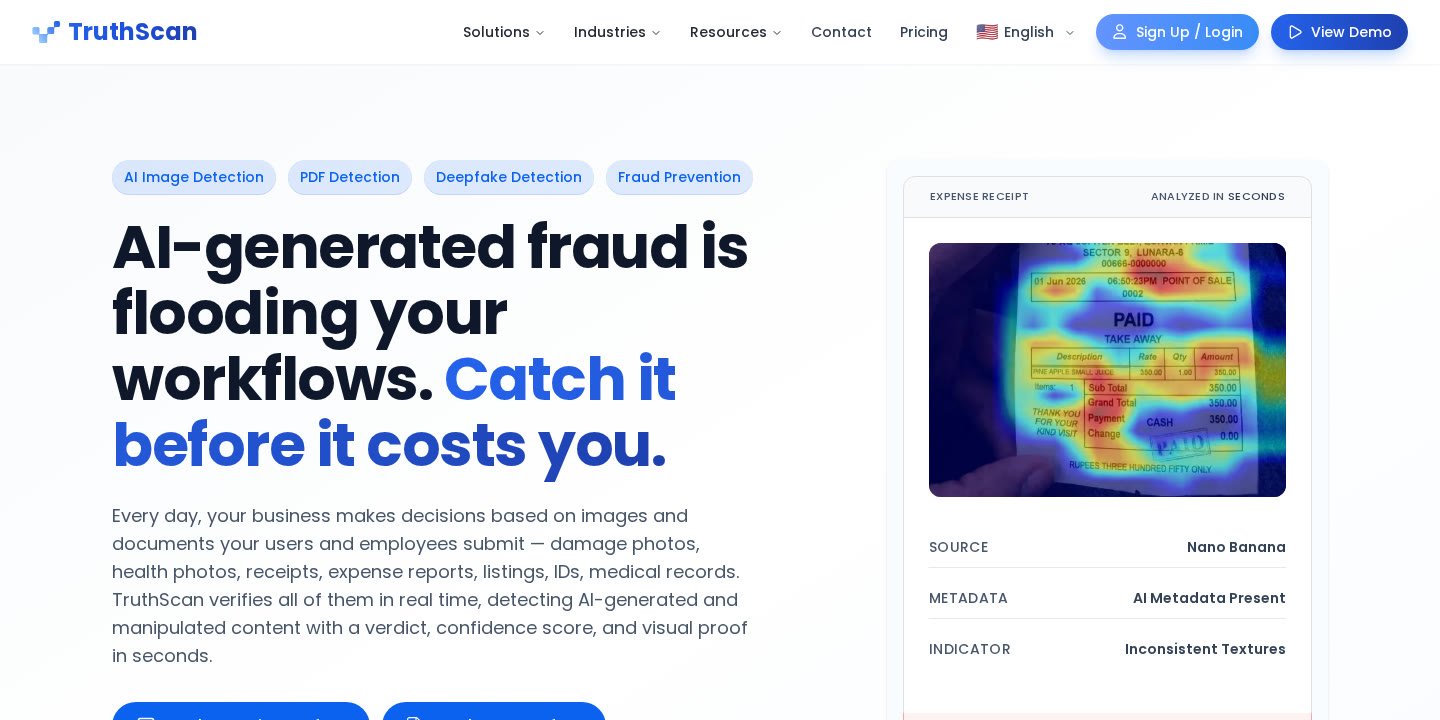
TruthScan document fraud detection is an automated verification system engineered to screen uploaded images and PDFs for digital tampering, synthetic modifications, and AI generation. Because modern generative tools allow bad actors to alter transaction amounts or fabricate proof of purchase in roughly 60 seconds, standard automated workflows that only extract text often fail to catch fraudulent documents.
- Core Functionality: Analyzes user-submitted receipts, invoices, bank statements, and expense PDFs via web interface or REST API.
- Detection Speed: Delivers end-to-end decisions with confidence scores and forensic heatmaps in 1 to 2 seconds.
- Enterprise Accuracy: Reports a 99.3% average detection accuracy across tested documents and receipts, backed by over 2 billion analyzed media assets.
- Compliance & Security: Certified under SOC 2 Type II and ISO 27001 standards, offering Zero Data Retention (ZDR) on higher tiers.
How TruthScan Document Fraud Detection Works on Tampered Files
Traditional corporate workflows operate under the historical assumption that an attached receipt or scanned invoice represents physical reality. With consumer AI models and digital editors widely accessible, bad actors can prompt an image generator to produce a synthetic receipt or use AI PDF editors to change line items on legitimate bills. Standard optical character recognition (OCR) systems cleanly pull the altered text, validating dates and totals without noticing that the document itself is synthetic.
TruthScan addresses this gap by operating two purpose-built engines: an AI image detection engine and a dedicated PDF detection engine. Rather than evaluating whether the text adds up mathematically, TruthScan performs regional forensic checks. It inspects metadata indicators, compression artifacts, and pixel inconsistencies across the file. If an applicant modifies a single dollar figure on an otherwise authentic bank statement or invoice, TruthScan flags the localized edit rather than diluting the signal across untouched regions of the page.
Teams looking to understand broader visual checks can review our guide on the TruthScan AI image detector and how it works.
Receipts and Expense Reports: Stopping T&E and Reimbursement Fraud
Travel and entertainment (T&E) reimbursement fraud is a major vulnerability for finance departments. When employees submit claims, manual reviewers rarely have the time or forensic tooling to identify altered digital receipts. A claimant might generate an inflated taxi fare, fabricate a hotel folio, or manipulate dinner receipts using off-the-shelf generative platforms.
With TruthScan, expense systems automatically route receipts to the document detection API the moment they are uploaded. The platform assesses whether the receipt was synthesized from scratch, assembled via digital collage, or altered after export. TruthScan reports a 99.3% accuracy rate on receipts specifically, allowing finance departments to isolate fraudulent claims before approving employee reimbursements or vendor payouts.
Invoices, Medical Superbills, and Bank Statements
Beyond simple point-of-sale slips, structured multi-page PDF documents introduce serious exposure across lending, insurance, and healthcare workflows. TruthScan screens several complex document categories:
- Invoices and Accounts Payable: Detects digitally replaced vendor addresses, altered payment terms, or inflated supply quantities. TruthScan cites a 98.1% accuracy rate for invoice checks.
- Healthcare Superbills and Medical Records: Healthcare and digital health workflows frequently rely on member-submitted superbills. When patients submit regenerated invoices with inflated costs to claim insurance reimbursements, TruthScan screens the files for synthetic creation markers.
- Income Verification Documents: In lending, credit underwriting, and KYC (Know Your Customer) onboarding, applicants might upload manipulated bank statements or pay stubs. TruthScan flags altered rows and synthetic layouts that otherwise bypass template validation checks.
Detailed performance benchmarks and metric thresholds are covered in our breakdown of TruthScan accuracy and detection scores.
Key Features of TruthScan’s Forensic Architecture
TruthScan integrates several core capabilities designed for operational reliability and compliance auditing:
1. Plain-Language Verdicts and Visual Heatmaps
Every scan returns an actionable classification, a numerical confidence score, and a detection heatmap. The heatmap highlights the precise coordinate areas of the PDF or image that exhibit manipulation, ensuring that internal review teams and auditors have concrete evidence rather than an unexplained automated decline.
2. High-Speed REST API and Webhooks
TruthScan functions inside existing tech stacks without requiring employees to move between separate portals. Developers can send images to the image API and PDFs to the document API via REST and receive 1–2 second verdicts. Webhooks facilitate automated branching, approving clean documents while sending suspicious files to review queues.
3. TruthScan Capture (Beta)
To reduce human review bottlenecks, TruthScan includes a live capture tool. If an uploaded document or photo triggers an ambiguous or borderline fraud risk, the system can send an automated link to the submitter’s mobile device to capture the receipt or document live. This verifies authenticity in real time and links directly to the original claim record.
4. Chrome Extension and Browser Batch Uploads
For organizations not yet integrated via API, TruthScan provides a browser-based dashboard supporting single files and bulk ZIP uploads (recommended up to 500 images per batch). Reviewers can also use the free TruthScan Chrome extension to inspect media on external web pages without leaving their active tabs.
TruthScan Plans, Results, and Pricing Structure
TruthScan employs a usage-based subscription model. In this framework, one result equals one image or one page of a PDF. A single 10-page bank statement consumes 10 results. Below is the published pricing structure available on the official platform:
| Plan | Monthly Cost (Billed Monthly) | Annual Cost (2 Months Free) | Included Results / Mo | Overage Rate | Key Capabilities Included |
|---|---|---|---|---|---|
| Free | $0 | $0 | 25 | N/A | Detailed indicators, API access, Chrome extension, unlimited seats |
| Starter | $24 | $290/yr | 1,000 | $0.03 / result | CSV export, batch uploads, audit-ready reports, standard support |
| Professional | $83 | $990/yr | 5,000 | $0.02 / result | Priority processing queue, higher API limits, audit reports |
| Business | $333 | $3,990/yr | 40,000 | $0.01 / result | Zero Data Retention (ZDR), DPA signing, highest self-serve limits |
| Enterprise | Custom | Contact Sales | Custom Volume | ≤ $0.005 / result | Dedicated on-prem deployment, custom SLAs, regional EU/UK processing |
For an expanded analysis of quotas and billing rules, read our dedicated breakdown on TruthScan pricing and plan features.
Step-by-Step: Setting Up Document Fraud Detection
Deploying automated document checks within your financial or compliance operations follows a structured four-step path:
- Generate Dashboard Credentials: Create an account on TruthScan. Free plans grant access to the dashboard and API key generation without requiring a credit card.
- Configure Ingestion Endpoints: Connect your ingestion pipeline—such as your expense submission portal or loan application upload form—to TruthScan’s REST API. Point incoming single- or multi-page PDFs to the document detection endpoint.
- Establish Risk Thresholds: Set automated workflow rules based on the returned confidence score. Highly authentic files pass straight to payment processing; flagged files automatically append the forensic heatmap to the internal audit ticket.
- Implement Capture Links for Edge Cases: Utilize the TruthScan Capture (beta) feature to generate live camera links for submitters whose files fall into borderline confidence thresholds, minimizing manual investigative labor.
Pros and Cons of TruthScan Document Fraud Detection
Pros
- Granular Regional Analysis: Unlike simple detectors that evaluate an image as a whole, TruthScan identifies small, isolated edits like an altered dollar sign or modified total.
- Fast Decision Latency: 1- to 2-second turnaround times allow teams to maintain real-time automated approval flows.
- No Per-Seat Licensing: Pricing is strictly based on the volume of analyzed pages and images, allowing unlimited team seats per organization.
- Enterprise Privacy Controls: Zero Data Retention (ZDR) options ensure sensitive financial records and customer personal data are discarded immediately after processing.
Cons
- Multi-Page Consumption: Long PDF documents consume one result credit per page, which can rapidly exhaust monthly quotas on large files if not planned carefully.
- Degradation Limits: Heavy image compression, re-saving screenshots repeatedly, or low-resolution thumbnails degrade underlying pixel data, reducing detection clarity.
- Strict File Constraints: Web and API file uploads max out at 10 MB per file, supporting JPG, PNG, JPEG, TIF, and WEBP formats alongside standard PDFs.
Who Should Use TruthScan Document Fraud Detection (And Who Should Not)?
Recommended For:
- Accounts Payable & Finance Teams: Organizations processing large numbers of employee reimbursement claims, vendor bills, and travel expenses vulnerable to AI modification.
- Lending and Credit Underwriters: Financial institutions seeking to verify submitted pay stubs, tax forms, and bank statements during account creation or loan origination.
- Insurance Claims Adjusters: Special Investigation Units (SIUs) and auto or property insurers reviewing invoices, repair estimates, and supporting receipts alongside claim imagery.
Not Recommended For:
- Heavy Physical Paper Workflows: Organizations dealing exclusively with physical paper mail where digital tampering is not a factor.
- Text-Only Plagiarism Checking: TruthScan is built for forensic image and file authenticity. Users seeking basic academic essay plagiarism or text similarity checks need specialized editorial tools instead.
Alternative Categories for Document and Fraud Screening
Organizations evaluating their fraud stack generally compare several technical approaches:
- Traditional OCR and Parsing Engines: These solutions extract text, dates, and tables from documents. While they validate data formats, they do not assess whether the underlying document or font was synthetically fabricated.
- Template-Matching Identity Tools: Many identity systems check whether a driver’s license matches known state layout templates. However, they can struggle when synthetic documents match the template format flawlessly.
- Forensic AI Fraud Layers: Platforms like TruthScan operate alongside existing OCR and identity pipelines, providing the forensic pixel and metadata analysis required to detect modern generative manipulation.
Common Implementation Issues and How to Avoid Them
When implementing TruthScan document fraud detection, teams frequently encounter a few practical hurdles:
- Accidental Quota Burn from Multi-Page PDFs: Because each PDF page counts as a distinct result, submitting an entire 50-page loan package burns 50 results. To conserve quota, extract and send only the relevant receipt or bank summary pages.
- Over-Compressed File Submissions: Downscaling receipt images to low-resolution thumbnails removes subtle metadata and pixel clues. For the highest detection accuracy, configure your intake forms to upload native-resolution receipts up to the 10 MB limit.
- Handling False Flags: While TruthScan reports an overall false positive rate under 1%, real documents with unusual compression can occasionally trigger reviews. Rather than immediately rejecting legitimate customers, route borderline files to manual review queues or deploy TruthScan Capture to request a live re-take.
Official website · Latest pricing & offers
FAQ
How does TruthScan calculate result usage on PDF documents?
One result equals one analyzed image or one page of a PDF. For example, submitting an expense report containing a 4-page PDF document will deduct exactly 4 results from your monthly plan quota.
Can TruthScan detect changes if only a few digits were altered on a receipt?
Yes. TruthScan conducts localized regional analysis rather than merely scanning the entire document on average. This design ensures that isolated modifications, such as an edited transaction amount or altered date, are surfaced via forensic heatmaps.
What happens if our organization exceeds its monthly plan limit?
TruthScan paid plans continue operating without service interruption. Overage is billed at the flat per-result rate specified by your tier ($0.03 on Starter, $0.02 on Professional, and $0.01 on Business), with real-time usage tracking visible in your dashboard once you reach 80% of your quota.
Does TruthScan store sensitive financial and receipt data?
By default, images and documents are retained in your dashboard history. However, organizations on the Business and Enterprise tiers can activate Zero Data Retention (ZDR), which immediately discards media once detection completes and ensures data is never used for training.
What file formats and sizes are supported for document uploads?
TruthScan supports PDF documents as well as JPG, PNG, JPEG, TIF, and WEBP images. Individual files must not exceed 10 MB in size, and using native resolution provides the cleanest forensic analysis.
Is API access restricted to enterprise contracts?
No. API access is included across all plans, including the Free tier. Users can generate an API key inside the dashboard to integrate document and image checks directly into their existing application flows.
Related Reading
- TruthScan AI Image Detector: Forensic Checks and How It Works (2026)
- TruthScan Accuracy Explained: What Detection Scores Mean (2026)
- TruthScan Pricing Explained: Plans, Results, and Features (2026)