Is Taplio Safe to Use? 2026 Review
Official website · Latest pricing & offers
Quick Answer: is taplio safe to use in 2026?
If you are asking is taplio safe to use, the honest answer is: Taplio can be reasonably safe for LinkedIn content planning, post scheduling, analytics, and idea generation, but it is not risk-free once you start using automation-heavy features such as auto-connect, DMs, and hands-off engagement workflows.
Taplio positions itself as a LinkedIn growth tool that helps users grow in “10 min/day,” and its official homepage highlights AI content creation, scheduling, analytics, engagement, connecting, DMs, and automation. That makes it useful—but also means buyers need to understand where LinkedIn account risk can appear.
Disclosure: toptrustreview.com may earn a commission if you sign up through our Taplio affiliate link. This review remains independent, and the recommendation is based on account-safety considerations first.
Short verdict: is taplio safe to use?
For most cautious creators, consultants, founders, and sales professionals, Taplio is safest when used as a content assistant rather than a fully automated growth machine.
In practical terms, drafting posts, finding inspiration, scheduling content, checking analytics, and creating carousels are lower-risk workflows. They help you become more consistent without necessarily making your account behave like a bot.
The higher-risk side is automation. Features related to connecting, DMs, engagement, and “autopilot” growth may create taplio linkedin account risk if used aggressively, repetitively, or in ways that appear spam-like to LinkedIn.
Who Taplio is safest for
Taplio is safest for users who want help with LinkedIn content creation and posting consistency.
That includes founders writing thought leadership posts, freelancers trying to stay visible, creators building a personal brand, and small teams that need a better workflow for ideas, drafts, scheduling, and performance analysis.
If you treat Taplio as an assistant and keep human control over what gets posted or sent, taplio safety looks much stronger.
Who should be cautious
You should be more cautious if your main interest is LinkedIn outreach automation.
If your plan is to send many connection requests, automate DMs, or run engagement activity with minimal review, the question is taplio safe to use becomes more complicated. No third-party tool can guarantee LinkedIn account safety, especially when automation touches actions LinkedIn may monitor closely.
Highly risk-averse users, regulated teams, and anyone whose LinkedIn account is mission-critical should test slowly, read the official terms, and avoid aggressive automation.
What Taplio Is and How It Works
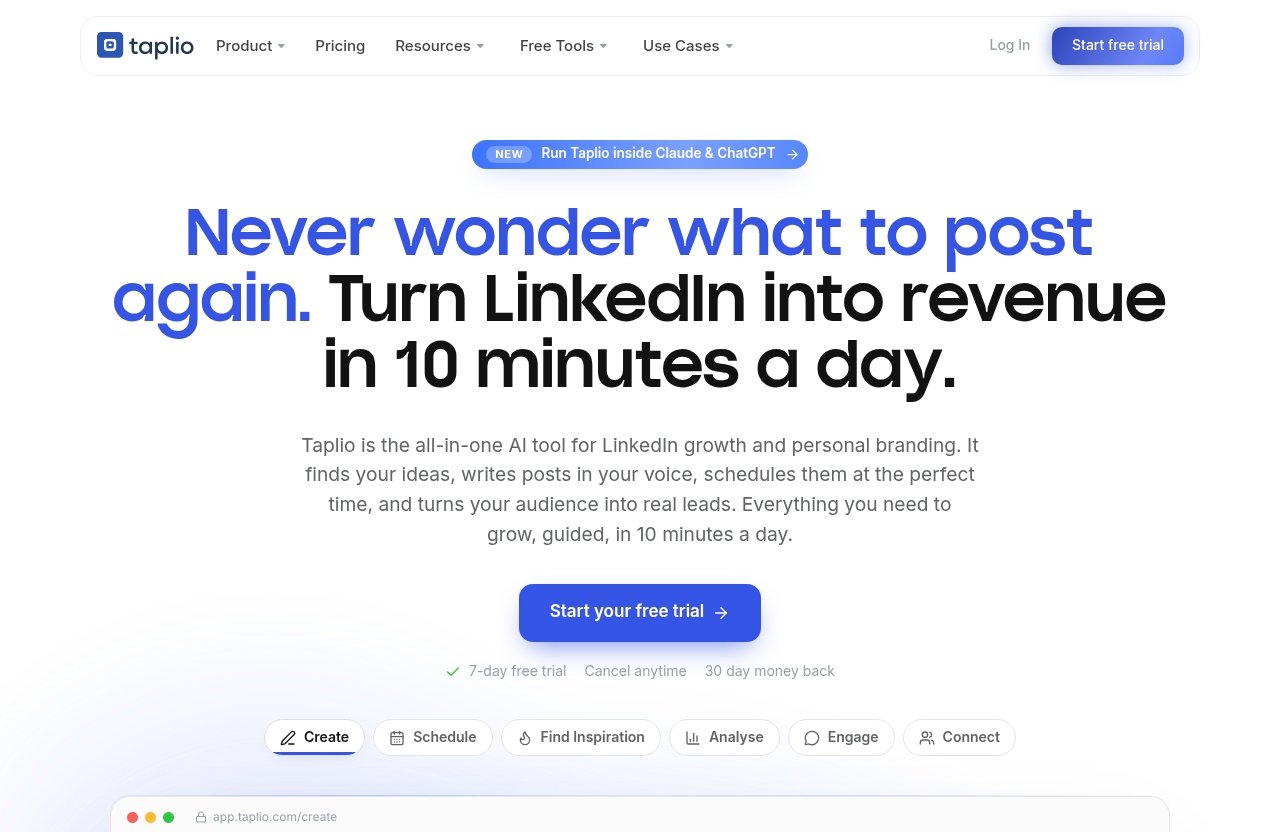
Taplio is a LinkedIn growth platform built around AI-assisted content creation, scheduling, analytics, inspiration, engagement, and outreach workflows.
The official homepage describes Taplio as an AI tool to grow on LinkedIn in 10 minutes per day. Its feature list includes Schedule, Find inspiration, Analyse, Connect, Create, Carousels, Engage, Automate, and a new MCP feature that lets users run Taplio from Claude, ChatGPT, or any MCP-enabled LLM.
That combination explains why people ask is taplio safe to use before subscribing. Taplio is not just a writing tool; it also includes features that can act on or around your LinkedIn growth workflow.
Core LinkedIn growth features
The lower-risk core features are mostly about content workflow.
Taplio can help you find ideas, write posts, turn content into carousels, schedule posts, and analyze what is working. These features are useful because many LinkedIn users struggle less with strategy and more with consistency.
Here is a simple safety-oriented breakdown:
| Feature Area | Officially Listed? | Typical Safety Profile |
|---|---|---|
| Create posts with AI | Yes | Lower risk if reviewed by a human |
| Find inspiration from viral posts | Yes | Lower risk if you avoid copying |
| Schedule posts | Yes | Lower risk if posting cadence is normal |
| Analyse performance | Yes | Lower risk |
| Carousels | Yes | Lower risk |
| Engage with relevant people | Yes | Medium risk depending on automation |
| Connect and send DMs | Yes | Higher risk if volume is aggressive |
| Automate LinkedIn growth | Yes | Higher risk depending on settings |
The short version: content tools are generally safer than action-taking automation.
Where automation enters the workflow
Automation appears most clearly in Taplio’s Connect, Engage, and Automate areas.
The official homepage says Connect can auto-connect and send DMs to warm leads. It also lists Automate as a way to put LinkedIn growth on autopilot. Those are the features cautious buyers should examine most closely.
When people search is taplio safe to use, they are usually not worried about a grammar suggestion or a draft post. They are worried about automated behavior that could look unnatural to LinkedIn.
Why this matters for safety
LinkedIn is a professional network, not just a publishing platform.
Its systems may pay attention to behavior patterns such as repetitive connection requests, repeated messages, unusual engagement speed, or account activity that looks scripted. This is why taplio automation risk depends heavily on how the user configures and uses the tool.
A tool can be legitimate and still create account risk if used carelessly. That distinction matters throughout this Taplio review 2026.
Taplio Safety: What the Official Product Says
Taplio’s official positioning is clearly safety-conscious, but buyers should not confuse marketing language with a guarantee.
The official homepage says Taplio works through AI, a database of viral posts, and native LinkedIn tools. It also states that connection requests and DMs are run at safe levels. Those are important claims, but they do not eliminate all taplio linkedin automation risk.
Official safety claim
Taplio’s safety claim is essentially that its system is designed to help users grow on LinkedIn without reckless automation.
That is a positive signal. It suggests the product team is aware that LinkedIn account safety is a buyer concern and that growth tools need guardrails.
Still, if your core question is is taplio safe to use, the responsible answer is not “yes, always.” The better answer is “likely safer when used conservatively, but not immune from LinkedIn enforcement or user misuse.”
Native-tool positioning
Taplio’s official messaging says it works through AI, a database of viral posts, and native LinkedIn tools.
The native-tool positioning is relevant because tools that align with normal LinkedIn workflows may feel less invasive than tools that rely heavily on scraping or hidden workarounds. However, as a buyer, you should still verify what permissions are requested, what actions Taplio can perform, and whether any setup steps make you uncomfortable.
A verified help center and official product pages are useful trust signals, but they are not proof that every workflow is risk-free.
What Taplio says about connection requests and DMs
Taplio’s homepage says it can auto-connect and send DMs to warm leads, and that these run at safe levels.
That is the right kind of promise to look for, but it should be interpreted carefully. “Safe levels” is not the same as “zero risk,” and LinkedIn’s own enforcement behavior can change over time.
For buyers asking is taplio safe, the safest approach is to treat outreach automation as a feature to use sparingly, not as a reason to run high-volume campaigns.
Where the Real Risk Comes From
Most Taplio safety concerns do not come from AI writing assistance. They come from automated actions and repetitive behavior.
This is true for LinkedIn tools in general. Independent discussions about LinkedIn automation risk, including risk guides from automation-focused sources such as Phantombuster, commonly warn that aggressive or unnatural automation can attract scrutiny. LinkedIn’s own policies also discourage spammy or manipulative behavior.
Automation and LinkedIn policy enforcement
Automation risk is not always about one specific feature. It is often about patterns.
If an account suddenly sends many connection requests, repeats similar messages, comments too quickly, or engages with the same type of content in a predictable sequence, that can look less human. That is where taplio account suspension concerns usually come from.
No public review can verify exactly how LinkedIn evaluates every behavior signal. So the practical buyer question is not only is taplio safe to use, but also “Can I use Taplio in a way that looks natural and human?”
Chrome extension concerns
Some users researching LinkedIn tools worry about browser-based automation and taplio chrome extension discussions.
A Chrome extension is not automatically unsafe. Many legitimate tools use browser extensions for convenience, data capture, or workflow integration. The concern is that browser-based tools can sometimes interact with LinkedIn in ways that feel closer to automation than simple content planning.
Because official product pages are the best source for current setup details, verify Taplio’s current onboarding flow before subscribing. Treat user comments about extensions as anecdotal signals, not definitive proof of danger.
Scraping, outreach, and behavior patterns
The highest-risk behaviors are usually the ones that look like mass prospecting.
That includes scraping-like activity, repetitive profile visits, bulk connection requests, templated DMs, or engagement patterns that occur faster than a normal person would act. Even if a tool has safety limits, users can still create risk by pushing too hard.
For cautious buyers, taplio safe for linkedin means using it to support a human-led strategy—not to replace human judgment.
Official website · Latest pricing & offers
Trust Signals and Red Flags to Check Before You Subscribe
Before paying for any LinkedIn growth tool, evaluate both trust signals and red flags.
Taplio has several legitimacy signals worth noting: an official homepage, an official pricing page, a help center, a blog, public product messaging, and external review profiles such as Trustpilot. But external reviews should be treated as anecdotal, not as proof of LinkedIn policy safety.
Company transparency
Start with the basics.
Look for clear product pages, clear pricing information, support resources, and explanations of what the tool does. Taplio’s homepage openly lists features such as Schedule, Analyse, Connect, Engage, and Automate, which helps buyers understand the scope of the product.
That transparency is useful because it lets you identify where taplio automation risk may apply before entering payment details.
Support and documentation
The official homepage references resource areas such as the help center and blog.
That is a positive sign because buyers need guidance on setup, permissions, billing, and safe use. However, documentation should not be treated as compliance proof. It is a support signal, not a guarantee.
If your LinkedIn account is especially important, read the help center before activating outreach or automation features.
Independent reviews and complaints
Trustpilot can be useful for understanding patterns in customer sentiment.
When checking taplio trustpilot reviews, look for recurring themes: billing issues, cancellation complaints, support responsiveness, account-safety concerns, or users praising content workflow. Do not rely on a single five-star or one-star review.
Reviews are anecdotal. They can reveal buyer experiences, but they cannot prove whether LinkedIn will or will not take action on your account.
Billing and cancellation sanity checks
Before subscribing, confirm the current price, trial terms, renewal timing, and cancellation process.
This is less about LinkedIn safety and more about buyer safety. A tool can be useful and still be a poor fit if you do not understand the billing terms.
If you decide to test it, use the official checkout flow or a trusted referral path such as this Taplio link, and document the plan details shown at the time of purchase.
Taplio Features Relevant to Safety and Control
The most important distinction in this review is control.
Features that help you plan, draft, schedule, and measure content generally give you more control. Features that automate outreach or engagement require more caution because they can perform actions that other people—and LinkedIn—may see.
Schedule queue and best-time posting
Taplio’s Schedule feature queues posts at your best times automatically.
This is generally one of the lower-risk features because scheduling a post is a normal social media workflow. The main safety concern is not scheduling itself, but whether your posting cadence becomes unnatural or your content becomes repetitive.
If your question is is taplio safe to use for scheduling, the answer is generally more favorable than it is for outreach automation.
Analytics and benchmarking
Taplio’s Analyse feature helps users see what is working and double down.
Analytics are low-risk because they do not require your account to send messages or interact with people automatically. They help you make better decisions based on your own content performance.
For many users, analytics may be one of the best reasons to use Taplio without taking on unnecessary LinkedIn account risk.
AI content creation and carousels
Taplio’s Create feature helps users find ideas and write posts that grow. Its Carousels feature turns content into swipeable carousel posts.
These features are useful, but you should still review everything before publishing. AI-generated content can sound generic, overconfident, or too similar to popular posts if you do not edit it.
From a safety perspective, the risk is less about account suspension and more about reputation. If your audience sees low-effort AI content, trust can drop.
Connect and automate features
Connect and Automate are where the most caution is needed.
Taplio’s official homepage says Connect can auto-connect and send DMs to warm leads, while Automate can put LinkedIn growth on autopilot. These features may save time, but they also touch behavior LinkedIn may scrutinize more closely.
If you are asking is taplio safe to use mainly because you want automated DMs, assume the risk is higher than with scheduling, analytics, or content drafting.
Best Practices to Reduce LinkedIn Risk When Using Taplio
The safest way to use Taplio is to keep the human in the loop.
That means slower pacing, manual review, realistic messaging, and avoiding anything that looks like bulk spam. You cannot remove all risk, but you can reduce the chance that your activity looks abnormal.
Use conservative automation settings
If Taplio offers automation controls during setup, start conservatively.
Do not begin with the highest possible volume, fastest cadence, or broadest targeting. A gradual ramp-up is more natural than a sudden spike in connection requests, DMs, or engagement.
This is the most practical answer to is taplio safe to use: it depends less on the tool alone and more on how aggressively you use it.
Avoid spam-like volume
Volume is one of the easiest ways to create problems.
Even a well-written message can feel spammy if it is sent to too many people without context. Connection requests and DMs should be relevant, personalized, and limited.
If you would feel uncomfortable sending the same action manually at that pace, do not automate it.
Review every generated post and message
AI drafts should be treated as first drafts.
Before publishing or sending anything, check tone, accuracy, claims, links, and personalization. This is especially important for founders, consultants, advisors, and anyone building authority on LinkedIn.
Taplio can speed up content work, but your name is still attached to the output.
Protect account security and recovery settings
Basic account hygiene matters.
Use strong passwords, enable two-factor authentication where available, keep recovery information current, and monitor login alerts. Also review what permissions you grant to any third-party tool.
These steps will not eliminate taplio linkedin account risk, but they reduce the damage if anything unusual happens.
Taplio Pricing and What You Get
Current pricing overview
The verified official Taplio pricing page title says: “Taplio Pricing – Plans from $39/mo | Free Trial.”
That is the only pricing claim this review relies on. Plans start from $39 per month, and the official pricing page mentions a free trial. I am not listing unverified tiers, plan names, or feature limits because those can change and were not part of the verified facts provided for this review.
What features justify the cost
The value case depends on whether you will use Taplio consistently.
The strongest value is likely for people who need help with LinkedIn content ideas, writing, scheduling, analytics, carousels, and growth workflows. If Taplio helps you publish better content more regularly, the price may be easier to justify.
If you only want occasional post ideas, taplio pricing may feel harder to justify compared with lighter tools or manual workflows.
How pricing affects the buying decision
Pricing should be weighed against both value and risk tolerance.
If you are mainly buying Taplio for scheduling, analytics, and content production, the buying decision is relatively straightforward. If you are buying it for automated outreach, factor in the potential cost of account restrictions, brand damage, or wasted time if the workflow does not fit your risk profile.
That is why the question is taplio safe to use should come before the question “Is it worth the price?”
Who Should Buy Taplio—and Who Should Skip It
Taplio is not for everyone.
It is best viewed as a LinkedIn growth assistant with both low-risk productivity features and higher-risk automation features. The right buyer is someone who understands that difference.
Best fit users
Taplio is a good fit for:
| User Type | Why It May Fit |
|---|---|
| Founders | Consistent thought leadership and content planning |
| Consultants | Better visibility and authority building |
| Creators | Idea generation, scheduling, and analytics |
| Sales professionals | Warm lead workflows, if used carefully |
| Small teams | More structured LinkedIn publishing |
For these users, taplio pros and cons are fairly balanced. The pros are consistency, speed, and LinkedIn-specific workflow. The cons are automation risk, possible overreliance on AI, and the need to monitor account behavior.
Poor fit users
Taplio may be a poor fit if you want a fully hands-off LinkedIn lead machine.
It may also be wrong for users who cannot tolerate any account risk, need advanced compliance controls, or are uncomfortable granting third-party tools access to LinkedIn-related workflows.
If losing LinkedIn access would seriously hurt your business, be conservative or consider taplio alternatives that focus only on content planning and do not automate outreach.
Decision checklist: is taplio safe to use for you?
Use this checklist before subscribing:
| Question | Safer Answer |
|---|---|
| Will I mainly use content and scheduling features? | Yes |
| Will I review all AI-generated posts? | Yes |
| Will I keep outreach volume low? | Yes |
| Am I comfortable with third-party LinkedIn tools? | Yes |
| Can I accept some automation-related risk? | Yes |
| Do I understand trial, renewal, and cancellation terms? | Yes |
If you answer “no” to several of these, Taplio may still be useful—but you should be careful.
Official website · Latest pricing & offers
FAQ
Is Taplio a good tool?
Taplio can be a good tool for LinkedIn content creation, scheduling, analytics, inspiration, and growth workflows.
It is especially useful for individuals building a personal brand who need a system for posting consistently. However, whether it is a good tool for you depends on your goals and risk tolerance.
If your main concern is is taplio safe to use, start with content and analytics features before trying automation.
Is Taplio better than other LinkedIn tools?
It depends on what you need.
Taplio appears strongest for LinkedIn-focused content workflows: inspiration, AI drafting, scheduling, analytics, carousels, and growth support. Other tools may be better for deeper personalization, CRM-style prospecting, team approval workflows, or different social platforms.
The best choice is not simply the most automated tool. It is the one that matches your workflow without creating unnecessary risk.
How much does Taplio cost?
The verified official Taplio pricing page says plans start from $39 per month and mentions a free trial.
Because pricing pages can change, check the current official pricing page before subscribing. Do not rely on outdated screenshots, old reviews, or unverified plan comparisons.
Can Taplio get your LinkedIn account banned?
Any automation tool can introduce LinkedIn account risk if it violates platform rules, triggers enforcement systems, or is used aggressively.
Taplio says its connection requests and DMs run at safe levels, but no third-party tool can guarantee immunity from LinkedIn restrictions, warnings, or account action. The safest approach is to use automation conservatively and keep human review in the process.
Does Taplio use a Chrome extension?
Some buyers raise taplio chrome extension concerns when researching reviews and LinkedIn automation risk discussions.
A browser extension does not automatically mean a tool is unsafe. Still, if you are concerned, verify Taplio’s current setup requirements directly through the official product, help center, or onboarding flow before connecting your account.
Treat review comments as useful signals, not final proof.
Final Verdict
Safety summary
So, is taplio safe to use in 2026?
Taplio can be a reasonable LinkedIn tool when used for content creation, scheduling, analytics, carousels, and careful workflow support. Those use cases are generally lower risk because they keep you in control.
The risk increases with automated connection requests, DMs, engagement, and autopilot-style growth. That does not mean Taplio is unsafe by default, but it does mean you should avoid aggressive automation and monitor your account closely.
Value summary
Taplio’s value is strongest for people who are serious about LinkedIn and want a more consistent publishing system.
The official pricing page shows plans from $39 per month with a free trial, so it is not a casual impulse tool for everyone. It makes more sense if LinkedIn is already important to your brand, pipeline, or content strategy.
Bottom line
Taplio is worth considering if you want a LinkedIn-focused content and growth assistant and you are willing to use automation carefully.
Skip it, or proceed very slowly, if you want zero account risk, fully hands-off outreach, or advanced compliance assurance. No third-party platform can promise complete LinkedIn safety, but cautious users can reduce risk by treating Taplio as an assistant—not a replacement for human judgment.
Related Reading
References
- Taplio homepage
- Taplio pricing page
- Trustpilot reviews for Taplio
- TryKondo: Is Taplio Safe? Understanding the Risks to Your LinkedIn Account