Best App for Planning Social Media Posts: Post Planner Review and Alternatives for 2026

Finding the best app for planning social media posts is not just about placing content on a calendar. The right platform should help you consistently publish better ideas, organize topics, manage multiple channels, and learn what drives engagement over time.
For this buyer’s guide, I reviewed Post Planner’s official feature and pricing information alongside the common positioning of popular social media scheduling tools such as Planable, Canva, Planoly, Adobe Express, Buffer, Later, and Sprout Social. My editorial recommendation is based on verified product facts and practical workflow fit—not promises of guaranteed reach. Social results still depend on content quality, your audience, consistency, and changing platform algorithms.
This article may include affiliate links. If Post Planner fits your workflow, you can explore it through our Post Planner affiliate link. Always confirm current plans and product suitability before purchasing.
Official website · Latest pricing & offers
Best App for Planning Social Posts in 2026: Quick Verdict
Post Planner is my top recommendation for marketers and teams that want an engagement-oriented system rather than a basic queue of scheduled posts. It combines account management, content discovery, post creation, categorization, scheduling, analytics, and mobile management in one social media planning app.
The best app for planning social media posts will differ by workflow. Post Planner stands out when your challenge is deciding what to publish and maintaining a repeatable content mix across several networks. In contrast, some alternatives may be a better match for approval-heavy teams, design-led creators, or large enterprise organizations.
Who should choose Post Planner
Post Planner is a strong fit for:
- Solo creators who need a repeatable content calendar without constantly starting from scratch.
- Small businesses seeking a social media scheduler for small business marketing across multiple accounts.
- Content teams that want content discovery alongside scheduling.
- Agencies managing several brands, social profiles, users, and publishing volumes.
- Marketers who organize recurring themes through topic-based content categories or buckets.
Its official homepage positions it as a “Social Media Scheduler built for Engagement.” Based on the verified feature list, that positioning is supported by tools for discovering post ideas, categorizing content, composing and previewing posts, scheduling publishing, and reviewing performance.
Best alternatives depending on team size, visual planning, and enterprise needs
Planable is often considered by teams that place collaboration, feedback, and approvals at the center of their social workflow. It can be a sensible option when stakeholders need to review planned content before it goes live.
Canva is usually the more natural choice for design-first creators who spend most of their time making graphics, templates, and branded visual assets. Planoly is commonly associated with visual creator planning, particularly for people who want their content calendar to feel image-led. Adobe Express may appeal to users who want straightforward creation and scheduling in a design ecosystem.
Buffer, Later, and Sprout Social are widely recognized names in social media management. Their relative fit depends on whether you prioritize simplicity, creator-oriented planning, broad management workflows, or more advanced business and enterprise requirements.
Bottom-line recommendation by use case
| Primary need | Best-fit direction |
|---|---|
| Engagement-led content planning and discovery | Post Planner |
| Team review and content approvals | Planable |
| Graphic creation as the main priority | Canva or Adobe Express |
| Visual creator calendar workflow | Planoly |
| Familiar general-purpose scheduling | Buffer, Later, or similar tools |
| Larger, process-heavy social operations | Consider enterprise-oriented options such as Sprout Social |
For most marketers who want a practical best app for planning social media posts rather than an isolated design tool, Post Planner offers one of the more complete engagement-first approaches.
What to Look for in the Best App for Planning Social Media Posts
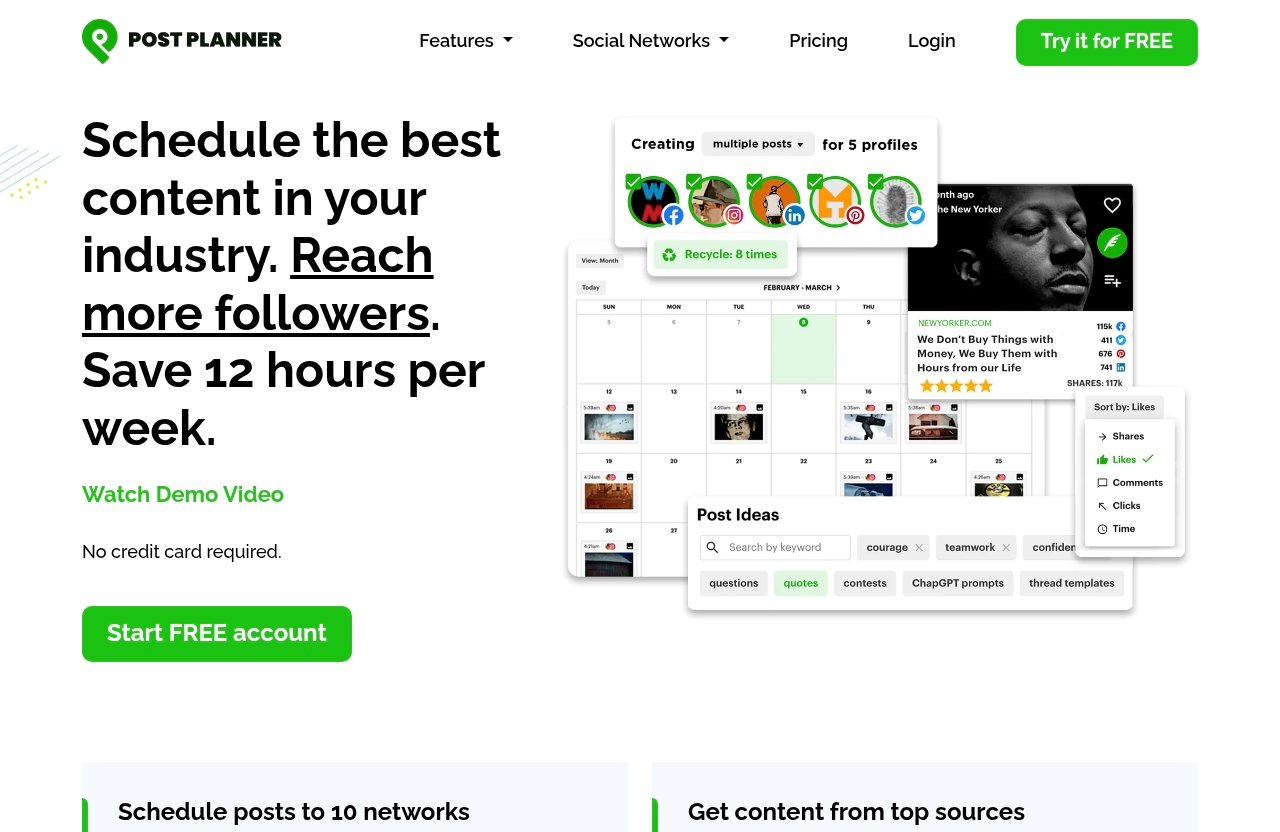
A good social media scheduling tool should reduce repetitive work without making your content feel automated or generic. Before choosing a platform, assess how it supports planning, creation, publishing, review, and measurement.
Scheduling depth and automation
At a minimum, a content scheduling app should let you prepare posts in advance and manage a sustainable publishing cadence. More useful systems also help you organize recurring content types, review upcoming posts, and avoid an inconsistent calendar.
For the best app for planning social media posts, look beyond the number of posts you can schedule. Consider whether the platform makes it easy to build an editorial rhythm around promotions, educational posts, customer stories, curated articles, and timely updates.
Content discovery and curation
Content discovery matters when you publish frequently but do not want every post to be created from a blank page. It is especially valuable for small teams that need to keep social feeds useful between original campaigns.
Post Planner’s verified feature set includes Discover, which is designed to help users find high-quality content and viral post ideas. The product also includes Categorize, allowing posts to be classified into topic-based buckets. For engagement-focused marketers, this is a meaningful differentiator from a basic social media calendar app.
Collaboration and approval workflows
If multiple people must approve content, the best social media scheduler for your business may be the one that makes feedback visible and organized. Agencies, regulated industries, and brands with several stakeholders should assess how a tool fits their review process before they prioritize publishing speed.
Post Planner’s official pricing data clearly lists user limits by plan. However, buyers needing formal, approval-first workflows should compare its workflow against collaboration-focused platforms such as Planable rather than assuming every scheduler handles stakeholder reviews in the same way.
Analytics and reporting
Publishing without reviewing performance creates a loop of guesswork. Analytics should help you understand which topics, formats, and messages earn meaningful engagement—not merely provide vanity metrics.
Post Planner officially lists Analyze as a feature for evaluating post performance and engagement. Its pricing table also shows Analytics as an included capability on higher tiers. The best app for planning social media posts should help you use those insights to refine future content categories and scheduling decisions.
Platform coverage and mobile access
Platform coverage is critical if your audience is split across networks. Post Planner’s homepage lists support for Facebook, Instagram, Google Business Profile, LinkedIn, Pinterest, TikTok, Twitter/X, YouTube, Threads, and Bluesky.
Mobile functionality is another practical consideration. Post Planner officially includes Mobile, enabling users to create and manage posts from a phone. That matters for creators and owners who need to react to opportunities away from their desktop.
Post Planner Review: Core Strengths for Social Post Planning
This Post Planner review focuses on the capabilities verified on the company’s official homepage and pricing page. The platform is most compelling when you want to combine planning discipline with content inspiration and multi-network publishing.
Manage multiple social accounts in one place
Post Planner’s Connect feature is designed to manage social accounts in one place. This is useful for marketers who would otherwise jump among native social apps to check multiple brands or channels.
Account limits scale substantially across plans, from one social account on Free to 200 social accounts on the largest Agency + 3 * 50 plan. That makes Post Planner relevant both as a simple social media content planner and as a multi-brand scheduling system.
Discover high-quality content and viral post ideas
The Discover feature is central to what separates Post Planner from a bare-bones queue. It is intended to help users find high-quality content and viral post ideas, giving teams a starting point for planned publishing.
No legitimate software can guarantee virality, and Post Planner does not eliminate the need for editorial judgment. Still, an engagement-focused social media scheduler can save time when you need to supplement original content with relevant, audience-friendly ideas.
Create, optimize, preview, and schedule posts
Post Planner officially includes Design, Create, Categorize, and Schedule. Users can design images with stock media editing tools, compose and optimize posts, preview them, sort content into topic buckets, and automate publishing schedules.
This combination is why I consider it a contender for the best app for planning social media posts for users who want creation and scheduling in one workflow. The category feature is particularly helpful for building a balanced calendar instead of filling every slot with the same type of message.
Analyze performance and engagement
Post Planner’s Analyze feature is intended to evaluate post performance and engagement. A sensible workflow is to review which categories, topics, and creative approaches perform best, then use that information to shape the next month’s calendar.
Analytics do not replace strategy. They are most useful when paired with clear goals, such as improving awareness, starting conversations, generating traffic, or supporting local business visibility.
Mobile management on the go
Post Planner’s official Mobile feature allows you to create and manage posts from your phone. For busy owners and solo marketers, this can be the difference between maintaining a plan and missing an important moment.
Mobile access should be evaluated as part of the total workflow. If you regularly create content on location, a flexible best app for planning social media posts needs to work beyond the office.
Post Planner Pricing and Plans in 2026
The following Post Planner pricing information is verified from the official pricing page at the time of research. Prices, plan names, included capabilities, and limits can change, so review the provider’s current checkout details before subscribing.
One important detail: the pricing page displays two price presentations for paid plans. I have reported them exactly as provided: a monthly figure labeled “billed annually,” plus another monthly and annual total display.
Free plan
The Free plan costs $0 and is designed for light testing or a single-account workflow.
| Feature | Free |
|---|---|
| Social accounts | 1 |
| Users | 1 |
| Scheduled posts | 10 |
| Daily posts per profile | 3 |
| AI images | 1 per month |
| Support | Email and chat |
It is a reasonable way to assess the interface before deciding whether Post Planner is the right social media planning app for your needs.
Starter plan
Starter is displayed at $14 per month billed annually, totaling $168 per year, or $9 per month, totaling $108 per year, on the official pricing page display.
| Feature | Starter |
|---|---|
| Social accounts | 3 |
| Users | 1 |
| Scheduled posts | 150 |
| Daily posts per profile | 12 |
| AI images | 15 per month |
| Support | Email and chat |
Starter is best suited to one person managing a handful of channels. It can work well for a freelancer, creator, or local business that wants more scheduling capacity than the Free plan provides.
Growth plan
Growth is marked “MOST POPULAR” on Post Planner’s official pricing page. It is displayed at $59 per month billed annually, totaling $708 per year, or $39 per month, totaling $468 per year.
| Feature | Growth |
|---|---|
| Social accounts | 15 |
| Users | 2 |
| Scheduled posts | 1,500 |
| Daily posts per profile | 24 |
| AI images | 150 per month |
| Support | Email and chat |
The Growth plan is also the first listed tier that supports X/Twitter and Pinterest. For a small agency or growing team, this is likely the most practical upgrade point when account count, post volume, or a second user becomes necessary.
Business plan
Business is displayed at $99 per month billed annually, totaling $1,188 per year, or $69 per month, totaling $828 per year.
| Feature | Business |
|---|---|
| Social accounts | 25 |
| Users | 5 |
| Scheduled posts | Unlimited |
| Daily posts per profile | Unlimited |
| AI images | 250 per month |
| Support | Email and chat |
Business is a better match for established teams that publish heavily and need unlimited scheduled posts and daily posting volume within the listed plan structure.
Agency plans and scaling thresholds
Post Planner offers three larger agency tiers for organizations managing many profiles and users.
| Plan | Official displayed price | Accounts | Users | Scheduled posts | AI images/month |
|---|---|---|---|---|---|
| Agency | $179/mo billed annually ($2,148/year) or $119/mo ($1,428/year) | 50 | 10 | Unlimited | 500 |
| Agency + 50 | $329/mo billed annually ($3,948/year) or $219/mo ($2,628/year) | 100 | 20 | Unlimited | 1,000 |
| Agency + 3 * 50 | $629/mo billed annually ($7,548/year) or $419/mo ($5,028/year) | 200 | 40 | Unlimited | 2,000 |
All three agency tiers list unlimited daily posts per profile and email and chat support. The official table also shows higher-tier capabilities including Scheduling (basic), Scheduling (plus), Content (basic), Content (plus), and Analytics, but it does not provide further specification in the verified information supplied here.
Official website · Latest pricing & offers
How Post Planner Compares With Top Social Scheduling Apps
There is no universal winner because social media management priorities vary. The best app for planning social media posts for an agency approval process may not be the best choice for a solo creator who needs content ideas every week.
Post Planner vs Planable
Post Planner is the better directional fit for engagement-led content planning, post categorization, discovery, and multi-network scheduling. Planable is often preferred by teams that emphasize collaboration, stakeholder feedback, and content approvals.
Choose Post Planner if your biggest bottleneck is consistently finding and organizing publishable ideas. Consider Planable first if the main bottleneck is getting content reviewed by clients, managers, or compliance teams.
Post Planner vs Canva Content Planner
Canva is widely known for design-first workflows, templates, and visual asset creation. Post Planner includes image design with stock media editing tools, but its verified product positioning is broader: it combines creation with discovery, categories, scheduling, and analysis.
Canva may be better for a creator whose primary need is producing graphics. Post Planner is usually the stronger candidate when the priority is operating an ongoing content schedule across multiple platforms.
Post Planner vs Planoly
Planoly is often associated with visual planning for creators. That can make it appealing when feed appearance and image sequencing are the central concerns.
Post Planner is more suitable for marketers looking for an engagement-focused social media scheduler with topic buckets and content discovery. Planoly may be the better fit if your planning process is primarily visual and creator-led.
Post Planner vs Adobe Express Content Scheduler
Adobe Express is commonly considered for simple design and content scheduling within Adobe’s creative environment. It may be attractive for people who already create visual assets there.
Post Planner is the more specialized choice for users who want content curation, categorized posting, and performance-oriented planning in the same system. The right choice depends on whether design production or social planning is your primary challenge.
Post Planner vs Buffer/Sprout/Later-style schedulers
Buffer, Sprout Social, and Later represent recognizable categories of social management platforms. They can be worth comparing if you want familiar scheduling workflows, creator tools, or a broader business management environment.
Post Planner differentiates itself through its stated engagement focus, Discover functionality, content buckets, and scalable account limits. For buyers searching for the best social media scheduler, the deciding question is whether they need idea generation and evergreen content organization, or a different workflow such as enterprise reporting, visual publishing, or collaboration.
Best Use Cases for Post Planner
Post Planner’s plan structure makes it possible to match your subscription to account count, users, and publishing requirements instead of paying for scale too early.
Solo creator or small business
The Free or Starter plan is the logical starting point for a single user. Free supports one social account and 10 scheduled posts, while Starter expands capacity to three accounts and 150 scheduled posts.
For a social media scheduler for small business, Post Planner is especially appealing if you publish educational, promotional, community, and curated content in a repeatable mix.
Agency managing multiple brands
Growth supports 15 social accounts and two users, while Business supports 25 accounts and five users. Agencies managing higher volumes can move to Agency tiers with 50, 100, or 200 accounts and up to 40 users.
Upgrade when your account count, user count, scheduled-post volume, or AI image allocation becomes restrictive. X/Twitter and Pinterest requirements are another important trigger, because those networks require Growth or higher.
Content team focused on engagement and curation
A team that regularly asks, “What should we post next?” is a prime Post Planner audience. Its verified Discover and Categorize features support a workflow built around curated ideas, original content, and topic-based content buckets.
This makes Post Planner one of the better options for teams that need a structured social media content planner, not merely a posting queue.
Brand with multiple platforms to publish across
Post Planner lists Facebook, Instagram, Google Business Profile, LinkedIn, Pinterest, TikTok, Twitter/X, YouTube, Threads, and Bluesky on its homepage. That breadth is useful for a brand that wants to coordinate planning across established and emerging networks.
A multi-platform brand should confirm that each network’s specific publishing needs align with its plan before subscribing. Platform support is not the same as identical publishing behavior across every social channel.
Pros and Cons of Post Planner
Pros
- Engagement-oriented positioning supported by verified discovery, categorization, scheduling, and analytics features.
- Manage social accounts from one location through the Connect feature.
- Discover high-quality content and viral post ideas for planning support.
- Topic-based buckets can help create a more balanced publishing mix.
- Supports a wide official list of social networks, including Threads and Bluesky.
- Mobile creation and management are included.
- Scales from one account on Free to 200 accounts and 40 users on the largest listed tier.
- Unlimited scheduled posts begin at the Business plan.
Cons
- The Free plan is limited to one account, one user, and 10 scheduled posts.
- Starter supports one user and three social accounts, which may be restrictive for a small team.
- X/Twitter and Pinterest require Growth or higher.
- Buyers needing formal approval-led workflows should compare collaboration-focused alternatives.
- The official pricing display should be checked carefully before purchase because plan pricing may change.
Best fit / not the best fit
Post Planner is a strong choice for buyers seeking the best app for planning social media posts around engagement, curation, categorized content, and cross-network scheduling. It is particularly well suited to active creators, small businesses, and agencies that need to maintain a consistent pipeline.
It may not be the first choice for teams whose entire buying decision rests on sophisticated approval chains, design production, or enterprise-specific operational requirements. In those cases, Planable, Canva, Adobe Express, or larger social management suites may deserve closer review.
How to Choose the Right Social Post Planning App for Your Workflow
The most effective buying decision starts with your biggest content bottleneck. Avoid selecting a tool just because it has a long feature list.
If you need approval workflows
Prioritize tools commonly positioned around collaboration and approval processes, such as Planable. Ask who must review content, whether clients need access, and how many revision rounds are typical.
Post Planner can still be useful for content planning and publishing, but approval-heavy teams should validate their exact workflow before committing.
If you need visual calendar planning
Visual-first creators may prefer Planoly or design-led ecosystems where imagery drives the editorial process. This is especially true if feed cohesion and visual sequencing are more important than content curation.
A social media calendar app should make it easy to see your planned mix. The right interface is often the one your team will actually use every week.
If you need content discovery and evergreen posting
Post Planner is the clearest recommendation here. Its official Discover and Categorize features are specifically relevant when you need a repeatable reservoir of topics and curated ideas.
For many users, this is what makes it the best app for planning social media posts: it helps address both the “when do we post?” and “what do we post?” questions.
If you need lower-cost scheduling
Start with the actual number of accounts, users, and planned posts you need. Post Planner’s Free plan is useful for evaluation, while Starter is aimed at a single user managing up to three accounts.
Do not assume the cheapest monthly price is the lowest overall cost. Consider time saved, post volume, platform needs, and whether the tool will need replacing as your business grows.
If you need more platforms and higher scale
Review platform coverage, account caps, user limits, and publishing volume together. Post Planner’s Growth tier and above are relevant for broader multi-account use, with Business and Agency tiers adding unlimited scheduled posts.
For high-scale requirements, create a simple procurement checklist: required networks, number of brands, users, monthly posts, approval process, content sources, and reporting expectations.
Final Recommendation
Best overall for engagement-led planning
Post Planner is my recommendation for marketers who want the best app for planning social media posts with an engagement-first approach. Its verified strengths—content discovery, topic categorization, post creation, scheduling, analytics, mobile management, and broad network coverage—make it a practical option for consistent publishing.
Best for visual collaboration
Planable is worth considering for teams that prioritize content reviews, stakeholder visibility, and approvals. It is often positioned around collaborative planning rather than engagement-driven content discovery.
Best for design-first creators
Canva and Adobe Express are natural options when visual production is the center of your workflow. They can be especially helpful when branded graphics and templates are more important than content curation.
Best budget starter option
Post Planner’s Free plan is a straightforward way to test the platform with one social account and 10 scheduled posts. For users who want an engagement-focused scheduler with more capacity, Starter and Growth are the practical next steps.
In short, buy Post Planner if you want content discovery, categorization, multi-network scheduling, and engagement analysis in one system. Consider alternatives if formal approvals, visual feed planning, or design-led production is your main priority. Readers who want to assess an engagement-first scheduler can review Post Planner’s available plans here.
Official website · Latest pricing & offers
FAQ
What is the best app to schedule posts on social media?
The best app depends on your main priority. Post Planner is a strong choice for engagement planning, content discovery, topic categories, and multi-network scheduling. Planable may suit collaboration-heavy teams, while Planoly and Canva can be better aligned with visual planning and design-first workflows.
What is the 5:3:2 rule for social media posts?
The 5:3:2 rule is a content-mix concept: for every 10 posts, share five pieces of relevant curated content, three original pieces of content, and two more personal or humanizing posts. A scheduler can help operationalize the rule by organizing curated, promotional, educational, and community posts into categories.
What is the best app for creating social media posts?
For design-first creation, Canva is often the leading consideration because of its visual design focus. Post Planner is better suited to scheduling-first planning while still offering verified tools to design images with stock media editing tools, create, optimize, preview, categorize, and schedule posts.
What is the best way to plan social media posts?
Use a content calendar, define topic buckets, schedule recurring content blocks, leave room for timely posts, and review performance regularly. Post Planner supports this approach through its Categorize, Schedule, and Analyze features, helping marketers turn content ideas into a more consistent publishing workflow.
Related Reading
- How Much Does a Post Planner Cost in 2026?
- Postplanner Review Complaints: What Users Should Know Before Buying in 2026
- Postplanner Review Complaints
References
- 14 best social media scheduling tools for 2026
- Planoly: Social Media Planner – App Store – Apple
- Social Media Planning & Scheduling Tool | Canva Pro
- 8 Best Social Media Schedulers I've Tested for 2026