Is Taplio Only for LinkedIn? A Practical 2026 Review

Is Taplio only for LinkedIn? Yes. Based on the official product and pricing pages available for this review, Taplio is built specifically for LinkedIn growth rather than as a general multi-platform social media management suite. Its tools focus on creating, scheduling, analyzing, engaging, and connecting on LinkedIn.
That focus can be a major advantage if LinkedIn is your primary channel. But if your team needs to publish natively to Instagram, X, Facebook, TikTok, and LinkedIn from one dashboard, Taplio should be viewed as the LinkedIn component of a wider workflow—not the complete stack.
Disclosure: TopTrustReview may earn a commission if you purchase through links in this article, at no extra cost to you. Our goal is to keep the assessment balanced and useful.
Official website · Latest pricing & offers
Quick Answer: Is Taplio Only for LinkedIn?
The Short Verdict: Is Taplio Only for LinkedIn?
The direct answer is yes: is Taplio only for LinkedIn is best answered with “effectively yes” based on its official positioning. Taplio describes itself as an AI tool for LinkedIn growth and presents its workflows around LinkedIn content, audience building, engagement, and lead connections.
The official pages reviewed do not verify publishing or management functions for other social platforms. Therefore, the safe expectation is that Taplio LinkedIn only is a fair description of the product’s current purpose.
What That Means for Creators, Founders, and Agencies
For a LinkedIn creator, this narrow focus can make the platform more relevant than a generic scheduler. Rather than splitting attention between many networks, Taplio is designed around the activities that matter on LinkedIn: post ideas, publishing consistency, relationship building, and outreach.
For agencies and teams with broad social media requirements, the answer to is Taplio only for LinkedIn matters more. You will likely need a separate multi-platform scheduling tool for other networks while using Taplio as your specialized LinkedIn workspace.
What Taplio Is Built to Do on LinkedIn
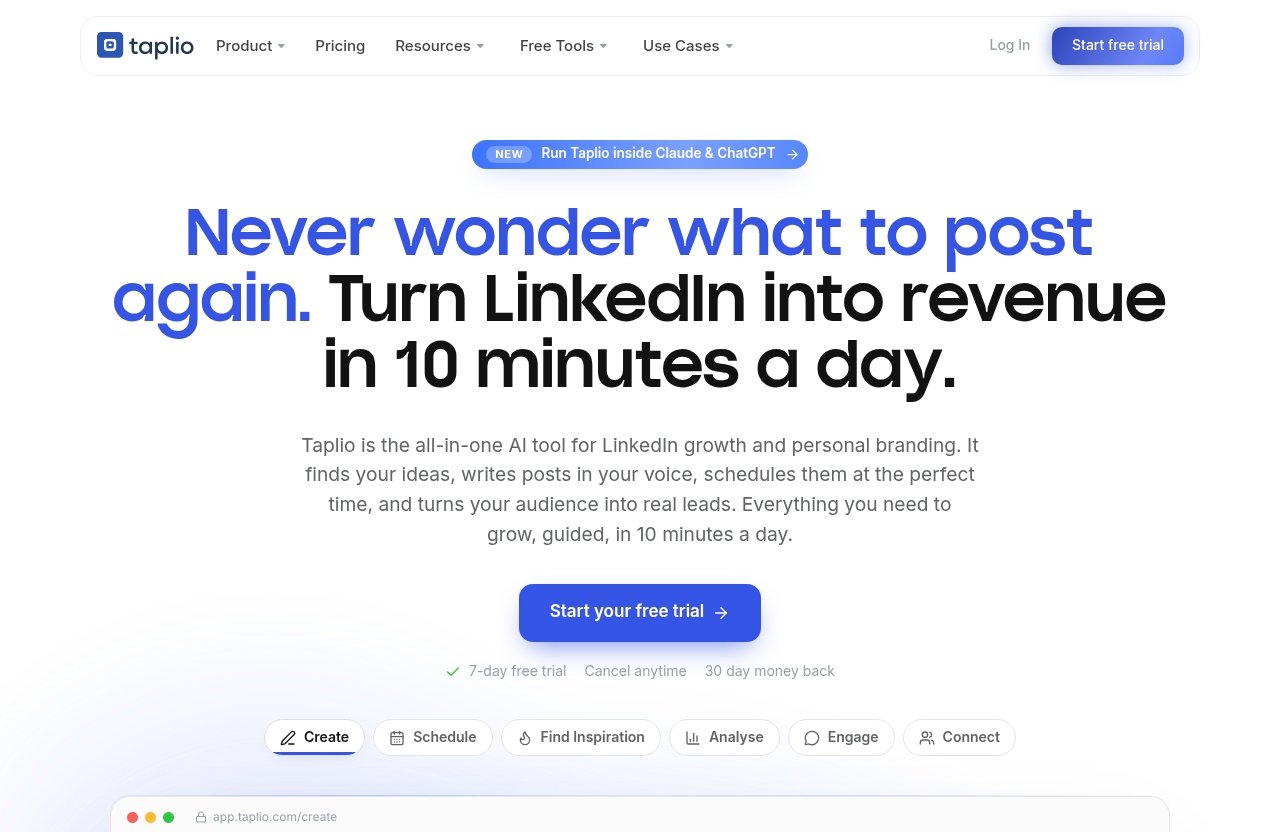
Taplio is positioned as an AI tool that helps users grow on LinkedIn in roughly 10 minutes per day. Its product modules include Create, Schedule, Engage, Connect, Analyze, Find Inspiration, Carousels, Automate, and MCP 2.0.
The platform is not simply a Taplio LinkedIn scheduler. It is designed as a fuller LinkedIn workflow for users who want to go from an idea to a scheduled post, then monitor activity and build relevant professional relationships.
Create Posts With AI
Taplio AI can generate post drafts from prompts and assist with hooks, rewrites, and tone matching. The company says its AI has been trained on more than 3 million posts, which is intended to help users generate LinkedIn-oriented writing ideas.
Its “Ask Taplio” capability is also positioned as a writing assistant that can read posts you have written, provide trend briefs, and produce voice-aware drafts. This may be useful for people who want assistance without starting every post from a blank page.
Schedule LinkedIn Content
The scheduling module lets users queue posts visually and schedule them at suggested times. Taplio says its best-time scheduling is tuned to followers, helping users create a more consistent LinkedIn publishing routine.
The product also supports scheduling content series and dripping carousels automatically. For users who publish educational sequences or recurring formats, that is more useful than a basic one-post-at-a-time calendar.
Find Inspiration From Viral Posts
Finding suitable post ideas is a common bottleneck, especially for professionals posting under their own name. Taplio includes a “Find Inspiration” module designed to help users discover ideas and relevant high-performing LinkedIn content.
This does not remove the need for original thinking or subject-matter expertise. However, it can give creators, founders, and consultants a starting point for turning timely topics into their own perspective.
Analyze Performance
Taplio’s product pages verify an Analyze module. The practical value of analytics is not just seeing a number after publishing; it is using performance feedback to identify formats, topics, and writing approaches worth repeating.
Because the supplied official information does not detail every reporting metric, buyers should avoid assuming highly specialized analytics capabilities. Still, analysis belongs in Taplio’s verified LinkedIn-focused product suite.
Engage and Connect With Leads
Taplio’s Engage feature provides a curated feed of prospects, peers, and creators worth engaging with. It also includes AI comment starters, which can help users participate in conversations before making a pitch.
The Connect module supports finding leads by title, industry, and engagement. Official materials also describe connection request sequences, DMs after acceptance, and safe, human-paced workflows. That makes the platform relevant to relationship-led outreach, not just content publishing.
What Taplio Does Not Appear to Support
Not a General-Purpose Social Scheduler
The key limitation is straightforward: is Taplio only for LinkedIn becomes important when your content plan covers several social channels. The official pages supplied for this review consistently frame Taplio around LinkedIn, not around managing every major social network from a unified calendar.
This is not necessarily a flaw. Specialized tools often offer a more channel-specific workflow, but they are not a substitute for broad social media management platforms when your needs extend beyond LinkedIn.
Not Positioned for Instagram, X, TikTok, or Facebook Publishing
The official information reviewed does not verify native Taplio publishing for Instagram, X, TikTok, or Facebook. As a result, users should not assume that Taplio can publish to, schedule for, or analyze those channels.
If you need cross-network publishing, plan for a separate tool or process. A careful Taplio LinkedIn review should make that distinction clear before you commit to a subscription.
Why That Matters for Multi-Platform Teams
A founder may be happy to treat LinkedIn as the primary thought-leadership channel. A social media team managing brand accounts across several platforms will usually need a broader content calendar, different creative formats, and reporting beyond LinkedIn.
In that context, Taplio cross-platform capability should not be assumed. Treat it as a LinkedIn-first workspace and assess whether a second platform is acceptable in your existing operations.
Taplio’s Product Suite: Official Features You Can Verify
Create
Taplio’s Create module centers on ideation and AI-assisted drafting. Verified tools include prompt-based post creation, AI hooks, rewrites, tone matching, and live reach prediction.
The company states that its AI is trained on 3 million-plus posts. That may help users identify familiar LinkedIn writing structures, but it is still wise to edit drafts carefully so posts retain real expertise and a human point of view.
Schedule
The Schedule module includes a visual queue and best-time scheduling tuned to followers. It also supports automatically dripping carousels and content series, which can be practical for campaigns that unfold over several posts.
For users posting regularly, the Taplio LinkedIn scheduler appears designed to reduce manual publishing work. It is especially relevant when consistency is more difficult than writing a single good post.
Engage
The Engage module is built around a curated feed of accounts and conversations worth following. AI comment starters may save time, but they should be used as prompts rather than copied blindly.
Meaningful engagement still requires context. The strongest approach is to use Taplio as an engagement tool to spot conversations, then add a specific, helpful comment based on your actual experience.
Connect
Connect is aimed at lead discovery and relationship workflows. Users can find relevant people based on title, industry, and engagement, then use human-paced connection and DM sequences.
This is potentially useful for sales teams, consultants, and founders who depend on LinkedIn for warm outreach. It should not be treated as a replacement for thoughtful targeting, compliant messaging, or genuine relationship building.
MCP 2.0 and Claude/ChatGPT Integration
Taplio MCP 2.0 is listed as a new product component. The supplied product information also references support involving Claude and ChatGPT, expanding the ways users can work with Taplio’s LinkedIn-oriented information and writing workflows.
As with any AI feature, verify the current setup and availability directly before buying. MCP-related functionality may be particularly relevant to advanced users who already use AI tools in their daily content process.
Official website · Latest pricing & offers
Taplio Pricing in 2026
Verified Plan Price
Taplio pricing 2026 starts from $39 per month, according to the official pricing information supplied for this review. That is the only verified price point available here, so it would be misleading to invent or estimate additional plans, user limits, or feature tiers.
Whether that starting price is worthwhile depends largely on how central LinkedIn is to your business. A weekly casual user may find it difficult to justify, while a professional publishing and prospecting consistently may see more value.
Trial and Money-Back Policy
A Taplio free trial is available according to the official pricing page. The homepage also mentions a 30-day money-back policy.
These policies can reduce buying risk, but terms can change. Check the official checkout and current plan details before subscribing, particularly if you are buying for a team or agency.
What Pricing Page Confirms
The official pricing and product information confirms modules including Schedule, Find Inspiration, Analyze, Connect, MCP 2.0, Create, Carousels, Engage, and Automate. It confirms a LinkedIn-centered toolkit, not a broad social publishing bundle.
If the focused feature set fits your needs, you can review the current offer through Taplio’s official partner link. Confirm the latest price, eligibility, and terms on the official site before making a decision.
Who Taplio Is Best For
LinkedIn Creators
Taplio for creators makes sense for professionals who publish consistently and want help with ideation, drafting, scheduling, and engagement. It is especially suitable for creators whose audience, clients, or career opportunities are primarily on LinkedIn.
The platform’s AI writing and inspiration features may reduce friction, while the scheduling queue encourages a consistent posting habit. The value is strongest when LinkedIn is not an afterthought.
Founders and Personal Brands
Taplio for founders can be a practical fit when a founder uses LinkedIn to share expertise, build credibility, recruit, attract partnerships, or generate demand. The ability to develop ideas, schedule posts, and engage with relevant people supports that type of visible leadership.
It will be less suitable for a founder whose audience is mainly elsewhere. In that case, a broader publishing tool may deserve priority.
Sales and Outbound Teams
Sales teams that take a relationship-first approach may benefit from Taplio’s engagement and connection tools. The ability to identify people by title, industry, and engagement aligns with professional prospecting workflows.
That said, software does not create trust on its own. Teams should use automation thoughtfully, keep messaging relevant, and avoid treating human-paced sequences as permission for impersonal outreach.
Agencies Managing Client LinkedIn Accounts
Taplio for agencies may be worthwhile when client work is heavily concentrated on executive or brand LinkedIn accounts. Its content, scheduling, and engagement focus can support a repeatable LinkedIn service process.
Agencies serving clients across multiple networks should recognize the boundary. Taplio can be a specialist tool within the stack, but it is not verified as the single operating system for all social media channels.
Who Should Not Choose Taplio
Teams That Need Native Multi-Platform Publishing
If your core need is one tool for publishing to LinkedIn alongside Instagram, X, TikTok, and Facebook, Taplio is not the obvious standalone choice. Official material reviewed for this article only verifies LinkedIn-centered functionality.
This is the clearest situation where is Taplio only for LinkedIn should influence your decision. Use a broader platform first, or pair Taplio with one if deep LinkedIn support remains important.
Users Who Want One Calendar for Every Social Network
Some teams need a single editorial calendar to coordinate campaign launches, creative approvals, community management, and reporting across every channel. Taplio’s product positioning does not establish that kind of all-network operational hub.
A split workflow can work well, but it adds process. Consider whether your team is comfortable managing LinkedIn separately before choosing a specialized tool.
People Who Rarely Post on LinkedIn
If you publish on LinkedIn only occasionally, the full suite may be more than you need. The benefit of AI assistance, scheduling, engagement, and connection workflows tends to increase with consistent use.
For light or occasional posting, a simpler workflow may be more cost-effective. The best tool is the one that matches actual behavior rather than aspirational activity.
How to Use Taplio in a Cross-Platform Workflow
Pair Taplio With a Multi-Platform Scheduler
A practical approach is to use Taplio for LinkedIn-specific planning and a separate scheduler for other social networks. This lets you benefit from LinkedIn-oriented AI, engagement, and connection tools without forcing one platform to meet every requirement.
Document which tool owns each task. For example, Taplio can own LinkedIn drafting and scheduling, while another system handles the wider publishing calendar.
Repurpose LinkedIn Posts for Other Channels
A strong LinkedIn post can become source material for other formats. Turn the core idea into short-form video notes, an email insight, a thread, a graphic concept, or a concise caption adapted to the norms of another platform.
Do not simply copy and paste. Each network has different expectations, audience behavior, and content formats, so adaptation is usually more effective than duplication.
Use Taplio as the LinkedIn Engine Inside a Bigger Stack
For teams with mature processes, Taplio can serve as the LinkedIn engine inside a wider marketing stack. Use it to uncover post ideas, draft in your voice, schedule LinkedIn content, and identify engagement opportunities.
This arrangement answers the multi-platform concern without asking Taplio to do work it is not officially positioned to do. It can be a sensible trade-off for teams that value LinkedIn depth over an all-in-one interface.
Taplio Alternatives if You Need More Than LinkedIn
When to Compare Alternatives
Compare Taplio alternatives when LinkedIn is not your main channel or when one unified social dashboard is non-negotiable. You should also compare options if your approval process, reporting requirements, or publishing needs are primarily cross-platform.
The question is not whether a broader tool is inherently better. It is whether the extra platform coverage matters more to your workflow than LinkedIn-specific features.
What to Look for in a Broader Tool
When evaluating a broader social media platform, look for verified native support for each network you use. Review its publishing calendar, collaboration and approval workflow, analytics coverage, content asset management, and pricing for the number of users and profiles you need.
Avoid selecting a tool based on a feature list alone. Test the workflow your team will use every week, especially content review, scheduling, reporting, and handoffs between team members.
Official website · Latest pricing & offers
FAQ
Is Taplio Worth the Cost?
Taplio can be worth considering if LinkedIn is a core growth channel and you want AI-assisted writing, scheduling, analysis, engagement, and connection tools in one LinkedIn-focused workspace. With pricing starting at $39 per month, the value is likely stronger for consistent users than occasional posters.
Check the current Taplio pricing 2026 details, trial terms, and money-back conditions on the official site before subscribing.
What Are Some Good Alternatives to Taplio?
Good Taplio alternatives depend on what you need. If you need publishing across several social networks, compare broader social media management tools that explicitly verify support for the channels your business uses.
Focus on proven platform coverage, calendar workflow, collaboration needs, reporting, and total cost. Do not assume a LinkedIn-focused tool and a multi-platform tool solve the same problem equally well.
Why Are People Getting Rid of LinkedIn?
Some people reduce or stop using LinkedIn because of time pressure, low-quality feed experiences, outreach fatigue, or a mismatch between the platform and their audience. Others simply prefer channels where their community is more active.
However, LinkedIn remains useful for many business-focused professionals. Taplio is aimed at users who still see LinkedIn as a meaningful channel for visibility, relationships, and professional growth.
Who Is LinkedIn’s Biggest Competitor?
There is no single competitor in every use case. Depending on the goal, professional networking can overlap with other social networks, job platforms, communities, and direct audience channels such as email.
For content and brand building, the most relevant alternative is usually the platform where your target audience is already engaged. The right comparison depends on whether you prioritize recruiting, lead generation, thought leadership, or community.
Final Verdict
Bottom Line: Is Taplio Only for LinkedIn?
The answer to is Taplio only for LinkedIn is yes for practical buying purposes. The official pages reviewed position Taplio as a dedicated LinkedIn growth platform with AI content creation, scheduling, inspiration, analytics, engagement, connection workflows, and MCP 2.0 capabilities.
That specialization is its main strength and its main limitation. It is not presented as a general-purpose tool for managing every major social network.
Best Decision by User Type
Choose Taplio if you are a LinkedIn creator, founder, consultant, sales professional, or agency that treats LinkedIn as a major growth channel. Its verified features are aligned with the daily work of publishing consistently and building professional relationships.
Choose a broader tool—or pair Taplio with one—if cross-platform publishing is essential. For the right LinkedIn-first user, Taplio offers a focused workflow; for an all-network social team, it should be one part of a larger system rather than the entire solution.
Related Reading
References
- Taplio Review 2026: Honest Pros, Cons and Pricing
- Taplio | AI tool to grow on LinkedIn in 10 min/day
- Taplio pricing – Plans from $39/mo | Free Trial
- Taplio LinkedIn Review (2026): Features, Pricing, Cons