Prospeo Extension: A Practical 2026 Guide to Setup, Lead Generation, and CRM Workflows

The prospeo extension is designed for sales professionals and teams that need to find verified business emails and mobile numbers while researching prospects in Chrome. Instead of moving between tabs, spreadsheets, and data tools, it brings contact enrichment, lead saving, filtering, and CRM syncing closer to the page where you are already doing research.
This guide explains how to install and use the extension, what to expect during setup, and where it fits into real outbound workflows. The goal is not to promise perfect data or automated outreach, but to show how a browser-based contact finder can help create cleaner, more actionable B2B lead lists.
Official website · Latest pricing & offers
What the Prospeo Extension Is and Who It’s For
Prospeo extension in one sentence
The prospeo extension is a Chrome-based prospecting tool that helps users find verified B2B contact information, review leads, save them, and sync selected data to a CRM without leaving the web page they are researching.
Prospeo positions its product around finding verified business emails and mobile numbers for outreach. Its extension supports contact enrichment across websites, company pages, directories, public databases, professional profiles, and search results.
Best-fit users: sales teams, founders, recruiters, agencies
The tool is most relevant when prospect research is part of the daily job. That includes:
- SDRs and account executives building outbound prospect lists
- Founders running focused, founder-led sales outreach
- Recruiters identifying hiring managers or relevant talent contacts
- Outbound agencies creating lists for multiple client campaigns
- RevOps teams standardizing lead capture and CRM hygiene
For these users, the practical appeal is reducing context switching. Rather than copying names into a separate email finder, a browser workflow can help qualify contacts as you discover them.
Where it fits in a prospecting stack
A prospeo chrome extension is not a full outreach strategy by itself. It is best treated as the research and enrichment layer between finding a potential account and adding a qualified person to your sales process.
A simple stack might look like this:
| Workflow stage | What happens | How Prospeo fits |
|---|---|---|
| Account research | You identify relevant companies or organizations | Open company sites, directories, and search results |
| Contact discovery | You look for decision-makers or relevant employees | Find verified emails and mobile numbers where available |
| Qualification | You assess fit, timing, role, and relevance | Filter, sort, and review leads before saving |
| Record management | You store usable contacts for follow-up | Save leads and sync them into a CRM |
| Outreach | You run compliant, personalized outreach | Use the approved contact record in your normal process |
How the Prospeo Chrome Extension Works
Find verified emails and mobile numbers on the web
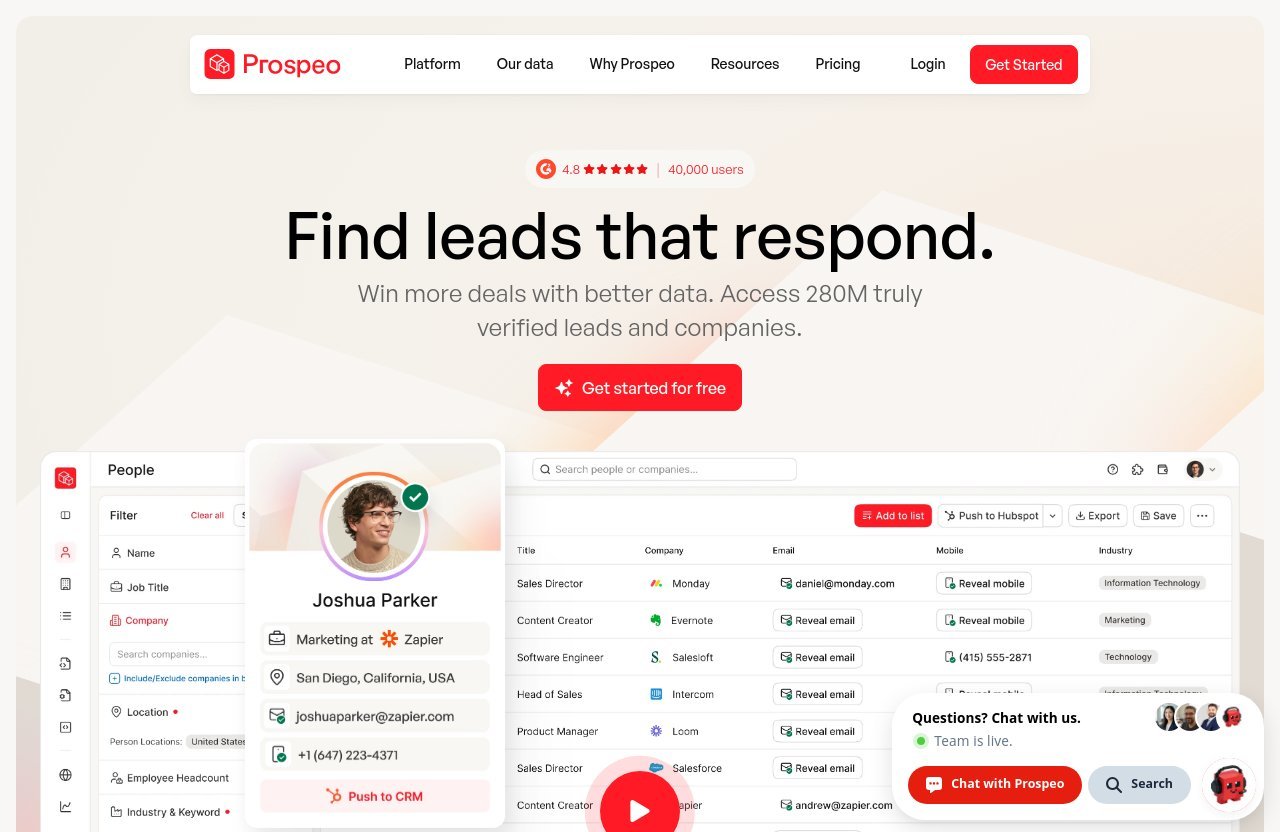
The prospeo extension works from the browser pages where prospecting research already happens. Official materials state that it can work on websites, company sites, directories, public databases, professional or social profiles, and search results.
In practical terms, you open a page related to a business or person, launch the extension, and review the contact information it can return. The intended outcome is to surface verified business emails and, where available, mobile numbers for outreach.
Prospeo’s Chrome Web Store listing says users “only pay for triple-verified data.” It also states that if no valid contact data is found, no credit is spent. That is useful for teams that want to explore leads without treating every unsuccessful lookup as a paid result.
Enrich contact data without switching tools
A prospeo contact finder is most useful when it stays close to your normal browsing workflow. Instead of manually transferring names and companies between tools, the extension is intended to enrich B2B contact information directly from the pages you visit.
That does not remove the need for judgment. You should still confirm that the company is a fit, the person has the right role, and the reason for contacting them is relevant before saving a record.
Filter, sort, save, and sync to CRM
After discovering leads, the browser workflow continues with lead organization. Prospeo states that the extension can filter and sort leads, save them, and sync the data into a CRM without switching tools.
The exact CRM connection screens and options can change, so follow the current in-product prompts or official help resources when configuring your account. Before syncing at scale, test the workflow with a small set of records and check how duplicate handling, field mapping, and ownership work in your CRM.
How to Install the Prospeo Extension in Chrome
Where to download it
Install the prospeo extension from its official Chrome Web Store listing. Avoid downloading browser add-ons from unofficial mirrors or third-party extension directories, particularly when the tool will interact with prospecting data.
A straightforward installation process looks like this:
- Open the official Prospeo listing in the Chrome Web Store.
- Select the option to add the extension to Chrome.
- Confirm Chrome’s installation prompt.
- Pin the extension to the browser toolbar if you want faster access.
- Open the extension and sign in or create a Prospeo account if prompted.
At the time of the provided Chrome Web Store snapshot, the listing showed version 3.0.1, an update date of July 17, 2026, and approximately 10,000 users. Check the live listing before installation because version information and user counts can change.
What permissions to expect
Chrome extensions may request permissions needed to operate on browser pages or access relevant website content. Read the live Chrome permission prompt carefully before accepting it.
Only grant permissions you understand and consider appropriate for your organization’s security policy. If you work in a regulated environment or use a managed browser, ask your IT or security team to review the extension before deploying it broadly.
First-time setup checklist
After installation, use this short checklist before starting a large research session:
- Confirm you are signed into the correct Prospeo account.
- Review your available credits and plan status.
- Decide which types of pages you will research first.
- Identify the CRM or export process your team uses.
- Test a few contacts before building a large list.
- Agree on lead qualification rules with your team.
A small test run makes the rest of your prospeo setup more predictable. It also helps prevent unqualified records from reaching the CRM.
First-Time Setup: Get the Extension Ready for Prospecting
Log in and connect your account
Open the extension after installation and log in using your Prospeo account. If you do not have one, create an account through the official Prospeo flow.
The Free plan includes access to the Chrome Extension, according to the verified pricing excerpt. It also includes 100 credits per month, so it is a sensible way to test the basic workflow before changing your team’s lead-generation process.
Choose your lead sources
Start with sources that already match your ideal customer or candidate profile. For example, a founder might research companies in a narrow market, while a recruiter may begin with relevant company pages and professional profiles.
Useful lead sources can include:
- Company websites and team pages
- Industry directories
- Public business databases
- Professional or social profiles
- Search engine results for targeted role and company queries
The best source is not necessarily the biggest one. A smaller, well-defined list with strong account fit is usually more valuable than a broad collection of unreviewed contacts.
Set up CRM or export preferences
Prospeo says the extension can sync leads into a CRM. Because specific integration setup steps were not included in the verified product facts, use the current in-app prompts and official Prospeo documentation to configure your connection.
Before you import or sync in volume, establish basic rules for:
- Required fields for a new lead
- Duplicate prevention
- Lead owner assignment
- Naming conventions
- Source tracking
- Consent and compliance review
This preparation matters as much as finding data. An accurate contact record that lands in the wrong pipeline stage can still create operational problems.
How to Use Prospeo on Websites, LinkedIn-Style Profiles, and Search Results
Open a profile or company page
To understand prospeo how to use in day-to-day research, begin with a relevant page. That may be a company website, directory listing, public database entry, professional profile, or search result.
First, scan the page manually. Look for signals such as company size, market, location, role relevance, hiring activity, product fit, or recent business changes. The extension can help with contact enrichment, but it cannot determine whether your message will be relevant.
Reveal verified contact details
Once you have identified a potential prospect, open the extension and review the contact details returned. The goal is to find verified business email addresses and, when available, mobile numbers associated with relevant contacts.
Do not assume every search will produce a usable result. The Chrome Web Store listing says no credit is spent when no valid contact data is found, which supports a more selective research process.
A prospeo email finder workflow is strongest when you start with a clear person or account hypothesis. For example: “I need a revenue leader at a software company in this niche,” rather than “I need any email address from this domain.”
Save leads and enrich records
After reviewing the available data, save only the contacts that meet your campaign criteria. Use filtering and sorting to keep the list focused, then sync qualified records to the CRM when your process is ready.
If you use the extension on LinkedIn-style professional profiles, treat visible job information as a starting point rather than a final truth. Roles change quickly, and a quick human review can prevent outdated messaging or duplicate outreach.
Practical Lead-Gen Workflows You Can Copy
Founder-led outbound workflow
Founder-led outreach works best when the list is small and highly relevant. Start by identifying 20 to 50 companies that closely match your product’s ideal buyer profile, then visit their sites, team pages, and relevant professional profiles.
Use the prospeo extension to find verified email or mobile contact options for the most relevant person at each account. Save only people you can contact with a specific, credible reason.
A basic workflow is:
- Build a narrow account list around one market segment.
- Visit each company site and confirm its relevance.
- Identify one or two likely stakeholders.
- Use Prospeo to enrich contact information.
- Add a short personalization note before saving to the CRM.
- Send low-volume, compliant outreach that references a real business observation.
Mobile numbers can be useful for a carefully considered follow-up path, but they should not replace respectful outreach practices. Review applicable laws, company policies, and the recipient’s reasonable expectations before using phone data.
Agency prospecting workflow
Agencies often need repeatable processes across several clients without blending client data. Begin with separate account lists, qualification rules, and CRM destinations for each client campaign.
An agency can use the extension to research public sources, identify contact opportunities, then filter and sort records based on the client’s agreed target profile. The main advantage is keeping lead discovery closer to the original source page while reducing manual copying.
Use a quality-control step before syncing. A campaign manager should review sample records for role fit, company fit, duplicates, and messaging relevance before a list becomes an outreach audience.
Recruiting and talent outreach workflow
Recruiters can use a prospeo phone number finder approach to support targeted talent research, but contact discovery should always sit behind candidate relevance and respectful communication. First identify people with the appropriate skills, experience, and likely interest in the role.
Then use public professional pages, company sites, and relevant search results as research sources. Where verified business emails or mobile numbers are available, review the record before saving it to your recruiting workflow.
Job changes are especially important in recruiting, but do not assume a specific job-change filter is available unless you have verified it in the live product. You can still use job-change signals from your research sources as a manual qualification factor, then confirm the person’s current role before outreach.
RevOps or SDR daily workflow
For SDR and RevOps teams, consistency matters more than maximum volume. Set daily prospecting blocks around a defined segment, then use the extension to enrich only accounts and contacts that meet your scoring criteria.
A repeatable daily process could be:
| Step | SDR action | Operational benefit |
|---|---|---|
| 1 | Review assigned accounts | Avoids duplicate prospecting |
| 2 | Open relevant company and profile pages | Keeps research tied to account context |
| 3 | Find contact options | Supports faster identification of reachable people |
| 4 | Filter and sort saved leads | Improves list prioritization |
| 5 | Sync approved records to CRM | Keeps pipeline records current |
| 6 | Review data before outreach | Reduces role and relevance errors |
Instant CRM sync can improve speed when it fits your process, but speed should not override review. A good RevOps standard is to require a clear source, account match, and owner before a new record is treated as outreach-ready.
Official website · Latest pricing & offers
Prospeo Extension Features That Matter Most
Verified business emails
Verified business email discovery is the core use case. A prospeo email finder workflow can help teams move from a name or company page to a potential business contact route without extensive manual data entry.
Prospeo’s Chrome Web Store listing describes its contact data as triple-verified. That is a useful product claim, but teams should still validate contact relevance and current role before sending a message.
Mobile number discovery
Mobile number availability can give sales and recruiting teams another outreach option. It is particularly useful when a team has a compliant, well-defined calling process and a legitimate business reason to contact the person.
Use mobile data thoughtfully. Laws, industry requirements, local regulations, and organizational policies may affect whether and how a number can be used.
Lead filtering and sorting
The extension can filter and sort leads, which helps users prioritize the best records instead of treating every discovered contact as equally valuable. This matters when working through directories, large result sets, or multiple decision-makers at one account.
The verified Free plan excerpt includes 28 search filters and 3 intent topics. Check the live interface and pricing page for the current list of filters, availability, and any plan-specific conditions.
CRM syncing
Prospeo states that users can save leads and sync them into a CRM without switching tools. This can reduce the friction of moving qualified records out of browser research and into an organized pipeline.
Always verify the live CRM setup instructions before relying on a new sync. Confirm where records land, what fields transfer, and how duplicates are handled.
Free monthly lead allowance
The prospeo extension free option is supported by the official pricing excerpt. The Free plan costs $0 and includes 100 credits per month, while the Chrome Web Store listing says users can start with 100 free B2B leads every month, forever.
That allowance is enough to test whether the workflow suits your team. It may also be sufficient for a founder or recruiter running a small, tightly targeted research process.
Pricing Snapshot for the Extension
Free plan overview
Based on the verified official pricing excerpt, Prospeo’s Free plan includes:
| Plan | Price | Verified included items |
|---|---|---|
| Free | $0 | 100 credits per month, 28 search filters, 3 intent topics, AI Search, AI Lookalikes, Personas, Chrome Extension, and 50+ AI Data Fields |
This is the clearest option for evaluating the extension’s basic lead-generation workflow without an upfront subscription cost.
Starter plan overview
The verified pricing excerpt lists the Starter plan at $37 per month per user with 1,000 credits per user per year.
Because no additional Starter plan conditions were provided in the verified source material, check the live Prospeo pricing page before publishing a budget, purchasing seats, or comparing annual and monthly billing options.
Scale plan overview
Details for a Scale plan were not provided in the verified pricing excerpt. Verify the live pricing page directly for current plan names, included credits, user requirements, and feature availability.
Growth and Enterprise options
Growth and Enterprise pricing or feature details were also not verified in the supplied information. Treat these as verify on live pricing page options rather than relying on third-party summaries.
Prospeo may update plans, credits, and included features over time. Review the official pricing page before making a purchasing decision.
When the free plan is enough
The Free plan is a practical fit when you want to test a chrome extension lead generation workflow, research a limited set of priority accounts, or validate whether the contact data supports your sales motion.
If your team requires larger-scale enrichment, additional paid-plan information should be verified directly with Prospeo. You can test the workflow through Prospeo via this link if you want to evaluate it yourself; this site may receive an affiliate commission at no extra cost to you.
Pros and Limitations to Know Before You Rely on It
Where it shines
The strongest case for the prospeo extension is convenience. It is designed to support finding verified B2B contact data from websites, profiles, directories, and search results while enabling lead saving and CRM sync.
Its no-credit-spent claim for searches that do not return valid contact data is also a practical advantage for exploratory research. The free monthly allowance makes it easier to test the process before scaling it.
Where human review is still needed
No contact tool should replace account research, role verification, or message relevance. Even verified contact details do not automatically mean the person is the right stakeholder, is still in the role, or should receive your outreach.
Review each saved lead for:
- Current role and company association
- Account fit
- Decision-making relevance
- Duplicate records
- Outreach permissions and compliance requirements
- Context for a personalized message
Best practices for data hygiene
Keep your CRM clean by syncing only qualified records. Add source context, record the date of research, and use consistent fields for lead status and ownership.
For a prospeo review 2026, the most balanced conclusion is that data quality claims should be tested against your own target market. Run a small pilot, compare results with your existing process, and inspect a representative sample before changing team-wide workflows.
Prospeo Extension vs Common Alternatives
What to compare: accuracy, workflow speed, CRM sync
When comparing any B2B contact enrichment tool, focus on the workflow rather than marketing claims alone. Key evaluation points include:
- Whether contact information is relevant to your target market
- How consistently valid data is returned for your lead sources
- How easy it is to work from company sites and profiles
- Whether filtering and sorting match your team’s process
- How CRM sync behaves in your actual data environment
- Whether credit rules are clear and predictable
Prospeo’s verified differentiators in the supplied material include browser-based enrichment, filtering, sorting, saving, CRM syncing, and its no-credit-spent policy when no valid contact data is found.
When Prospeo is the better fit
Prospeo may be a good fit if your team researches prospects directly on the web and wants a single browser workflow for discovering, organizing, and moving contact information into a CRM.
It is especially worth testing if you need to find verified emails and phone numbers while working through company pages, directories, public databases, and professional profiles.
When another tool may be enough
Another tool may be enough if you do not need browser-based enrichment, do not use a CRM, or only research a very small number of contacts manually each month.
Likewise, organizations with strict data governance requirements should assess every vendor against their legal, procurement, privacy, and security standards before adoption.
Troubleshooting and Support Resources
Extension not appearing in Chrome
If the extension does not appear after installation, first check Chrome’s extension management area to confirm it is enabled. You may also need to pin it to the toolbar for easy access.
If it still does not appear, restart Chrome and review your organization’s browser policies. Managed devices can restrict browser extensions, so contact your administrator if installation or activation is blocked.
Search results not showing data
A page may not return valid contact data for many reasons, including limited publicly available information or a lack of a matching contact record. The Chrome Web Store listing says no credit is spent if no valid contact data is found.
Try a more specific company page, a relevant professional profile, or another qualifying source. If the issue persists across multiple pages, check that you are logged in and review official Prospeo support resources for current troubleshooting steps.
Need help with account or billing
For account access, billing, plan questions, CRM configuration, or feature availability, use Prospeo’s official support and pricing pages. This is particularly important because subscription details and product capabilities can change.
Do not rely on an old third-party article for current plan rules. Verify live pricing, credits, and available features before making a purchase decision.
Official website · Latest pricing & offers
FAQ
How do I install the Prospeo extension?
Go to the official Prospeo listing in the Chrome Web Store, add the extension to Chrome, confirm the installation prompt, and then sign in or create a Prospeo account if needed. After installation, pinning it to your toolbar can make daily prospecting faster.
What does the Prospeo extension do?
The extension helps users find verified business emails and mobile numbers, enrich B2B contact information, filter and sort leads, save records, and sync them to a CRM without switching tools.
Can I use Prospeo on company websites and professional profiles?
Yes. Official materials state that it works across websites, company sites, directories, public databases, professional or social profiles, and search results. Review each contact before saving it to ensure it fits your outreach purpose.
Does Prospeo spend credits if no valid contact is found?
According to Prospeo’s Chrome Web Store listing, no credit is spent if no valid contact data is found. Check the live listing and current plan documentation for the latest terms.
Is there a free plan for the Prospeo extension?
Yes. The official pricing excerpt lists a Free plan at $0 with 100 credits per month, and it includes the Chrome Extension. The Chrome Web Store listing also states that users can start with 100 free B2B leads every month, forever.
Final Verdict: Is Prospeo Extension Worth Using in 2026?
Best use cases
The prospeo extension is most useful for people who prospect from browser-based research sources and want a more direct way to find, review, save, and sync B2B contact records. It fits sales, recruiting, agency, founder-led outbound, and RevOps workflows that value a clean handoff from research to CRM.
Who should try it first
Try it first if your team currently loses time copying prospect details from company sites, profiles, directories, or search results into a separate tool. The Free plan’s 100 monthly credits provide a low-risk way to test the workflow with real target accounts.
Quick recommendation
For a practical prospeo extension evaluation in 2026, start small: install it from the official Chrome Web Store, test a few high-fit accounts, verify how the results sync to your CRM, and measure whether it improves research speed without reducing data quality. It is worth trying when you need browser-based B2B contact enrichment, but maintain human review, compliant outreach practices, and regular checks of the live Prospeo pricing and feature pages.
Related Reading
- Prospeo Pricing 2026: Plans, Credits, Limits, and Value
- Prospeo API Review 2026: Fast Searches, Enrichment, and Workflow Value
- Is Taplio Only for LinkedIn? A Practical 2026 Review
References
- Prospeo Contact Finder – Email & Phone Number Finder (Chrome Web Store)
- Find Emails & Phone Numbers Anywhere – Contact Finder Extension | Prospeo
- Prospeo – Find Verified Emails & Phone Numbers for Outreach
- Pricing – Flexible Plans for Accurate Lead & Company Data