Klap Review for Solopreneurs: Is It Worth It in 2026?
Official website · Latest pricing & offers
Klap Review for Solopreneurs: Quick Verdict
If you are a one-person business owner trying to publish more short-form videos without living inside an editor, this klap review for solopreneurs comes down to a simple verdict: Klap is worth considering if you already create long-form videos and want a faster way to turn them into TikToks, Reels, and Shorts.
Klap is built around a practical promise: paste a YouTube link or upload a video, let AI find short clips, add captions, reframe the video, and export in high resolution. For busy solo creators, that can remove a major content bottleneck.
Affiliate disclosure: This article may contain affiliate links. If you choose to try Klap through our link, toptrustreview.com may earn a commission at no extra cost to you. My goal in this Klap review is to help you decide whether it fits your workflow, not to pressure you into buying.
Pricing and product details in this article are based on Klap’s official homepage and pricing page as available at the time of writing. Always verify current pricing and plan details before purchasing.
Who Klap is best for
Klap is best for solopreneurs who already have long videos, webinars, podcasts, interviews, tutorials, screen recordings, or YouTube content. If you regularly publish long-form material but struggle to create enough short clips, Klap can help with short-form content repurposing.
This klap review for solopreneurs is especially relevant if your biggest constraint is time. Klap is not just an AI video clipping software tool; it is a workflow shortcut for creators who need to post consistently without hiring an editor.
Who should skip it
You should probably skip Klap if you do not produce long-form video content. The tool is designed to turn long videos into shorts, so it is less useful if your content starts as scripts, images, carousels, or text posts.
You may also want to skip it if you need frame-by-frame creative control over every edit. Klap automates a large part of the clipping and reframing process, which is helpful for speed but may not replace detailed manual editing for highly polished brand campaigns.
Bottom-line recommendation
My bottom-line recommendation in this klap review for solopreneurs is straightforward: try Klap if video repurposing is already part of your content strategy and editing is slowing you down. The free trial is useful because Klap’s homepage says you can try it for free with no credit card required.
For most individual creators, the Basic plan is the natural starting point because it is listed for individuals and includes 100 clips per month when billed yearly. Heavier publishers may need Pro, but the right plan depends on how many clips you realistically publish.
You can explore Klap through this affiliate link: try Klap here.
What Is Klap and How Does It Work?
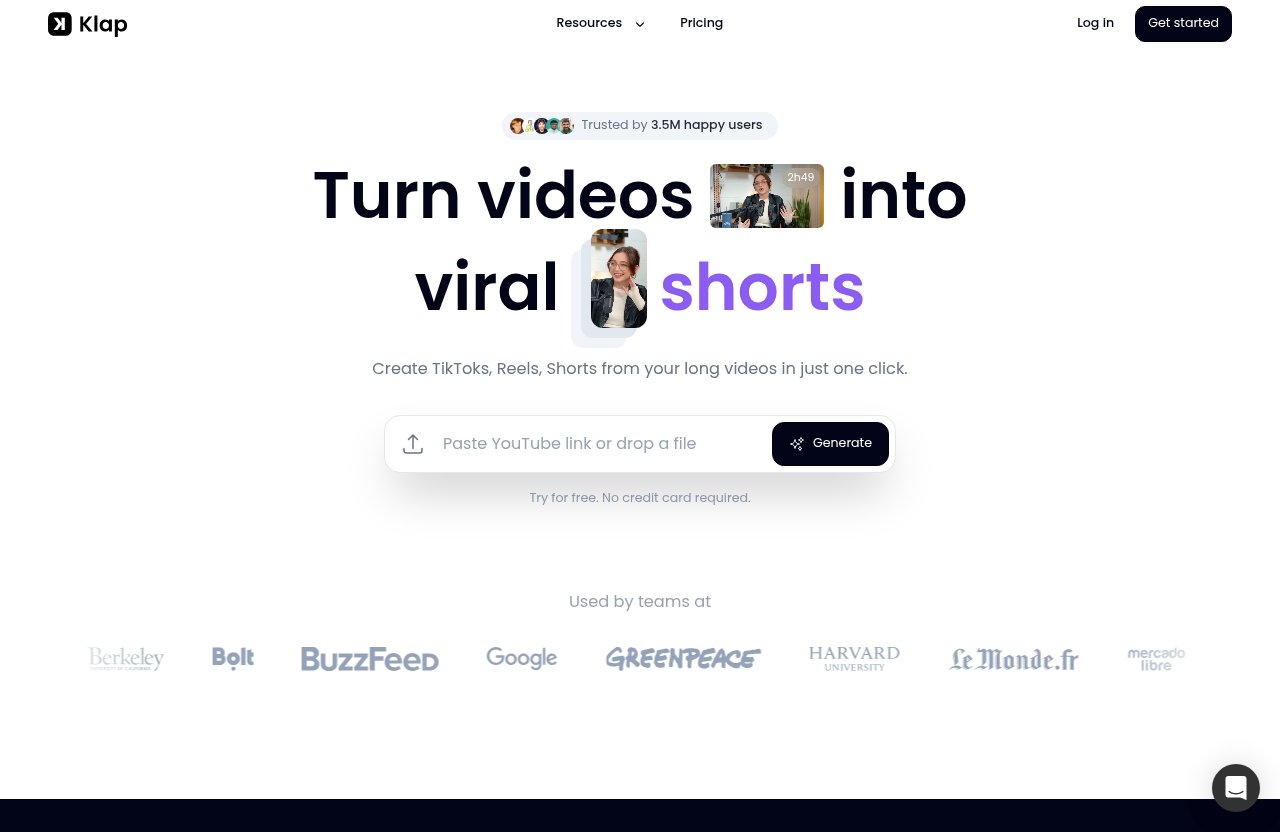
Klap is an AI clipping tool for solopreneurs, creators, and video publishers who want to repurpose long videos into short-form content. Its official homepage says Klap turns videos into viral shorts and creates TikToks, Reels, and Shorts from long videos in one click.
For this klap review for solopreneurs, the most important point is not the “viral” language. No tool can guarantee virality. The real value is that Klap can help you move faster from long-form content to ready-to-post short clips.
Upload a YouTube link or video file
The workflow starts with either a YouTube link or a video file upload. That matters for solopreneurs because many solo creators already have content sitting on YouTube, in recorded calls, in course videos, or in podcast video files.
Instead of manually scrubbing through an hour-long video, you can feed the source content into Klap. From there, the tool analyzes the video and generates clips.
Automatic clip generation in minutes
Klap’s homepage gives a useful rule of thumb: a one-minute video produces about 5 clips. Actual results can vary based on the source video, but this gives you a practical way to think about clip output.
In this klap review for solopreneurs, I would treat that as guidance rather than a guaranteed number. A tight, information-dense video may produce better short clips than a rambling recording with long pauses or unclear structure.
Export and post across platforms
Once clips are generated, Klap lets you export them in high resolution. The product is positioned for creating TikToks, Instagram Reels, and YouTube Shorts from long videos.
According to the pricing page facts provided, all plans include unlimited social accounts for TikTok, Instagram, and LinkedIn, plus Analytics. That is useful if your one-person brand posts across several profiles or client-facing channels.
Key Features That Matter for Busy Solo Creators
A good klap review for solopreneurs should focus less on flashy AI language and more on whether the features solve real solo-operator problems. Klap’s most relevant features are AI Clipping, AI Reframe 2, AI-generated captions, unlimited social accounts, and Analytics.
These features line up with the typical short-form content repurposing workflow: find the clip, resize it, caption it, export it, publish it, and review performance.
AI Clipping
AI Clipping is the core feature. Klap analyzes long videos and generates shorter clips intended for platforms like TikTok, Reels, and Shorts.
For a solopreneur, this can remove one of the slowest parts of content production: deciding where every short clip should start and end. That does not mean you should never review the output, but it does mean you are starting from AI-generated options instead of a blank timeline.
AI Reframe 2
AI Reframe 2 is one of Klap’s newer verified features. According to the product facts, it resizes videos for any platform and analyzes scenes to apply layouts such as Split Screen, Screencasts, Gaming, and more.
This matters because repurposed content often fails when the framing feels awkward. A talking head, screen recording, or gaming-style layout may need different treatment, and AI Reframe 2 is designed to handle platform-specific resizing and scene-aware layouts.
AI-generated captions
Klap provides AI-generated captions for clips. Captions are important for short-form video because many viewers watch without sound, especially on mobile.
For this klap review for solopreneurs, captions are one of the biggest practical time-savers. Manually typing, timing, and formatting captions for every short can become tedious fast, especially if you are trying to post daily.
Unlimited social accounts
All plans include unlimited social accounts for TikTok, Instagram, and LinkedIn. This is a useful detail for solo creators who manage multiple personal brands, business profiles, or niche accounts.
It is important to be precise here: the verified plan detail names TikTok, Instagram, and LinkedIn for unlimited social accounts. Klap’s homepage also positions the tool for creating TikToks, Reels, and Shorts, but the provided pricing fact specifically mentions those social accounts.
Analytics
All plans include Analytics. For solopreneurs, this is helpful because publishing more content only matters if you can learn from what performs.
Analytics should not be seen as a magic growth engine. The practical benefit is that you can review results, notice patterns, and decide which long-form topics are worth repurposing again.
Klap Pricing Explained
This klap review for solopreneurs uses the official pricing facts provided from Klap’s pricing page. The prices below are listed as billed yearly, so you should verify the current pricing page before you buy.
| Plan | Listed audience | Clips per month | Price when billed yearly |
|---|---|---|---|
| Basic | Individuals | 100 clips/month | $14/month |
| Pro | Professionals | 300 clips/month | $39/month |
| Pro+ | Teams | 1000 clips/month | $94/month |
Basic plan
The Basic plan is listed for individuals. It includes 100 clips per month and is priced at $14/month when billed yearly.
For many solo creators, this is the logical entry point. If you publish a few clips per week across TikTok, Reels, Shorts, or LinkedIn, 100 clips per month may be enough to test a consistent repurposing workflow.
Pro plan
The Pro plan is listed for professionals. It includes 300 clips per month and is priced at $39/month when billed yearly.
This plan makes more sense if you publish frequently, create long-form content often, or manage a high-volume content calendar. In this klap review for solopreneurs, I see Pro as the option for serious solo publishers who want more room to experiment.
Pro+ plan
The Pro+ plan is listed for teams. It includes 1000 clips per month and is priced at $94/month when billed yearly.
Most solopreneurs will not need this much clip volume at the start. However, it may fit a one-person agency, media operator, or creator managing a large publishing system.
What each plan includes
According to the verified pricing facts, all plans include AI Clipping, unlimited social accounts for TikTok, Instagram, and LinkedIn, and Analytics. That means the main difference between the plans is clip volume and price.
This is good for solo creators because you do not have to start on a higher plan just to access the core clipping workflow. You can begin with the plan that matches your publishing volume.
Which plan fits solopreneurs best
For most individual users, the Basic plan is the best starting point. It is explicitly positioned for individuals and gives you 100 clips per month.
If you already know you will publish multiple clips per day, Pro may be a better fit. My practical advice in this klap review for solopreneurs is to start with your actual content cadence, not an optimistic plan you may not maintain.
Official website · Latest pricing & offers
Pros and Cons of Klap for Solopreneurs
No tool is perfect, and a balanced klap review for solopreneurs should look at both the strengths and tradeoffs. Klap’s main advantage is speed, but its usefulness depends on your source videos and publishing habits.
Pros
| Pro | Why it matters for solopreneurs |
|---|---|
| Turns long videos into short clips | Helps repurpose content without starting from scratch |
| YouTube link or file upload | Works with common creator workflows |
| AI-generated captions | Reduces repetitive editing work |
| AI Reframe 2 | Helps adapt clips to platform formats and layouts |
| High-resolution export | Supports polished publishing |
| Free trial with no credit card | Lets you test before paying |
| Analytics included on all plans | Helps review performance |
| Unlimited social accounts for TikTok, Instagram, and LinkedIn | Useful for multi-profile publishing |
The biggest practical pro is that Klap can shorten the gap between creating one long video and publishing several short posts. That is exactly where many solo creators get stuck.
Cons
| Con | Why it may matter |
|---|---|
| Yearly billing on listed prices | Monthly commitment may differ, so verify current pricing |
| Clip limits by plan | Heavy publishers may outgrow Basic |
| Depends on source video quality | Better long videos usually produce better clips |
| AI still needs review | You may want to check captions, framing, and clip choices |
The key limitation is not that Klap lacks a useful workflow. It is that AI clipping still benefits from human judgment, especially if your brand voice, claims, or visual style need careful review.
Potential limitations to consider
The first practical limitation is clip quota. If you post aggressively across multiple platforms, you may hit your monthly clip limit faster than expected.
The second limitation is source quality. As a practical inference, not an official Klap claim, clear audio, focused topics, and strong moments in the original video will likely give you better clips. A messy recording can still be clipped, but the output may need more review.
The third limitation is yearly billing. Since the listed pricing is billed yearly, verify the live pricing page and make sure the commitment fits your budget before subscribing.
How Klap Helps Solopreneurs Save Time and Publish More Content
This is the main reason to read a klap review for solopreneurs: time. Most one-person businesses do not have a content team, video editor, strategist, and analytics person. You are often doing all of it yourself.
Klap helps by turning one long-form asset into multiple short-form assets. That supports a more consistent publishing system without requiring you to create every post from zero.
Repurpose one long video into many shorts
If you record a podcast, tutorial, webinar, coaching call, or YouTube video, Klap can help you turn long videos into shorts. That means one recording session can become several pieces of short-form content.
Klap’s rule of thumb says a one-minute video produces about 5 clips. You should treat that as an estimate, but it shows the core idea: long videos can become a library of short clips.
Create a consistent posting cadence
Consistency is difficult for solopreneurs because content creation competes with sales, client work, admin, product development, and customer support. A tool like Klap can help you build a repeatable process.
For example, you might record one long video each week, generate clips, review the best outputs, and publish across TikTok, Instagram Reels, YouTube Shorts, and LinkedIn. That is where this klap review for solopreneurs sees the strongest use case.
Reduce editing bottlenecks
Manual editing creates several bottlenecks: finding highlights, cutting clips, resizing for vertical format, adding captions, and exporting. Klap directly addresses these steps through AI Clipping, AI Reframe 2, captions, and high-resolution export.
You should still review clips before publishing. But reviewing AI-generated clips is usually faster than manually building every short from the original footage.
Scale content without hiring
Hiring an editor can be valuable, but not every solopreneur has the budget or volume to justify it. Klap can help bridge that gap.
That does not mean it replaces professional editors for every use case. It means an AI clipping tool for solopreneurs can help you increase output before you are ready to build a team.
Klap vs Manual Editing for Solo Creators
A practical klap review for solopreneurs should compare Klap against the real alternative most solo creators face: doing everything manually. The question is not whether manual editing can produce great results. It can. The question is whether you have the time to do it consistently.
Time saved
Manual editing requires watching the full video, identifying moments, cutting clips, resizing, captioning, exporting, and organizing versions. Klap automates much of that workflow.
The biggest time saving is at the beginning of the process. Instead of searching for every clip yourself, you start with AI-generated candidates and refine from there.
Cost of DIY editing
DIY editing may look free, but your time has a cost. If you spend several hours making short clips, that time is not going into sales calls, client delivery, product work, or audience engagement.
In that sense, Klap is not just AI video clipping software. It is a way to decide whether paying for automation costs less than doing everything yourself.
Consistency and workflow speed
Consistency often beats occasional perfection in short-form content. A manual workflow can work when you have extra time, but it often breaks during busy weeks.
Klap can make content repurposing more repeatable. For this klap review for solopreneurs, that is the main commercial argument: if the tool helps you publish more consistently from content you already create, it can be worth testing.
Real User Signals and Social Proof
Social proof should be used carefully. In this klap review for solopreneurs, I am not treating testimonials or usage numbers as proof that every user will get results. They are trust signals, not guarantees.
Homepage testimonials
Klap’s official homepage includes testimonials. Testimonials can help show that real users are finding value in the product, but they should not replace your own trial.
The best approach is to use the free trial to test Klap with your actual videos. Your content style, niche, pacing, and production quality will affect how useful the clips are.
Usage scale: 8.5M clips and 3.5M creators
Klap’s homepage claims 8.5M clips made by 3.5M creators. That is meaningful usage-scale social proof.
Again, this does not prove ROI for your business. It does suggest that Klap has been used at significant scale by creators who want to repurpose video content.
What this suggests for trust
The combination of a clear workflow, visible usage numbers, testimonials, and a no-credit-card free trial makes Klap easier to evaluate. You do not have to rely only on marketing copy.
For a solo creator, that matters. The safest buying path is to test the tool with one or two real long-form videos and judge whether the output saves enough time.
Is Klap Worth It for Solopreneurs?
So, is Klap worth it? Based on this klap review for solopreneurs, yes, for the right user: a solo creator who already has long videos and wants a faster way to create short-form content.
It is less compelling for people who do not record video, publish rarely, or want complete manual control over every edit. Like most automation tools, Klap is strongest when it supports an existing workflow rather than trying to create a strategy for you.
Best-case scenarios
Klap is best when you already produce long-form video consistently. That could include YouTube videos, recorded podcasts, webinars, tutorials, interviews, product demos, or educational content.
It is also useful if your audience is active on TikTok, Instagram Reels, YouTube Shorts, or LinkedIn. The more platforms you publish to, the more valuable a faster repurposing workflow becomes.
When it is not worth it
Klap may not be worth it if you only create occasional videos. If you publish one long video every few months, a paid clipping plan may be more than you need.
It may also be less useful if your videos are poorly structured or not designed for repurposing. As a practical inference, strong clips usually come from strong source material.
Final recommendation
My final recommendation in this klap review for solopreneurs is to test Klap if video editing is slowing down your content engine. The official homepage says you can try it for free with no credit card required, which makes evaluation lower-risk.
If you want a faster way to turn long videos into shorts, generate captions, reframe clips, and publish more consistently, Klap is a strong fit for a busy solo workflow. If that sounds like your current bottleneck, you can try Klap through our affiliate link.
Official website · Latest pricing & offers
FAQ
Common buying questions from solopreneurs
Below are concise answers to the questions solo creators usually ask before trying an AI clipping tool.
What are the cons of a solopreneur using an AI tool like Klap?
The main tradeoffs are yearly billing on the listed prices, clip limits by plan, and dependence on the quality of the original video. You should also expect to review the AI-generated clips before publishing.
For a one-person business, the biggest risk is paying for more clip volume than you actually use. Start by estimating your real posting cadence.
Is Klap good for solo creators who post on TikTok, Reels, and Shorts?
Yes, Klap is a good fit if you already have long-form videos and want to repurpose them into TikToks, Reels, and Shorts faster. Its homepage specifically positions the tool around creating short clips from long videos.
This klap review for solopreneurs rates Klap strongest for creators who want consistent short-form publishing without doing every edit manually.
How many clips can Klap generate from one video?
Klap’s official homepage gives a rule of thumb that a one-minute video produces about 5 clips. Actual output can vary depending on the source video.
A focused video with clear topics and strong moments will likely be easier to repurpose than a loose recording with long pauses.
What plan is best for an individual solopreneur?
The Basic plan is the entry option for individuals. It includes 100 clips per month and is listed at $14/month when billed yearly.
If you publish heavily or want more clip volume, the Pro plan offers 300 clips per month at $39/month when billed yearly. Always verify current pricing before purchasing.
Does Klap require a credit card to try?
Klap’s homepage says you can try it for free with no credit card required. That makes it easier to test the tool with your own videos before committing.
For busy solo creators, that trial is the best way to decide whether Klap is the best AI tool for busy solopreneurs in your specific workflow.
Related Reading
- Klap vs Riverside: best platform for podcast clip creation
- Is Repurpose.io worth it in 2026?
- Best social media scheduler for engagement in 2026
References
- Klap official homepage
- Klap pricing page
- How to do an annual business review (for solopreneurs)
- How to do an end-of-year business review