Contentstudio Free Trial 2026: How to Test It Before You Pay
If you are considering the contentstudio free trial, the smartest approach is not just to sign up and browse the dashboard. Use the 7 days to test the exact workflows that would justify paying: connecting accounts, scheduling posts, trying AI Studio, checking analytics, and seeing whether the workspace fits how you actually work.
This guide is based on the official ContentStudio homepage, pricing page, signup page, and Trustpilot review page. I’ll keep the claims careful and practical, so you can start the trial quickly, know what to test first, and decide whether the paid Standard plan makes sense before you add or confirm any payment details.
Official website · Latest pricing & offers
What ContentStudio Is and Who the Free Trial Is Best For
ContentStudio is a social media management platform built around planning, publishing, AI-assisted content creation, analytics, and workflow organization. If you are comparing tools, the contentstudio free trial is useful because it lets you test your real posting process before committing to a paid plan.
The platform is commonly evaluated for publishing, AI Studio, analytics, social inbox workflows, social listening, and content discovery. During your trial, the goal is to confirm which of those areas matter to your work and whether ContentStudio handles them smoothly enough for daily use.
Quick definition of ContentStudio
ContentStudio is a social media management tool for creating, scheduling, organizing, and reviewing content across connected social accounts. Its official pricing page lists features such as AI Studio for text, image, and video, unlimited social posting, a multi-view content planner, social media analytics, a media and assets library, and automation via third-party tools.
In practical terms, it sits between a content calendar, an AI content assistant, and a publishing dashboard. Instead of writing posts in one place, storing visuals somewhere else, and manually publishing across platforms, you can test whether ContentStudio brings enough of that work into one workflow.
The contentstudio free trial is especially helpful if your current process feels scattered. You can use the trial to see whether planning, asset storage, AI generation, and publishing feel more organized in one system.
Best use cases for solo creators, agencies, small businesses, and marketing teams
For solo creators, ContentStudio may be worth testing if you post regularly and want one place to draft, schedule, and review content. The Standard plan details verified on the official pricing page include 5 social accounts, 1 workspace, and 1 user, which is a practical fit to evaluate for individual use.
For small businesses, the trial helps answer whether the team can plan posts in advance and maintain a consistent publishing rhythm. The official pricing page lists a multi-view content planner, unlimited social posting, social media analytics, and a media and assets library, all of which are worth testing with actual campaigns rather than sample content.
For agencies and marketing teams, the key question is workflow fit. Even if you are not ready to pay, the contentstudio free trial can help you judge whether the workspace setup, content planner, AI tools, and reporting views match how your team handles clients or internal brands.
When a 7-day trial is enough to evaluate the tool
A 7-day trial is enough if you enter with a plan. You do not need to test every corner of the platform; you need to test the features that affect whether you will pay.
A good evaluation can be done in three sessions:
| Trial Day | What To Do | Why It Matters |
|---|---|---|
| Day 1 | Complete ContentStudio sign up, connect accounts, explore settings | Confirms setup is simple enough |
| Day 2-3 | Create and schedule real posts | Tests daily publishing workflow |
| Day 4-5 | Try AI Studio, media library, and planner views | Shows whether it saves time |
| Day 6 | Review analytics and inbox-related workflows | Checks reporting and monitoring fit |
| Day 7 | Compare value against ContentStudio pricing | Helps decide before paying |
The contentstudio 7-day free trial is short, so avoid spending the whole week exploring menus. Use it like a buying checklist.
How to Start the ContentStudio Free Trial
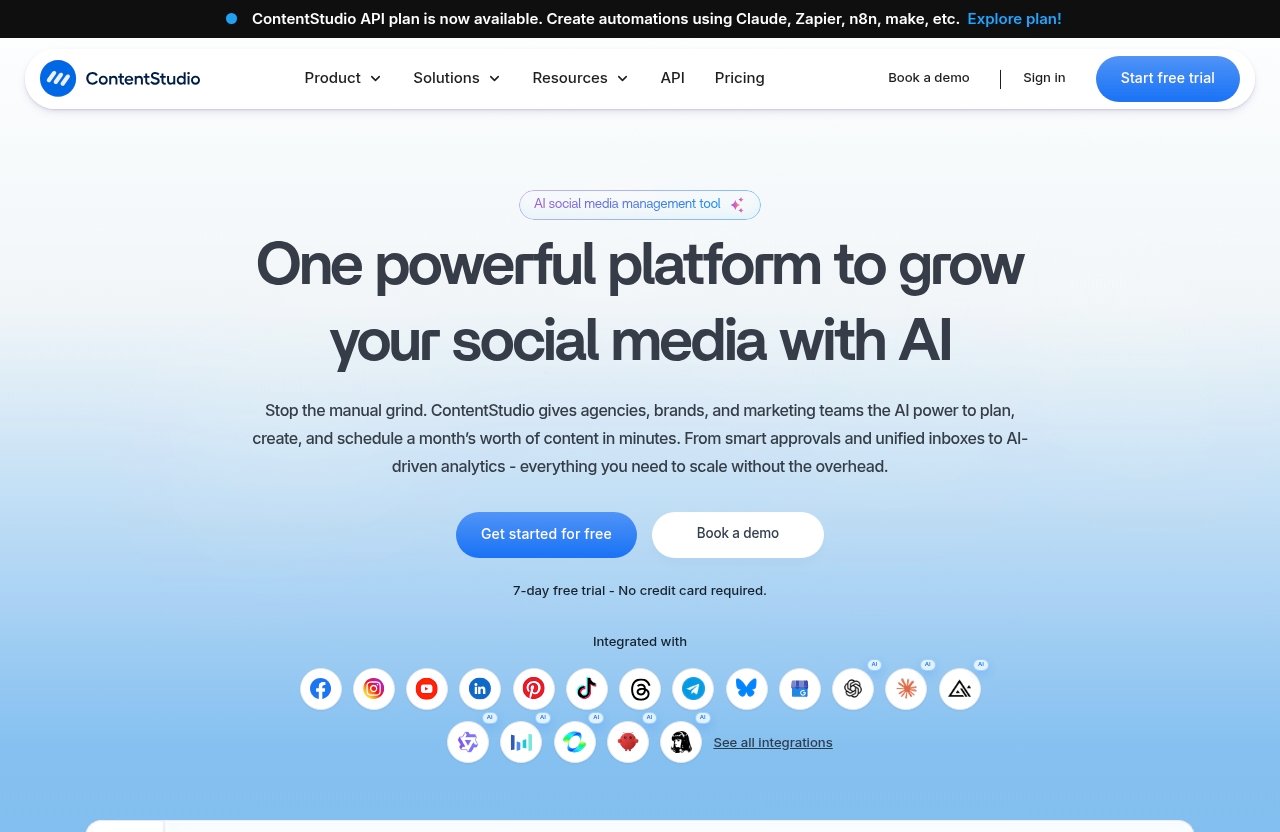
Starting the contentstudio free trial should be straightforward because the official homepage says it is a 7-day free trial and no credit card is required. Still, I recommend using the official site only and confirming the trial terms on the signup page before creating your account.
You can start from the official ContentStudio trial page here: get started with the ContentStudio free trial. This keeps the process focused on the current official signup flow.
Go to the official signup page
Begin by visiting the official ContentStudio website or the official signup page. Look for the option to start the free trial or get started for free.
The official homepage states “7-day free trial,” “No credit card required,” and “Get started for free.” Those are the key trial details to verify before you continue.
For safety, avoid unofficial download pages, copied signup forms, or third-party pages that ask for payment details before you see the official ContentStudio sign up process.
Create your account
Once you are on the signup page, follow the prompts to create your account. This usually means entering your basic account details and completing whatever verification steps are shown on the page.
Do not rush this step. Use an email address you can access immediately, because login or verification delays can waste part of the short contentstudio free trial window.
If you are evaluating ContentStudio for a business or client workflow, use the email address you would realistically use after purchase. That keeps the trial closer to your real setup.
Confirm that no credit card is required
The official homepage says the trial requires no credit card. This makes the contentstudio free trial without credit card especially useful for buyers who want to test the tool before making a payment decision.
During signup, verify that the page does not require card details to begin the trial. If you see any payment request, pause and confirm you are on the official ContentStudio site and the correct trial path.
This is also why “contentstudio no credit card required” is an important search point. It means you can evaluate the platform first, then decide whether the paid plan is worth it based on your own workflow.
What happens right after signup
After signup, follow the prompts inside the account to begin setup. Start by connecting the social accounts you want to test, then create a small batch of real content rather than experimenting with random drafts.
The first 30 minutes should answer three questions:
- Can you connect the accounts you need?
- Can you create and schedule a post without friction?
- Does the planner view make your upcoming content easier to understand?
If the answer is yes, continue with deeper testing. If the answer is no, note the issue immediately so you can decide whether to troubleshoot or skip before the contentstudio free trial ends.
PRODUCT FACTS: Verified Pricing and Trial Details
This section uses only the verified facts from the official ContentStudio homepage and pricing page. Because pricing and plan details can change, always verify your own account details on the official site before payment.
The most important confirmed trial facts are simple: the official homepage says ContentStudio offers a 7-day free trial, no credit card required, and get started for free.
Standard plan price and billing terms
The official ContentStudio pricing page lists the Standard plan at $19/month. It also lists the Standard plan as $228 billed annually.
The pricing page also shows Save $120/yr and states Cancel anytime. If you are comparing ContentStudio pricing, those are the verified billing details available from the provided official pricing facts.
Here is the confirmed Standard plan information:
| Item | Verified Detail |
|---|---|
| Plan referenced | Standard |
| Monthly price | $19/month |
| Annual billing | $228 billed annually |
| Annual saving shown | Save $120/yr |
| Cancellation wording | Cancel anytime |
Before subscribing, check the pricing page directly in your own browser. This is especially important if you are moving from the contentstudio free trial into a paid account.
What the trial includes before payment
The official homepage says the trial is a 7-day free trial and that no credit card is required. That means you can test the platform before payment, which is the main reason trial-first is the safer route for most buyers.
The official pricing page also lists these Standard plan details:
| Standard Plan Detail | Verified Amount |
|---|---|
| Social accounts | 5 |
| Workspace | 1 |
| User | 1 |
| AI text credits | 25,000 |
| AI image credits | 25 |
| AI video credits | 100 |
| AI video clipping credits | 100 |
Use these details as your testing boundary. For example, if you need more than 5 social accounts or more than 1 user, you should verify available options on the official pricing page rather than assuming the Standard plan will cover your use case.
Key features listed on the official pricing page
The official pricing page lists the following included features for the Standard plan:
- AI Studio: text, image, and video
- AI brand knowledge and voice
- Unlimited social posting
- Multi-view content planner
- Social media analytics
- Media and assets library
- Audio library
- X threads and LinkedIn carousels
- Auto first comment
- MCP Integration
- API access
- Automate via third-party tools
During the contentstudio free trial, do not just check whether these features exist. Test whether they make your actual workflow faster, clearer, or easier to repeat.
Official website · Latest pricing & offers
What to Test During Your 7-Day Trial
The contentstudio free trial is most valuable when you treat it like a working test, not a product tour. Pick one real campaign, one week of social posts, or one client workflow and run it through the platform.
If you only have one hour, test scheduling, AI Studio, the content calendar, analytics, and workspace fit first. Those areas will usually tell you whether ContentStudio is worth paying for.
Publish and schedule content
Start by connecting the social accounts you plan to use. The official pricing page lists 5 social accounts for the Standard plan, so test the accounts that matter most to your daily posting.
Then create several real posts. Include different content types if they reflect your normal work, such as short updates, promotional posts, educational posts, X threads, or LinkedIn carousel ideas where relevant.
What to check:
- Is the post creation process easy to understand?
- Can you schedule content without extra manual steps?
- Does the workflow feel faster than your current tool or spreadsheet?
- Can you maintain your normal posting rhythm?
A good result means you can create and schedule a few posts without needing constant workarounds. If scheduling feels confusing during the contentstudio free trial, that friction may grow after you pay.
AI Studio for captions and visuals
The official pricing page lists AI Studio for text, image, and video. It also lists 25,000 AI text credits, 25 AI image credits, 100 AI video credits, and 100 AI video clipping credits for the Standard plan.
Use the AI tools on real content, not generic prompts. For example, test captions for your brand, post variations for different platforms, visual concepts, and repurposing ideas.
What to check:
- Do the AI outputs match your tone after editing?
- Can AI brand knowledge and voice help keep posts consistent?
- Are the credits enough for your expected monthly usage?
- Does AI Studio reduce drafting time, or does it create more editing work?
The contentstudio free trial should help you decide whether the AI features are a genuine productivity boost for your workflow. If you already use another AI tool, compare the total time from idea to scheduled post.
Content calendar and smart scheduling
The official pricing page lists a multi-view content planner. This is one of the most important areas to test because a scheduler is only useful if you can see what is coming next.
Add a week of posts to the planner. Look at how the calendar helps you spot gaps, repeated topics, or crowded posting days.
What to check:
- Can you quickly understand your weekly content plan?
- Are planner views useful for your style of work?
- Can you move from planning to publishing smoothly?
- Does the calendar reduce missed posts or last-minute scrambling?
If you manage multiple campaigns, the calendar should help you see the big picture. If you are a solo creator, it should make the next few days of posting feel more manageable.
Analytics and social inbox
The official pricing page lists social media analytics. During the trial, check whether the analytics view gives you enough insight to make better posting decisions.
Because analytics depend on connected accounts and available data, your trial experience may vary. The main question is whether the reporting layout helps you understand performance without spending too much time exporting or interpreting data elsewhere.
What to check:
- Can you identify which posts performed better?
- Are the metrics easy to scan?
- Can you use the insights to adjust upcoming content?
- Does the platform support the monitoring workflow you need?
If you are also evaluating social inbox workflows, test how comfortably you can review and manage interactions inside your account. Keep the focus on whether it fits your real daily routine.
Media library and collaboration features
The official pricing page lists a media and assets library, an audio library, and 1 workspace with 1 user on the Standard plan. That makes this part especially important for solo users and small teams evaluating the entry-level paid option.
Upload or organize a few real assets you use often. Test whether you can find them quickly when creating posts.
What to check:
- Can you store reusable brand assets in a useful way?
- Does the media library reduce repeated uploads?
- Is one workspace enough for your current setup?
- Is one user enough, or do you need to verify other options on the official pricing page?
For agencies, the contentstudio free trial should be used to test workflow structure, not just posting. If your process needs multiple people, multiple client spaces, or approval layers, verify those needs directly on the current official pricing and account pages before paying.
Best Way to Decide if ContentStudio Is Worth Paying For
The best way to judge ContentStudio is to compare the paid cost against time saved, workflow clarity, and whether you will actually use the tools every week. A feature list is helpful, but your trial behavior is more reliable.
By the end of the contentstudio free trial, you should know whether the platform is becoming part of your routine or sitting unused after the first login.
Signs the platform fits your workflow
ContentStudio may fit your workflow if you can create, schedule, and review posts faster than before. It is also a positive sign if the content planner helps you see your publishing schedule more clearly.
Good fit signals include:
- You connected your key social accounts without major friction.
- You scheduled multiple real posts during the trial.
- AI Studio helped you draft or repurpose content faster.
- The planner made your week easier to manage.
- Analytics helped you understand what to improve.
- The Standard plan’s 5 social accounts, 1 workspace, and 1 user match your current needs.
If several of these are true, the contentstudio free trial has likely given you enough evidence to consider paying.
Signs you should skip or downgrade
You should hesitate if you only use the platform once during the trial. A social media management tool needs regular use to justify its cost.
You may want to skip paying if:
- You post rarely and do not need scheduling.
- You do not use AI content tools.
- You need more accounts, users, or workspaces than the verified Standard plan details provide.
- Your current system is already simple and effective.
- You cannot clearly explain what ContentStudio will replace.
Also consider whether your evaluation was realistic. If you did not connect accounts or schedule real posts, extend your research on the official site before making a payment decision.
Questions to ask before the trial ends
Before the trial ends, ask direct buying questions. This prevents paying for a tool based on curiosity rather than need.
Use this checklist:
- Did ContentStudio save me time this week?
- Did it improve my publishing consistency?
- Did AI Studio produce useful drafts, visuals, or video ideas?
- Are the listed AI credits enough for my expected usage?
- Is the Standard plan’s 5-social-account limit enough?
- Is 1 workspace and 1 user enough?
- Does the pricing make sense compared with the time saved?
- Have I verified current account and billing details on the official site?
If the answers are mostly yes, paying may be reasonable. If you are unsure, do not rely on assumptions; revisit the official ContentStudio pricing page and account details before subscribing.
Common Problems During Signup and How to Avoid Them
Most signup problems are avoidable if you use the official site, check your email promptly, and confirm trial terms before creating the account. Because the contentstudio free trial lasts 7 days, small delays can affect your evaluation time.
This section is intentionally practical and careful. If a detail is account-specific, verify it inside your ContentStudio account or through official support resources.
Can’t access signup
If you cannot access the signup page, first confirm you are using the official ContentStudio website. Avoid unofficial pages that imitate the signup flow or ask for information too early.
Try these basic steps:
- Refresh the page.
- Use a different browser.
- Disable browser extensions temporarily.
- Check your internet connection.
- Return to the official homepage and restart from the free trial option.
If you still cannot access signup, use the official site’s support or help resources. Do not enter payment information on a page you cannot verify.
Email verification or login issues
If your account requires email verification, check your inbox immediately. Also check spam, promotions, or security folders.
Use an email address you control and can access during the trial. Losing access can waste time and make the contentstudio free trial harder to evaluate properly.
If login issues continue, follow the password reset or account recovery prompts shown on the official signup or login page. Avoid creating multiple accounts unless official support advises it.
Confusion between trial and paid plan
The official homepage says the trial is 7 days and no credit card is required. The official pricing page lists the Standard plan at $19/month or $228 billed annually, with Save $120/yr shown.
To avoid confusion, separate these two stages:
| Stage | What To Confirm |
|---|---|
| Trial | 7-day free trial, no credit card required |
| Paid plan | Standard plan price, billing term, included limits |
| Before payment | Current details on the official pricing/account page |
If you are evaluating the contentstudio free trial without credit card, make sure you are not accidentally choosing a paid billing path before you are ready.
How to cancel before being charged
The verified pricing page states “Cancel anytime.” Since the official homepage says no credit card is required for the trial, you should not need to provide card details just to start.
If you later add payment information or subscribe to a paid plan, check the account or billing area for cancellation options. Also review ContentStudio’s official help docs or support guidance for current cancellation steps.
Before any payment, take a minute to verify the plan, billing term, and renewal details in your own account. That is the safest way to avoid misunderstanding the transition from trial to paid use.
ContentStudio Free Trial vs Paying From Day One
For most buyers, the contentstudio free trial is the better first step because it lets you test actual workflows without providing a credit card. Paying from day one only makes sense if you already know the platform fits your needs.
Since the official homepage says “Get started for free,” there is little reason to skip the trial unless your buying decision has already been made.
Why the trial is the safer route
The trial is safer because it turns the decision into a practical test. You can see whether the ContentStudio scheduler, AI Studio, planner, analytics, and media library are useful for your real content process.
It also helps you validate plan fit. The verified Standard plan details include 5 social accounts, 1 workspace, and 1 user, so the trial gives you time to see whether those match your current workflow.
You can start the official trial here: try ContentStudio through the official free trial path. Use the 7 days to test before you decide whether the paid plan is necessary.
When immediate purchase may make sense
Immediate purchase may make sense if you have already tested ContentStudio before, know the current ContentStudio pricing, and are ready to use the Standard plan for live work.
It may also make sense if your business has an urgent need for social media scheduling and you have already verified that the listed plan details match your requirements. Even then, I would still check the current official pricing page before paying.
For new users, however, the contentstudio free trial is usually the more careful route. It gives you evidence instead of assumptions.
How agencies and teams should evaluate ROI
Agencies and teams should evaluate ROI based on time saved, publishing consistency, workflow clarity, and whether the platform reduces manual coordination. Do not measure value only by the monthly price.
For example, if ContentStudio helps your team plan a week of content faster, reuse assets, generate drafts, and review performance in one place, the paid plan may be easier to justify. If your team still relies on separate tools for most of the work, the value may be lower.
Agencies should also verify account limits carefully. The provided Standard plan facts list 1 workspace and 1 user, so any agency needing broader team access should confirm current options on the official pricing page before payment.
Official website · Latest pricing & offers
FAQ
How much does ContentStudio cost?
The official ContentStudio pricing page lists the Standard plan at $19/month. It also lists $228 billed annually and shows Save $120/yr.
Before paying, verify the current ContentStudio pricing on the official pricing page in your own account.
Is ContentStudio better than Buffer?
It depends on your workflow. ContentStudio’s verified listed strengths include AI Studio, unlimited social posting, a multi-view content planner, social media analytics, media and assets library, X threads and LinkedIn carousels, API access, and automation via third-party tools.
A fair comparison requires checking Buffer’s current official features and pricing separately. Use the contentstudio free trial to test ContentStudio directly before deciding.
What is ContentStudio used for?
ContentStudio is used for social media management, including publishing, AI-assisted content creation, analytics, social inbox workflows, social listening, and content discovery.
Its official pricing page lists tools such as AI Studio, a multi-view content planner, social media analytics, media and assets library, and unlimited social posting.
Do I need a credit card for the ContentStudio free trial?
No. The official ContentStudio homepage says the 7-day free trial requires no credit card.
That makes the contentstudio free trial without credit card a low-risk way to test the platform before deciding whether to pay.
How long is the ContentStudio free trial?
The official ContentStudio homepage says the trial length is 7 days.
Because the contentstudio 7-day free trial is short, test your most important workflows early: account connection, scheduling, AI Studio, planner views, analytics, and workspace fit.
Conclusion
The contentstudio free trial is worth trying if you want a practical way to evaluate social media scheduling, AI content tools, analytics, and workflow management before paying. The official homepage says it is a 7-day free trial with no credit card required, which makes trial-first the sensible route for most new users.
For solo creators, the trial is useful if you need a cleaner way to plan and publish consistently. For agencies, it is a chance to test whether the workflow structure fits client work, while remembering that the verified Standard plan lists 1 workspace and 1 user. For teams, the key is to confirm whether ContentStudio reduces planning friction and supports your publishing process.
Start the trial with a checklist, test real content, review the official ContentStudio pricing page before payment, and decide based on evidence. If the platform saves time during the trial, helps you schedule consistently, and fits your account needs, it may be worth paying for after the 7 days.
Related Reading
References
- ContentStudio Pricing | Plans From $19 per Month
- ContentStudio: Unified Social Media Management Tool
- ContentStudio – Unified Social Media Management Platform (Signup)
- Read Customer Service Reviews of contentstudio.io