Postplanner Review Complaints: What Users Should Know Before Buying in 2026
Official website · Latest pricing & offers
Post Planner Complaints in 2026: Quick Verdict
Post Planner is a social media scheduling and content-discovery tool built around helping users find ideas, organize posts, create visuals, schedule publishing, and review engagement. This postplanner review complaints guide takes a different approach from a standard feature roundup: it starts with the friction users may encounter before deciding whether the platform is worth testing.
The recurring themes in public feedback are fairly consistent. Some users report support delays, cancellation or renewal frustration, content suggestions that can feel repetitive, and a mobile experience that may not suit an on-the-go workflow. Others appreciate the straightforward scheduling process, category-based post organization, and idea-discovery tools.
Quick verdict: Post Planner appears best suited to solo marketers and small businesses that value simple scheduling and content ideas more than deep analytics, complex approvals, or premium hands-on support. The complaints are not automatic dealbreakers, but they matter greatly if you run an agency, manage many brands, or need reliable help during billing changes.
Who this review is for
This review is for buyers comparing social media tools before subscribing. It is especially relevant if you have seen postplanner complaints related to support, mobile usability, or billing and want to understand whether those themes would affect your own workflow.
It is also useful for small business owners who want to avoid paying for features they will not use. Rather than assuming every negative review applies to every account, the goal is to connect each reported issue to a realistic use case.
What counts as a real complaint vs. a normal tradeoff
A real complaint is a recurring problem that prevents someone from using a paid service as expected. Examples can include difficulty getting help with an account issue, unclear cancellation steps, or a workflow that fails to support an essential publishing need.
A tradeoff is different. A lightweight scheduler may not offer the same depth of analytics, client approvals, or customization as an enterprise social media platform. That does not necessarily make it poor software; it may simply mean it is designed for a different buyer.
Bottom-line verdict on whether the issues are dealbreakers
The most serious postplanner review complaints involve support and cancellation expectations, because those issues can affect money, access, and business continuity. Before paying, verify the current terms on the official site and test how the product fits your actual publishing routine.
For users with simple content calendars, Post Planner may still be practical. For teams that need advanced collaboration, broad format control, or immediate white-glove help, the reported pain points deserve more weight.
What Is Post Planner? A Fast Overview
Core purpose of the tool
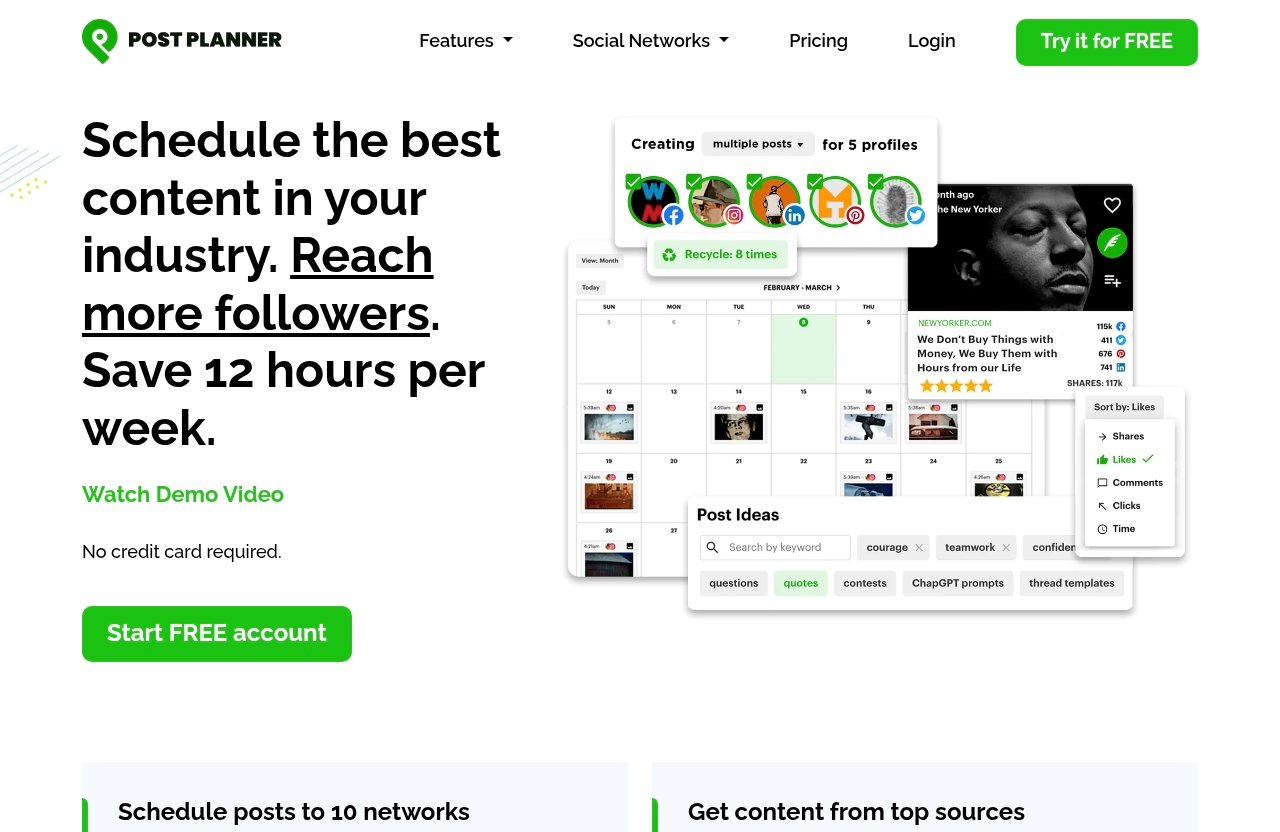
Post Planner: Social Media Scheduler built for Engagement is designed to bring social content work into one system. Its official feature categories include connecting social accounts, discovering content and viral post ideas, designing images, categorizing posts, creating and optimizing content, scheduling publishing, analyzing performance, and managing posts on mobile.
In practical terms, it aims to reduce the back-and-forth between idea generation, graphic creation, a content calendar, and social publishing. That centralization is a key reason some post planner customer reviews are positive.
Who uses it most
The tool is likely to appeal most to solo creators, local businesses, lean marketing teams, and social media managers with recurring publishing schedules. These users often need a quicker way to maintain consistency without building a complicated approval system.
It may be less natural for large agencies or organizations with strict compliance requirements. Those teams frequently need deeper permissions, client reporting, and multi-stage editorial workflows than a simple scheduler can comfortably provide.
Supported networks and primary workflows
According to the official homepage, Post Planner supports Facebook, Instagram, Google Business Profile, LinkedIn, Pinterest, TikTok, Twitter/X, YouTube, Threads, and Bluesky. That is broad network coverage on paper, but buyers should not assume every network has identical publishing depth or format handling.
The core workflow is straightforward: connect accounts, find or create content, organize posts into topic-based buckets, schedule them, and analyze engagement. The most useful postplanner review complaints tend to emerge when a buyer’s needs extend beyond that basic loop.
The Most Common Post Planner Complaints Reported by Users
Public review themes should be interpreted carefully. Reviews represent individual experiences at a particular moment, not verified proof that every customer will have the same result. Still, repeated patterns across post planner Trustpilot and post planner G2 discussions can help prospective buyers identify what to test.
Support and response-time complaints
Some public reviewers describe difficulty getting a timely or satisfying answer when they need account help. These post planner support complaints matter most when the question is urgent, such as a publishing issue, access problem, payment question, or cancellation request.
A user who schedules content weeks in advance may be able to tolerate a slower response for a minor question. A social manager handling a live campaign or a client account may not have that flexibility.
Cancellation and billing frustration
Post planner cancellation complaints are another theme worth taking seriously. Some customers report frustration around renewals, account closure, or the process of resolving a charge they did not expect.
This does not establish that every cancellation is difficult or that a charge is improper. It does mean buyers should read current billing terms, save confirmation records, and understand renewal timing before starting a subscription.
Feature limitations and missing social formats
Several postplanner review complaints come from users who expected more advanced functionality. Common areas of mismatch include complex reporting, detailed team workflows, granular permissions, or specific content-format needs.
The official product supports a wide range of networks, but support for a network does not automatically mean every post type, publishing path, or native feature will be available in the exact way a power user expects. That distinction is crucial.
Content library freshness and quality concerns
Post Planner promotes content discovery and post ideas, but some users say suggested content can feel old, repetitive, or less relevant than they hoped. For marketers using discovery tools daily, content quality is not a minor detail—it directly affects how quickly they can plan a calendar.
A suggestion library works best as a starting point, not as a replacement for editorial judgment. Businesses with specialized, regulated, or highly original content needs may need to create more of their own material.
Mobile/app usability complaints
Post planner app complaints often center on usability expectations. Users who primarily work from a phone can be less forgiving of extra steps, smaller-screen navigation, or a workflow that feels more natural on desktop.
The official site lists mobile post creation and management as a capability. Still, prospective subscribers should personally test the post planner mobile app experience if mobile publishing is central to their job.
Complaint 1: Support and Cancellation Problems
What users say about support
Among the most consequential postplanner review complaints are reports of support that some customers felt was slow or insufficient for their circumstances. Public feedback can be emotional when an account, payment, or scheduled campaign is involved, so it is important to separate a poor individual interaction from a universal conclusion.
The practical question is not whether a support complaint exists—most software companies receive them—but whether you can operate safely if help takes longer than expected. An independent creator may have more flexibility than an agency responsible for multiple client accounts.
What users say about auto-renewals or cancellations
Some post planner cancellation complaints refer to renewal expectations and the effort required to end a subscription. Others frame the concern as post planner billing issues, particularly when a customer believes a renewal was not adequately anticipated.
Before subscribing, check the current checkout language, renewal schedule, cancellation path, and refund terms on the live official site. Take a screenshot or save an email confirmation after making changes. That is a sensible habit with any recurring software subscription, not just this one.
How serious this issue is in 2026
For a buyer who only wants to try a scheduling tool, unclear cancellation confidence can be a major barrier. It can turn an otherwise useful platform into a stressful purchase decision.
The sensible response is to test cautiously. Use the available free option advertised on the official homepage, avoid assuming that an old review reflects current policy, and contact support with a basic pre-sales question before committing. The quality and speed of that reply can be a useful real-world signal.
Complaint 2: Features Feel Limited for Advanced Teams
Where the tool feels lightweight
Post Planner’s appeal is partly its simplicity, but simplicity can feel limiting to advanced users. The official capabilities emphasize content creation, buckets, scheduling, discovery, and engagement analysis rather than elaborate enterprise-level operations.
This is where many post planner features discussions become less about whether the platform works and more about whether it fits the job. A simple publishing calendar can be excellent for one brand and inadequate for a multi-client agency.
What power users may miss
Power users may expect highly detailed reporting, extensive approval layers, complex account governance, or precise controls around every network’s newest content formats. Those requirements are more likely to expose limitations than a basic recurring content schedule.
Agencies should also consider how the software fits existing research and creative tools. For example, teams that analyze advertising trends may pair scheduling software with an ad library Chrome extension or a creative research workflow such as Foreplay Marketing. Post Planner may cover the publishing stage without replacing every tool around it.
When the limitations matter less
The reported limitations matter much less when one person is planning a predictable set of posts for a local business, personal brand, or small online store. In that situation, fewer settings can mean faster work and less training.
A buyer should not pay for complexity they do not need. The postplanner review complaints about advanced features are most relevant when your business genuinely depends on advanced features every day.
Complaint 3: Content Quality and Freshness Concerns
Outdated or repetitive suggested content
Some users report that content suggestions do not always feel current, distinctive, or closely aligned with their audience. This is a reasonable concern because content discovery is one of the product’s stated value areas.
No automated content source can fully understand a brand’s voice, local market, customer objections, or current industry news. If you see postplanner complaints about stale ideas, consider them a prompt to test the discovery feed with your own niche rather than a reason to assume every suggestion will be unusable.
How library quality affects scheduling speed
A strong discovery library can shorten planning time. A weak or repetitive one can create extra work because the user must filter ideas, check dates, rewrite copy, and search elsewhere.
That difference is especially noticeable for social managers publishing frequently. If content discovery saves only a few minutes per week, it may not justify the subscription by itself; if it reliably sparks relevant posts, it may be genuinely valuable.
Who is most affected
Brands in fast-moving fields are most sensitive to freshness issues. News-focused organizations, ecommerce teams with changing offers, trend-led creators, and B2B companies discussing new technology may need more current material than an evergreen local service business.
For these buyers, use Post Planner’s suggestions as prompts rather than ready-to-publish content. The best defense against generic social posts is still human editing, fact-checking, and a clear brand point of view.
Complaint 4: Mobile and Ease-of-Use Issues
App usability pain points
The official mobile capability is useful for users who need to create and manage posts while away from a computer. However, post planner app complaints suggest that some people find phone-based workflows less comfortable than expected.
This can be subjective. A desktop-first marketer may only need mobile access for quick edits, while a creator who films, captions, and publishes from a phone may need a smoother experience with fewer steps.
Website experience on smaller screens
A web tool can be functional on a smaller screen without being ideal for every task. Calendar views, visual scheduling, multi-account management, and detailed analytics generally demand more screen space than writing a quick caption.
Test the exact action you perform most often. If you routinely make last-minute changes from a phone, schedule several posts, edit an image, preview it, and check the final result. That is more informative than merely logging in.
When this becomes a dealbreaker
Mobile friction becomes a dealbreaker when it slows down time-sensitive publishing or forces you to wait until you are back at a laptop. It is less serious when mobile is only a backup option.
These postplanner review complaints should carry extra weight for freelance creators, event marketers, and business owners who run their social presence between appointments. Desktop-heavy teams may find the same issue manageable.
Official website · Latest pricing & offers
Complaint 5: Platform Coverage and Format Gaps
Supported networks vs. format expectations
Post Planner officially lists support for Facebook, Instagram, Google Business Profile, LinkedIn, Pinterest, TikTok, Twitter/X, YouTube, Threads, and Bluesky. This is valuable coverage, particularly for businesses that publish across several major networks.
But “supported” should not be read as “every native format and workflow is handled identically.” Social platforms change quickly, and tools may differ in how they manage publishing, previews, editing, analytics, or content types.
Where users may feel constrained
Users may feel constrained when a platform-specific format is central to their strategy and the scheduler does not match the native app’s flexibility. The same can happen when a team wants highly customized reporting or a specific approval process.
These are not necessarily failures; they are fit questions. A broad social tool has to balance convenience with the technical limits and changing rules of multiple social networks.
How to judge fit before subscribing
Write down the exact accounts, formats, and actions you need. Include recurring posts, short-form video, location-specific updates, visual content, reporting needs, and team approval requirements.
Then test those priorities during the available free access period. This is the most practical way to determine whether postplanner review complaints about coverage affect you or are irrelevant to your setup.
What Positive Reviews Say: Why Some Users Still Stick With It
Ease of setup and daily use
Balanced post planner customer reviews often point to convenience. Users who do not need an enterprise platform may appreciate having account connection, post creation, scheduling, and basic performance review in one place.
A clear daily workflow can be more valuable than a long feature list. For a small team, the ability to get a week of content organized without extensive training is a meaningful advantage.
Bucket/category workflow
Post Planner’s Categorize feature is designed around topic-based buckets. This can help users avoid publishing too much of one type of message and create a more balanced social calendar.
For example, a local business might separate customer stories, educational tips, promotions, seasonal posts, and community updates. That structure is simple, but it can reduce planning fatigue and support consistent posting.
Content discovery and scheduling convenience
Even users who do not rely heavily on suggested content may benefit from having idea discovery close to the scheduling workflow. The tool can be useful when inspiration is the bottleneck, not publishing itself.
If that sounds like your use case, you can review the official Post Planner site and compare the current experience with your must-have workflow. Treat it as a fit check, not a promise that every feature will solve every social media challenge.
Is Post Planner Legit in 2026? Trust Signals to Check
What public reviews indicate
For readers asking “post planner legit?”, it appears to be a real, established social media scheduling product with a defined official feature set and public customer feedback. The existence of mixed reviews is not, by itself, a sign that a product is illegitimate; mixed feedback is common for subscription software.
What matters is whether the product’s current terms, feature coverage, and support process match what you expect. Use public reviews to identify questions, not as a substitute for checking the current official details.
What to verify before paying
The official homepage includes a Pricing section and a Try it for FREE option, but current prices, plan names, and trial terms should be confirmed directly on the live official pricing page. Do not rely on an old blog post or a screenshot from another reviewer for post planner pricing.
Also verify which of your social accounts can connect, whether your key formats are supported, and how to cancel before you enter payment information. If you are comparing post planner alternatives, apply the same checklist to every platform.
Risk-reduction checklist
- Confirm current pricing, renewal terms, and cancellation instructions on the official site.
- Test your most important social account and content format first.
- Schedule, edit, preview, and publish a sample post before committing.
- Contact support with a simple question and judge the experience yourself.
- Keep account, payment, and cancellation confirmations for your records.
- Avoid subscribing based solely on a single glowing or negative review.
Who Should Avoid Post Planner?
Agencies needing deep reporting
Agencies managing many clients may need more detailed analytics, customizable reporting, approval trails, and account-level controls. If those requirements are contractual, a simpler scheduler may create more manual work than it removes.
The recurring postplanner review complaints about limitations should matter more to this group. A tool that is easy for one brand can become difficult to scale across dozens of client workflows.
Creators needing broad format control
Creators who depend on every emerging platform format, native editing option, or real-time publishing behavior should test carefully. Social media tools can be useful, but native apps often retain the most complete control over platform-specific features.
Post Planner may still help with planning and general scheduling. It may not be the best single tool if your competitive advantage depends on constant experimentation with every new social format.
Teams that need white-glove support
If delayed support would immediately disrupt revenue, client commitments, or public communications, choose a vendor only after you have evaluated its support process. Reported post planner support complaints make this an especially important due-diligence step.
Teams with strict service expectations should prioritize documented support channels, response expectations, and a clear escalation route. Do not assume any self-serve platform includes concierge-level help.
Who Is Post Planner Still Good For?
Solo creators and small businesses
Post Planner can make sense for a solo creator or small business owner who needs a single place to organize recurring social work. Its core capabilities address the common challenge of staying consistent without spending hours manually switching between networks.
For these users, the relevant question is whether the scheduling and discovery convenience offsets the reported limitations. Often, it can—provided the user has realistic expectations.
Facebook/Instagram-first marketers
Marketers whose strategy is centered on familiar recurring content for Facebook and Instagram may find the basic workflow useful. A bucket system, content ideas, visual creation support, and scheduled publishing can simplify a weekly routine.
That does not mean buyers should ignore postplanner review complaints. It means they should focus on the issues most connected to their work rather than paying equal attention to complaints from a very different type of user.
Teams that want simple scheduling and content ideas
Lean teams may benefit most when they want less complexity, not more. If the goal is to plan posts, maintain variety, find starting ideas, and review engagement in one platform, Post Planner’s stated feature set is aligned with that need.
It is less compelling when the goal is sophisticated social operations. The best product is not the one with the most features; it is the one that removes the biggest bottleneck in your own content process.
How to Test Post Planner Before Buying
Use the free trial strategically
The official homepage advertises a Try it for FREE option. Use that access period to test real work, not just browse the dashboard for five minutes.
Create several posts, use content discovery in your niche, make an image, organize posts into categories, and test your scheduling process. If the workflow feels awkward during a realistic trial, paying for more time rarely fixes a fundamental fit problem.
Check support before checkout
Send a short, specific pre-sales question about a requirement that matters to you. For example, ask about your primary network, a needed format, or the current cancellation process.
This is a practical way to evaluate concerns behind post planner support complaints. You are not trying to catch the company out; you are checking whether its communication style and response time work for your business.
Test the key workflow you care about
Do not test every possible feature equally. Identify the action that would make the subscription worthwhile—perhaps bulk planning, finding ideas, maintaining content categories, or publishing from a phone—and test that workflow end to end.
The final postplanner review complaints verdict is simple: Post Planner is not automatically a bad choice because some users report friction, but it is not automatically the right choice because it supports many networks. It is a potentially useful scheduler for simpler workflows, while advanced teams should scrutinize support, billing terms, mobile use, content freshness, and format needs before subscribing.
Official website · Latest pricing & offers
FAQ
Is Postplanner legit?
Post Planner appears to be a real, established social media scheduling tool with publicly described features and customer feedback. Still, verify current billing terms, cancellation instructions, support responsiveness, and platform fit before subscribing.
How much does a post planner cost?
Post Planner has a Pricing section on its official website, but pricing can change. Check the live official pricing page for current rates, plan details, and any available free-access terms rather than relying on older third-party references.
What are the biggest complaints about Post Planner?
The most common reported themes include support responsiveness, cancellation or renewal frustration, feature limitations for advanced users, content suggestions that may feel stale, and mobile usability concerns. Their importance depends on how you use the tool.
Is Post Planner good for small businesses?
It can be a good fit for small businesses that want straightforward scheduling, content ideas, categories, and a simpler planning process. It is less suitable if the business needs advanced analytics, complex approvals, or high-touch support.
Does Post Planner work for all social platforms?
Post Planner officially supports Facebook, Instagram, Google Business Profile, LinkedIn, Pinterest, TikTok, Twitter/X, YouTube, Threads, and Bluesky. Confirm your exact platforms and required content formats before buying, because feature depth may vary by network.
Related Reading
References
- Post Planner Reviews | Read Customer Service Reviews of postplanner.com
- Post Planner Reviews 2026: Details, Pricing, & Features
- Post Planner Review: Facebook Marketing App on Steroids