Post Planner for Agencies: A Practical 2026 Review

Official website · Latest pricing & offers
Quick verdict: Is Post Planner worth it for agencies?
Post Planner is worth serious consideration for agencies that need a straightforward, engagement-focused social media scheduler for agencies. Its verified agency capabilities—one-login client management, separate posting plans, content discovery, bulk scheduling, recycling, analytics, and mobile management—address many of the repetitive tasks that slow down small and mid-sized teams.
My view is practical: Post Planner for agencies makes the most sense when your bottleneck is finding publishable content and getting a large volume of posts scheduled across client accounts. It is less convincing when your agency’s process depends on formal client approvals, detailed permissions, or sophisticated executive reporting.
Best fit agencies
The strongest fit is an agency managing multiple local businesses, niche brands, or content-heavy clients. Think of a team handling restaurants, real estate agents, gyms, ecommerce shops, or professional services firms that need regular social activity but may not supply fresh creative assets every day.
In that scenario, Post Planner can centralize client account management, help your team discover relevant content ideas, and let you schedule weeks of posts in one sitting. That is a useful combination for lean teams where account managers also write copy and coordinate publishing.
Not ideal for agencies that need advanced approvals or deep reporting
Agencies with strict approval chains should investigate carefully before subscribing. The official materials provided clearly highlight one-login management and individual posting plans, but they do not clearly show granular client approvals, client commenting, multi-step review paths, or enterprise governance controls.
Likewise, Post Planner includes post performance and engagement analysis, but the supplied official information does not confirm deep custom reporting, white-label reporting, or advanced cross-client dashboards. If those are non-negotiable, compare it with broader agency platforms before committing.
Short answer based on official features and agency use cases
For the right workflow, Post Planner for agencies is a sensible productivity purchase rather than an all-in-one agency operating system. It is built around helping teams discover engaging content, organize it, schedule it, and evaluate results without moving between separate client logins.
The important caveat is workflow complexity. A two- to ten-person team managing many publishing calendars may get substantial value; a larger organization with compliance-heavy approvals should validate collaboration requirements first.
What Post Planner is built to do
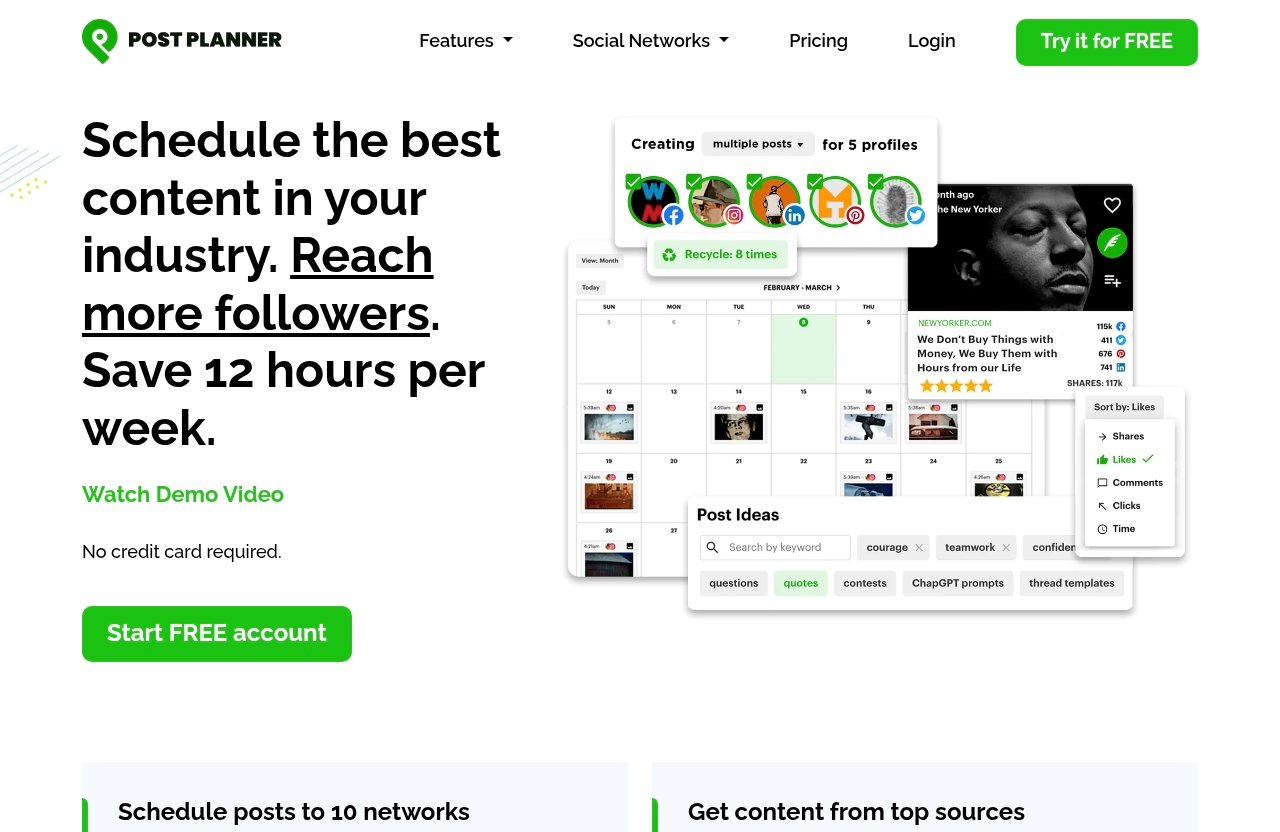
Post Planner is officially positioned as a social media scheduler built for engagement. Its workflow is easy to understand: connect social accounts, discover content, design visuals, categorize posts, create and optimize them, schedule publishing, and analyze performance.
That makes Post Planner for agencies more than a basic publishing queue. The product is designed to support the full path from content idea to published post, which matters when an agency is trying to keep several client calendars consistently active.
Core workflow: connect, discover, create, schedule, analyze
The Connect function brings social accounts into one place. Discover helps users find high-quality content and viral post ideas, while Design provides image creation tools with stock media and editing capabilities.
From there, teams can categorize material into topic-based buckets, compose and preview posts, automate their posting schedule, and review engagement data. Mobile management is also verified, so account managers can create and manage posts away from their desktop.
For a practical post planner review for agencies, that all-in-one workflow is the key attraction. It reduces the friction of researching content in one tool, designing in another, and manually publishing across separate network interfaces.
Why the platform is positioned around engagement
The engagement angle is not just marketing language. The official feature set places unusual emphasis on finding viral ideas, organizing them by topic, and identifying content worth sharing or adapting for a client’s audience.
That does not replace an agency’s strategy, brand voice, or creative judgment. It does, however, give social teams a useful starting point when they need to fill content gaps without producing every single post from scratch.
Networks supported
The official source data lists support for Facebook, Instagram, Google Business, LinkedIn, Pinterest, TikTok, Twitter/X, YouTube, Threads, and Bluesky. Homepage data also states that users can schedule posts to 10 networks.
That coverage is meaningful for multi account social media management. An agency can potentially manage different client channel mixes without having to maintain separate scheduling tools just because one brand focuses on Pinterest while another prioritizes LinkedIn or Google Business.
Agency use cases where Post Planner can save time
The value of Post Planner for agencies becomes clearer when viewed through everyday client work rather than a feature checklist. It is especially practical for teams that repeat the same process across several accounts: source ideas, draft captions, load media, schedule, and review what performed well.
The platform will not eliminate planning work, but it can reduce repetitive publishing administration. That distinction matters when assessing social media automation for agencies.
Managing multiple client accounts from one dashboard
The official agency messaging says you can manage every client account from one login. For an agency owner or social media manager, this is a meaningful convenience because it reduces constant logouts, browser-profile switching, and password chasing.
Consider an agency serving eight local clients. Instead of opening individual native social platforms every morning, the team can work through a centralized environment and focus on the posting calendar that needs attention.
Building separate posting plans per client
Separate posting plans are an important safeguard for client-service work. A home services company, boutique hotel, and financial adviser should not share the same frequency, content mix, or publishing cadence.
Post Planner for agencies supports individual plans for each client, helping teams keep brands separated while still operating from a single login. It is a simple feature, but it is often more useful than a complicated dashboard that does not reflect how account managers actually plan content.
Scheduling weeks of content in one sitting
The official agency pages state that users can schedule weeks of client posts in one sitting and queue dozens of posts at once across client accounts. This is where bulk scheduling for agencies can have the biggest operational impact.
A team might reserve Monday afternoon for a month’s worth of posts for several low-touch clients, then use the rest of the week for custom campaigns and community management. Exact time savings will vary by team and client complexity, but the reduction in repetitive publishing steps is easy to understand.
Recycling top-performing posts
Post Planner also lets users toggle recycling so top-performing posts re-enter the queue. For evergreen content—tips, customer education, recurring offers, seasonal reminders, or frequently asked questions—this can keep proven material visible without rebuilding it from zero.
Agencies should use this feature selectively. Recycling is useful when the message remains accurate and relevant, but it should not become a substitute for reviewing promotions, dates, regulations, or a client’s evolving brand priorities.
Collaboration and client management: what it does well
Post Planner for agencies has clear client organization strengths, particularly for teams that need a simpler publishing workflow. The official information supports centralized access, distinct client plans, content categorization, and account-level scheduling.
That said, it is important not to confuse centralization with a fully verified collaboration suite. The available product information does not establish every team-management detail an agency may need.
One-login account access
One-login access is the most concrete client account management benefit. It can make handoffs easier when an account manager is covering a colleague’s clients or when an agency owner needs a quick overview of several social calendars.
It also reduces the risk of operational delays caused by scattered credentials. Before onboarding a large portfolio, I would still confirm how account connections are authorized and how access is maintained for each client.
Separate posting plans for each client
A dedicated posting plan per client helps preserve context. Teams can build a cadence around each client’s objectives rather than using a generic agency-wide queue that mixes industries and priorities.
For example, a local cafe might need daily visual content, while a B2B consultant may publish fewer, more educational LinkedIn posts. Post Planner agency features are most useful when they let your team handle those differences without making the workflow cumbersome.
Topic-based buckets for content organization
Categorize allows posts to be classified into topic-based buckets. This is helpful for maintaining an intentional content mix, such as education, testimonials, product promotion, behind-the-scenes material, and community content.
A content curation tool becomes much more useful when discoveries do not disappear into an unsearchable list. Buckets give account managers a practical way to balance themes and avoid publishing five similar posts in a row.
What’s missing if your agency needs strict approval layers
The official source material does not clearly show advanced approval workflows, client comments, multi-stage approvals, granular permissions, or formal sign-off tracking. That does not prove these functions are unavailable; it means they are not verified in the supplied information.
If your agency requires every client post to be reviewed, approved, and documented before publishing, ask Post Planner directly about the current workflow. Do not assume a scheduling platform offers governance features just because it supports multiple accounts.
Official website · Latest pricing & offers
Content curation for agencies: the main differentiator
For many teams, content discovery is the reason to evaluate Post Planner for agencies in the first place. Most schedulers can publish posts; fewer make it a central task to locate high-quality content and viral ideas that can inform a client calendar.
This is particularly valuable for clients that expect frequent publishing but have limited in-house content. It can help an agency maintain momentum without forcing every post to be an original production.
Finding viral content in seconds
Post Planner’s Discover feature is designed to find high-quality content and viral post ideas. In a working agency environment, that means a manager can begin with a client niche, identify themes that may resonate, and turn the best ideas into a planned content series.
The word “viral” deserves a measured interpretation. A popular post is not automatically appropriate for every client, so teams should review tone, accuracy, rights, and audience fit before sharing or recreating anything.
Ratings for posts, articles, and videos
The supplied official feature notes reference ratings for posts, articles, and videos. Used well, these signals can help a social manager prioritize material when the team is researching a crowded niche.
Ratings should guide editorial judgment rather than replace it. The most highly rated content may not match a regulated client, a premium brand, or a local audience, but it can still reveal useful hooks, formats, and discussion topics.
When curation is more valuable than original creation
Curation is most valuable when a client needs an active, relevant presence but cannot fund daily custom design or video production. A fitness studio, small retailer, or specialist service provider may benefit from a balanced calendar that combines original offers with useful third-party ideas and adapted trends.
Post Planner for agencies supports that kind of blend by pairing discovery with design, categorization, and scheduling. The strategy still belongs to the agency: use curated material to support a content plan, not to fill a calendar indiscriminately.
Scheduling, automation, and recycling: how much workload can it remove?
Scheduling is where the product’s engagement tools become operationally useful. Once a team has selected content, it can compose, optimize, preview, categorize, and queue posts according to each client’s schedule.
This is a realistic benefit for agencies that spend too much time on manual publishing. It does not automate client strategy, but it can standardize the execution layer.
Bulk scheduling across multiple accounts
The official agency feature set says users can queue dozens of posts at once across client accounts. For a team with a structured editorial calendar, bulk scheduling turns approved content into a repeatable batch process.
Post Planner for agencies is therefore a strong candidate for portfolios with many lower-complexity accounts. It can be particularly helpful when several clients follow a predictable cadence and need content loaded ahead of holidays, campaigns, or staff absences.
Automating publishing schedules
The Schedule feature automates social publishing schedules. Teams can create posts ahead of time rather than relying on someone to be online at the exact moment each client needs to publish.
This is one of the core reasons agencies pay for a central scheduler. Native publishing tools can work for one brand, but they become less convenient when an account manager must coordinate different platforms and multiple client calendars.
Recycling top performers back into the queue
Recycling lets high-performing content return to the queue when enabled. For evergreen assets, this can extend the useful life of a strong post and give new followers an opportunity to see it.
Use a review routine alongside recycling. Check that links work, claims remain current, the design still matches the client’s brand, and the post is not repeating too frequently for a smaller audience.
Multi-network coverage and where it matters
Post Planner supports the 10 networks listed earlier, which gives agencies flexibility when clients have different channel needs. A local business may value Facebook, Instagram, Google Business, and TikTok, while a B2B client may concentrate on LinkedIn, YouTube, and Threads.
Not every post belongs everywhere. The multi-network advantage is less about identical cross-posting and more about managing a varied client portfolio from a more centralized workspace.
Pricing and value for agencies
How to think about pricing without overpaying
The supplied official materials do not include a complete current plan table, so this review will not guess at post planner pricing. Instead, evaluate cost against the work your team can realistically consolidate: content discovery, design support, queue management, and publishing across accounts.
A lower subscription cost is not automatically better if it leaves your team researching content manually or switching between client logins all day. Conversely, a larger suite may be poor value if your agency only needs efficient curation and scheduling.
What to verify on the pricing page before buying
Check the official pricing page for current plans, included accounts, user access, feature availability, and any restrictions relevant to your client roster. These details can change, so they should be confirmed before you make a buying decision.
Also validate the capabilities most important to your process: supported networks, analytics needs, team permissions, client access, and approval expectations. Official SERP data indicates a trial CTA with no credit card required, but it does not verify the trial length.
Who gets the best ROI
The best return tends to come from agencies that publish frequently for multiple clients and spend substantial time finding ideas. A team that can use discovery, topic buckets, batch scheduling, and recycling consistently will usually see more value than a team managing one highly bespoke executive account.
In other words, the ideal buyer is not necessarily the biggest agency. It is the agency with a repeatable content workflow that needs to become faster without losing relevance.
Post Planner limitations agencies should consider
A balanced post planner review for agencies should be clear about what has not been verified. Post Planner’s official materials strongly support its scheduling, discovery, account-management, and recycling capabilities, but they do not answer every agency operations question.
Treat these as due-diligence items, not confirmed product deficiencies.
No verified advanced approval workflow in the source data
There is no clear verification in the supplied official pages of multi-level approvals, client feedback threads, mandatory sign-off steps, or approval audit trails. Agencies working in regulated industries or with demanding client stakeholders should confirm these requirements directly.
For teams that approve content in email, shared documents, or another project-management system, Post Planner may still fit well as the scheduling layer. Just be deliberate about where approvals happen.
Potential fit gap for enterprise reporting needs
Post performance and engagement analysis are verified features. However, the available information does not clearly establish enterprise-grade reporting, customized client reports, advanced benchmarking, or consolidated executive dashboards.
If reporting is the centerpiece of your client retainers, make that your first product demonstration question. A scheduler can be excellent at publishing while still not being the right reporting system for a large agency.
Need to confirm team permissions and client access
Before migrating a portfolio, ask about current user permissions, team roles, and whether clients can access relevant areas without seeing other accounts. These details are not clearly shown in the provided source data.
This is especially important for agencies with freelancers, regional teams, or clients who expect visibility into their own social calendars. Good client management requires clear boundaries as well as convenience.
Post Planner vs broader agency tools: how to choose
Choose Post Planner if curation and scheduling are the priority
Choose Post Planner for agencies when your priority is discovering engaging content, organizing it by topic, and scheduling it efficiently across a multi-client portfolio. It is well aligned with teams that need more help filling calendars than they need complex governance.
It also suits agencies that want one workspace for client accounts while retaining a lightweight process. That is a valuable middle ground for growing teams.
Choose a broader suite if approvals and reporting are central
Consider broader post planner alternatives when your process revolves around multi-step approvals, detailed stakeholder collaboration, or advanced reporting requirements. Those capabilities are not clearly verified in the official information supplied for Post Planner.
The right choice depends on where your operational risk sits. If missed approvals or reporting gaps create client problems, prioritize those needs over content discovery convenience.
Hybrid workflow suggestion
A sensible hybrid workflow is to use Post Planner as the publishing and content-discovery engine while keeping approvals in the project-management or communication system your clients already use. This can work well for teams that do not want to force clients into a new process.
If the engagement-focused workflow matches your agency, you can review Post Planner through this partner link. This is an affiliate link, which may earn Top Trust Review a commission at no extra cost to you.
Official website · Latest pricing & offers
FAQ
How much does a post planner cost?
Current post planner pricing should be checked on the official pricing page. The supplied official excerpt does not include the full, current plan table, so it would be misleading to quote a price or assume account and user limits.
What is the 5 3 2 rule on Instagram?
The 5 3 2 rule is a content-balance framework: out of every 10 posts, share five curated posts from others, three original posts, and two personal or relationship-building posts. Post Planner can help with discovery and scheduling, but it does not create the underlying strategy for you.
Is Facebook's scheduler free to use?
Facebook provides native scheduling within its own ecosystem, and it is generally available without paying for a separate scheduling platform. Agencies often use third-party tools because managing many client accounts, networks, content sources, and publishing calendars in one workflow can be more efficient.
What is the best app to schedule posts?
The best app depends on your workflow. Post Planner is a strong option for agencies that prioritize engagement-focused content curation, multi-account scheduling, and recycling proven posts, while teams needing advanced approvals or reporting should compare broader suites.
Final recommendation
Best agency profiles for Post Planner
Post Planner for agencies is best for small and mid-sized teams managing multiple client accounts, particularly those serving local businesses or content-hungry niches. Its strongest verified advantages are one-login account management, separate posting plans, viral-content discovery, design tools, bulk queues, automation, recycling, analytics, and broad network coverage.
It is especially appealing when your team needs to publish consistently without spending all day looking for ideas or moving between platform dashboards.
Who should skip it
Skip—or at least investigate more deeply—if your agency requires formal approval chains, granular role permissions, client commenting, or enterprise-level reporting as part of every retainer. Those capabilities are not clearly shown in the official source material provided for this review.
The tool is also less necessary for a solo brand with only one or two channels and very limited publishing volume. In that case, native schedulers may be sufficient.
Bottom-line verdict
Post Planner for agencies is a practical, focused choice for teams that want better content discovery and faster multi-account publishing rather than an oversized agency suite. It earns its place when bulk scheduling, content curation, recycling, and centralized client plans solve real day-to-day bottlenecks.
Check the current official plans and confirm your collaboration requirements first. If your agency’s workflow centers on finding engaging content and keeping many client calendars moving, Post Planner is worth trying.
Related Reading
- Post Planner for Small Business Review 2026
- Contentstudio Social Media Automation Review 2026
- Taplio for Agencies Review 2026
References
- Post Planner: Social Media Scheduler built for Engagement
- Schedule posts, find content, and …
- RecurPost: Social Media Scheduler & Management Tool
- Adobe Express: Free content scheduler