TruthScan Accuracy Explained: What Detection Scores Mean (2026)
Evaluating truthscan accuracy requires understanding both the published benchmark metrics and the forensic evidence the platform returns alongside every file verdict. Rather than relying on simple binary flags, TruthScan evaluates uploaded visual media and PDF files using region-level forensic checks, outputting confidence scores, probabilistic classifications, and pixel-level heatmaps within one to two seconds. Understanding what these scores represent—and where automated detection encounters physical limits—is essential for risk teams configuring automated fraud prevention pipelines.
Affiliate disclosure: This article may contain affiliate links. If you buy through them, we may earn a commission at no extra cost to you. Details were checked on November 18, 2026 and can change.
Official website · Latest pricing & offers
Quick Answer: How Accurate Is TruthScan?
According to official technical disclosures published by TruthScan, the platform achieves an average detection accuracy of 99.3% based on a production benchmark evaluating 250,000 real images against 92 generative AI systems. Its documented false positive rate is under 1% across supported categories.
- Documented Benchmark: 99.3% average detection accuracy across 92 image generators and 250,000 authentic images.
- Model Coverage: Over 500 AI image generators supported, maintaining a 95%+ detection rate across every generator evaluated.
- False Positive Rate: Below 1%, with an integrated live retake tool (TruthScan Capture beta) designed to resolve flagged authentic submissions.
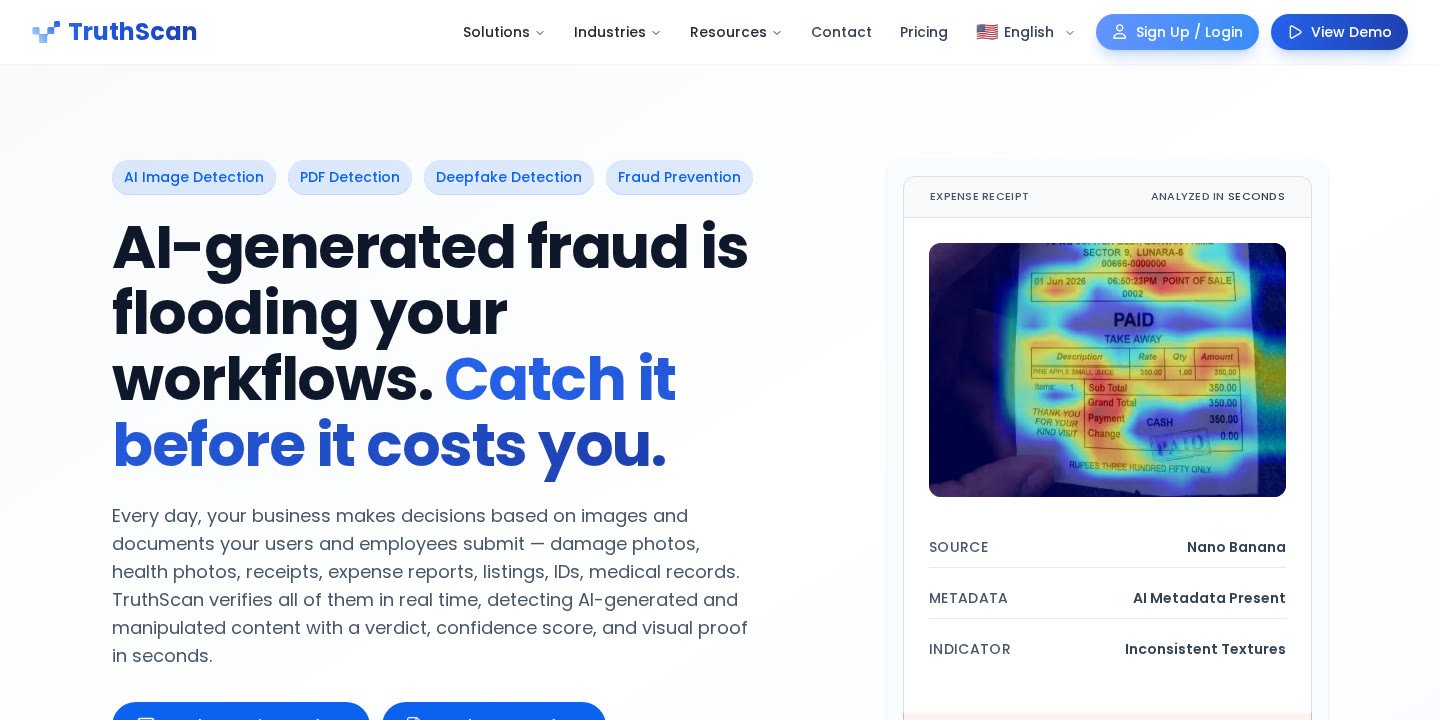
- Forensic Output: Provides multi-layered analysis including probability ratings, confidence scores, plain-language reasoning, and heatmaps that isolate altered pixel clusters.
- Physical Limitations: Detection integrity degrades when analyzing heavily recompressed media, screenshots of screenshots, or severely downsampled thumbnails where original pixel metadata is destroyed.
Official TruthScan Accuracy Benchmarks and Published Numbers
In operational environments where user-submitted media directly triggers financial payouts or account approvals, broad statistical claims are rarely sufficient. Risk officers and operations managers need to know how automated engines perform against specific fraud vectors. TruthScan publishes granular benchmark data categorized by document type and AI generator architecture.
Overall Accuracy and Testing Scope
TruthScan documents an overall average detection accuracy of 99.3%. This figure is derived from an evaluation dataset comprising 250,000 verified authentic images paired with outputs generated across 92 distinct commercial and open-source image generation tools. Additionally, TruthScan reports that its engine maintains compatibility with more than 500 image generation architectures, achieving at least 95% accuracy on every individual generator included in their testing regime.
Speed is also an operational factor in automated pipelines. The service returns complete end-to-end forensic verdicts in 1 to 2 seconds, allowing risk workflows to evaluate submissions synchronously without introducing unacceptable customer friction.
Accuracy by Content Category
AI fraud manifests differently depending on the submission context. A fake auto insurance claim requires synthetic damage rendered onto physical metal, while expense fraud involves fabricated text and alignment grids on digital receipts. To provide transparency, TruthScan details specific detection accuracy rates across twelve core content categories:
| Content Category | Documented Detection Accuracy | Common Fraud & Submission Context |
|---|---|---|
| Chats | 99.9% | Fabricated customer support or messaging screenshots |
| Product | 99.8% | Marketplace listings and e-commerce return verification |
| Close-up | 99.7% | Macro shots of purported product flaws or material damage |
| Full body | 99.6% | Identity verification poses and physical damage overviews |
| Receipts | 99.3% | Expense reports, corporate travel audits, and proof of purchase |
| Documents | 99.3% | KYC address verification, bank statements, and pay stubs |
| Generic | 99.2% | Unclassified photographic media across standard business flows |
| Food | 99.0% | Delivery platform refund claims alleging spoiled or undercooked orders |
| Cars | 99.0% | Automotive insurance collision photos and bumper damage claims |
| Faces | 98.6% | Identity document portraits, synthetic avatars, and profile submissions |
| Invoices | 98.1% | Vendor billing, contractor statements, and medical superbills |
| Cards | 98.1% | Government identity cards, driver licenses, and payment cards |
Performance Across Generative AI Models
Generative image models update rapidly, altering artifact patterns and rendering capabilities. TruthScan tracks performance benchmarks against modern frontier image generators. Published platform data indicates the following detection rates against prominent systems:
- Nano Banana 2: 100%
- Seedream 4.5: 100%
- Imagen 4: 99.9%
- Grok: 99.9%
- Flux 2 Pro: 99.4%
- GPT-Image 1.5: 99.2%
- Midjourney: 98.6%
For organizations evaluating overall system capabilities and enterprise fraud integration, our TruthScan review provides an expanded analysis of how these detection mechanisms function across production environments.
Understanding TruthScan Accuracy: What Detection Scores and Outputs Mean
One common pitfall in AI detection is treating system outputs as simple black-and-white determinations. When evaluating truthscan accuracy, users and automated rules engines must parse four distinct data points provided with every scan: the overall classification verdict, the probability score, the confidence score, and the visual heatmap report.
The Classification and Overall Verdict
The primary verdict represents TruthScan’s top-level determination regarding whether an asset is authentic, fully synthetic, or digitally altered. Because the software sits behind customer upload pipelines via REST API or direct browser inspection, the verdict provides immediate categorical guidance. However, relying solely on an automated pass/fail flag without reviewing the accompanying confidence metrics can lead teams to misinterpret borderline files.
Probability and Confidence Scores
TruthScan provides both a statistical probability score and a confidence score for each submitted file:
- Probability Score: Reflects the statistical likelihood that generative artificial intelligence or digital manipulation tools were used to construct or alter the file. High probability values indicate strong synthetic patterns identified within the file structure.
- Confidence Score: Reflects the certainty of the engine’s internal models regarding that assessment, given the quality, resolution, and forensic integrity of the input file.
Understanding the interplay between these two metrics is critical for operational routing. A submission might exhibit a moderate probability of manipulation accompanied by low confidence if the image has undergone extreme JPEG compression. Conversely, native-resolution files showing obvious generative artifacts will typically present both high probability and high confidence scores. Organizations can establish custom thresholds to route high-probability, high-confidence files to automated rejection while funneling ambiguous combinations into manual review queues.
Forensic Heatmaps and Region-Level Highlighting
A central element of TruthScan’s forensic reporting is the visual detection heatmap. Instead of providing an unverified number, TruthScan generates a visual overlay that highlights exactly which pixel clusters contain generative synthesis, face swaps, or object replacements. Authentic background regions appear clear, while manipulated sections—such as an edited repair bill total or an artificially generated dent on a vehicle bumper—are highlighted in high-contrast forensic colors. This visual proof gives audit and Special Investigation Units (SIU) clear documentation to defend claim denials or account suspensions.
Plain-Language Forensic Explanations
To assist human reviewers who are not trained digital forensic analysts, every TruthScan report includes a plain-language summary detailing the specific reasoning behind the score. This report outlines the detected markers—such as structural anomalies in digital fonts, mismatched noise floors, or unnatural synthesis boundaries—ensuring that non-technical adjusters and trust-and-safety specialists can understand why a file was flagged.
Region-Level Scanning vs. Whole-Image Averaging
A primary factor driving truthscan accuracy in commercial fraud environments is its region-level scanning architecture. Standard consumer AI detectors are frequently built to evaluate whole images simultaneously. While this works adequately when analyzing an image generated entirely from a single prompt, it fails against real-world fraud techniques.
Why Localized AI Edits Break Traditional Detectors
Modern fraudsters rarely generate entire scenes from scratch when committing financial or insurance fraud. An individual filing a false auto damage claim will take a genuine photo of their undamaged vehicle and use inpainting to add a dent or scratch. Similarly, an employee filing a fraudulent reimbursement will photograph a genuine lunch receipt and prompt an AI editor to change the date and dollar figures.
When an automated detector evaluates the entire image at once, the untouched pixels—making up 90% or more of the image—dilute the forensic signal. The authentic camera noise, standard lens distortion, and natural lighting of the original photo average out the synthetic signature of the small edited section, causing the detector to return a false negative.
How TruthScan Handles Partial Edits and Face Swaps
TruthScan’s image detection engine analyzes visual media at the region level. By evaluating local pixel grids independently, the system detects localized manipulation even if the surrounding image is completely authentic. It surfaces:
- AI-Assisted Inpainting: Additions or deletions of objects, such as fabricated cracks on electronic screens or added structural damage.
- Document Alterations: Changed digits, altered dates, or reconstructed lines on bank statements and receipts that pass standard optical character recognition (OCR).
- Face Swaps: Synthetic facial overlays applied to authentic government identification cards or selfie verification checks.
- Traditional Digital Retouching: Conventional digital cloning, slicing, and manual adjustments that disrupt natural noise patterns.
For very small alterations where artifacts occupy only a few dozen pixels, TruthScan’s technical guidance recommends cropping directly to the questionable region and rescanning to obtain the clearest possible forensic signal.
Factors That Degrade TruthScan Accuracy and Detection Signals
Automated detection engines operate within the physical constraints of digital media. While TruthScan’s models are trained on real-world handling practices, certain forms of file destruction permanently erase the forensic markers needed for accurate verdicts.
Compression, Laundering, and Screenshot Degradation
TruthScan notes that its pipeline is engineered to withstand routine digital handling, such as social platform re-encoding, standard JPEG compression, routine resizing, and the natural generational loss that occurs when files are forwarded across messaging applications. Furthermore, the system includes tests against deliberate fraud laundering techniques, including artificial noise injection, filtering, and color grading designed to disguise AI artifacts.
However, heavy digital degradation inevitably impacts performance. When an applicant submits a low-resolution screenshot of a screenshot, or a file compressed down to a tiny thumbnail, the underlying pixel-level relationships are permanently obliterated. No forensic detector can extract signals that are no longer mathematically present in the file. In such scenarios, the engine may return reduced confidence scores due to insufficient data.
File Formats, Resolution, and Size Constraints
To maximize detection accuracy, media should be submitted in the highest available quality, ideally matching the camera’s native capture output. TruthScan enforces clear technical specifications for uploaded files:
- Supported Formats: JPG, PNG, JPEG, TIF, and WEBP.
- File Size Cap: Up to 10 MB per file.
- PDF Documents: Evaluated through a dedicated document detection engine that analyzes both metadata anomalies and embedded image layers on a per-page basis.
- Resolution Recommendations: Native resolution files provide the most definitive results, whereas downscaled web previews restrict the engine’s ability to inspect sub-pixel boundaries.
Handling False Positives and the TruthScan Capture Workflow
Even with an official false positive rate below 1%, high-volume platforms processing hundreds of thousands of files per month will encounter legitimate submissions that trigger risk warnings. Effective risk management requires systems that can resolve these exceptions without permanently stalling operations.
Interpreting the Sub-1% False Positive Rate
A false positive rate of less than 1% means that fewer than one in one hundred authentic submissions will be erroneously flagged as AI-generated or manipulated. In sectors like e-commerce returns or digital banking, blindly auto-denying every submission with a borderline score risks rejecting honest customers. Consequently, TruthScan allows administrative teams to configure custom risk thresholds inside their dashboards or API integrations rather than mandating rigid automated rejections.
Routing Borderline Scores and Live Photo Retakes
To address borderline scores and false positive flags in production, TruthScan provides a structured escalation pathway:
- Automated Clean Approval: Submissions that display negligible probability scores and high authentic confidence are cleared instantly through automated webhooks.
- Review Queue Routing: Submissions with ambiguous scores or localized heatmap alerts are routed to a human adjudication queue with the complete forensic report and visual heatmap pre-attached.
- TruthScan Capture (Beta): Instead of forcing adjusters to guess, teams can trigger an automated live retake link sent directly to the customer’s smartphone. The user is prompted to capture the document or damaged item in real time using their device camera. The resulting capture is verified live, eliminating generative editing opportunities, and automatically attached to the original scan record.
TruthScan Plans, Inspection Capacity, and Pricing
Understanding how detection capacity is billed is essential for teams calculating operational costs per verification. For an exhaustive analysis of billing structures and volume tiers, see our complete guide to TruthScan pricing.
Tier Overview from Free to Enterprise
TruthScan offers self-serve monthly and annual plans alongside custom enterprise contracts. All plans include full API access, dashboard detection history, and unlimited seats via team invitations under Settings:
- Free ($0/month): Provides 25 results per month (images or PDF pages) with full API access, detailed forensic indicators, and dashboard history. Requires no credit card and does not expire.
- Starter ($24/month): Includes 1,000 results per month ($0.03 per additional result). Adds batch uploads, CSV export capabilities, audit-ready detection reports, and standard customer support. Annual billing is $290/year (equivalent to 2 months free).
- Professional ($83/month): Includes 5,000 results per month ($0.02 per additional result). Adds priority processing queues and higher API rate limits for teams in production. Annual billing is $990/year.
- Business ($333/month): Includes 40,000 results per month ($0.01 per additional result). Introduces Zero Data Retention (ZDR), priority support, custom Data Processing Addenda (DPA), and the highest self-serve rate limits. Annual billing is $3,990/year.
- Enterprise (Custom): Tailored for operations processing over 100,000 results per month, scaling costs down to $0.005 or less per result. Includes custom Service Level Agreements (SLAs), dedicated throughput, 24/7 account management, and optional regional data processing or dedicated deployments.
What Counts as a Detection Result
TruthScan defines one detection result as either one processed image or one individual page of a PDF document. For example, a 12-page submitted bank statement consumes 12 results from the organization’s monthly quota. If an organization exceeds its included monthly limit, operations do not halt; overage is billed automatically at the plan’s flat per-result rate, with running totals visible in the dashboard once 80% of the quota is reached.
Who Needs TruthScan and Who Should Consider Alternatives?
Because TruthScan is specifically engineered as a forensic layer for transactional pipelines, its accuracy profiles and reporting mechanisms align with specific operational demands.
Primary Enterprise and Operational Use Cases
TruthScan is designed for workflows where inbound media directly dictates financial payouts, access permissions, or legal liabilities:
- Delivery & On-Demand Marketplaces: Evaluating refund claims alleging missing items, damaged packaging, or spoiled food before credits are disbursed.
- Insurance Carriers & SIU Units: Screening auto collision imagery, property damage files, and medical superbills for inpainting and digital price adjustments.
- KYC & Financial Onboarding: Detecting synthetic identity cards, altered utility bills, and AI-generated proof-of-address documents.
- E-Commerce Retailers: Verifying product condition in return logistics and screening seller catalog images against synthetic generation.
- Corporate Finance Teams: Auditing employee expense reports and vendor invoices against generative receipt generators.
When Alternative Approaches Make More Sense
Despite high benchmark accuracy, TruthScan is not suitable for every content moderation scenario:
- Casual Text-Only Verification: Organizations looking solely to check short classroom essays for automated text generation may find full forensic image and document suites excessive for their administrative needs.
- Extremely Low-Fidelity Workflows: If your workflow only collects heavily compressed 200×200 pixel thumbnails or multi-generation re-encoded screenshots, automated pixel-level forensic engines cannot provide high confidence scores due to signal loss.
- Free Open-Source Requirements: Teams operating without operational fraud budgets who require offline, self-hosted open-source software without commercial API maintenance should look into local open-source computer vision libraries.
Official website · Latest pricing & offers
FAQ
What does a high confidence score mean on TruthScan?
A high confidence score indicates that TruthScan’s models have sufficient forensic evidence and pixel clarity to stand behind their determination. If paired with a high AI probability rating, it means strong structural indicators of generative synthesis or image manipulation were detected across the file’s pixel grid or document metadata.
Can TruthScan detect localized edits or only fully synthetic images?
TruthScan is specifically engineered to detect localized edits alongside fully synthetic media. Its region-level scanning evaluates localized pixel blocks independently, allowing it to highlight partial alterations—such as an edited number on an invoice, an added dent on a car bumper, or a swapped face on an ID card—without the signal being diluted by untouched authentic pixels.
What causes a false positive in TruthScan?
While TruthScan’s false positive rate is officially under 1%, false positives can occur when authentic photos undergo extreme digital processing, heavy sharpening filters, or severe re-encoding that mimics synthetic artifacts. Teams can resolve borderline flags using manual review queues or TruthScan Capture (beta), which provides a live mobile retake link to verify authenticity.
Does file resolution impact TruthScan detection accuracy?
Yes. Submitting native-resolution images (up to 10 MB in JPG, PNG, JPEG, TIF, or WEBP) provides the most accurate results. When files are downscaled to low-resolution thumbnails or captured as screenshots of screenshots, the pixel-level forensic metadata required to evaluate synthetic generation is often destroyed, lowering detection confidence.
How does TruthScan analyze PDF documents?
TruthScan features a dedicated PDF document detection engine that analyzes files on a per-page basis. The engine evaluates document metadata anomalies, structural font discrepancies, and embedded image layers to catch fabricated bank statements, altered medical superbills, and synthetic receipts that often pass traditional OCR checks.
Does TruthScan retain uploaded images to train future models?
Images submitted on standard plans are retained by default for reporting and dashboard access. However, organizations subscribed to the Business plan or higher have access to Zero Data Retention (ZDR). Under ZDR, submitted images and customer files are immediately discarded once analysis is complete and are never used for model training.
How fast does TruthScan return accuracy scores via API?
TruthScan delivers end-to-end detection verdicts, confidence scores, plain-language reasoning, and heatmaps within 1 to 2 seconds via REST API and webhooks, allowing organizations to integrate automated fraud screening directly into live customer upload workflows.
Related Reading
- TruthScan Pricing Explained: Plans, Results, and Features (2026)
- TruthScan Review 2026: AI Content and Fraud Detection Explained