Tools Like Klap: 2026 Guide to AI Video Clipping Alternatives
Creators looking for tools like Klap usually want one outcome: turn a longer recording into several polished short videos without spending hours inside an editing timeline. This guide is for podcasters, marketers, educators, freelancers, and small teams comparing AI-powered clipping options for Shorts, Reels, and TikToks.
The best choice depends on more than an AI highlight feature. You need reliable clip selection, readable captions, sensible reframing, export flexibility, and a workflow that fits how often you publish. Klap is a useful benchmark because its official workflow focuses on converting long videos into multiple short clips in one click.
Official website · Latest pricing & offers
What ‘Tools Like Klap’ Really Means for Creators
Definition of AI video clipping tools
AI video clipping tools analyze a longer video and help create shorter, social-ready segments. In practice, an automatic video clip creator may identify promising moments, crop the frame for vertical platforms, add captions, and prepare several clips from one upload.
Most tools like Klap are designed to reduce the repetitive work involved in video repurposing. They do not remove the need for human judgment, though. A creator should still review the chosen hook, captions, framing, and final message before publishing.
Who searches for Klap alternatives
People searching for a Klap app alternative are often deciding between an all-in-one workflow and a more specialized tool. Some want faster clipping from a podcast or webinar, while others need captions to look a certain way or want to test a free option before paying.
The search for tools like Klap can also come from teams that need to increase output without adding editing hours. For these buyers, the relevant question is not simply whether AI can make clips. It is whether the software consistently makes clips that are usable for their audience and brand.
Common jobs-to-be-done: repurposing long videos into Shorts, Reels, and TikToks
A common goal is to repurpose long videos into Shorts from a podcast interview, product demo, lesson, livestream, or customer conversation. These source videos contain many useful moments, but locating and editing them manually can be slow.
A Reels creation tool should help turn those moments into a clear short-form story. The best clips usually have a strong opening statement, a self-contained idea, clean audio, and enough context for someone who has not seen the original video.
For creators assessing tools like Klap, posting efficiency matters too. A strong workflow helps you create, review, export, and organize multiple pieces of content from a single source recording rather than treating every social post as a separate editing project.
Best Tools Like Klap: Comparison Criteria That Matter
Clip quality and viral scoring
Clip quality is the first thing to test when comparing tools like Klap. AI can suggest highlights, but the real measure is whether the resulting clip begins at a logical point, reaches a useful conclusion, and preserves the speaker’s meaning.
Some platforms use language around viral potential or scoring. Treat that as a suggestion rather than a guarantee. A clip may be technically engaging but still fail if it does not match your niche, audience expectations, offer, or posting style.
The practical test is simple: upload a real episode or video that has several useful talking points. Review whether the suggested clips include your strongest moments, not merely the loudest or most abrupt parts of the conversation.
Auto captions and subtitle control
Captions are important because many viewers watch short-form video with audio muted or low. Look at accuracy first, then review whether you can correct words, punctuation, speaker names, and line breaks before export.
When evaluating AI video clipping tools, also inspect whether captions remain readable on a phone screen. Decorative subtitle styles can look impressive in a preview but may cover a face, product, or important on-screen information.
Klap officially lists AI-generated captions among its homepage capabilities. That makes captions part of the benchmark workflow, but shoppers should still use a real sample to check how well the output handles accents, technical terms, and fast speech.
Reframing and aspect ratio support
Vertical framing is not just about shrinking a horizontal video into a taller canvas. Good reframing should keep the active speaker, screen recording, gameplay, or product demonstration visible at the right moment.
A TikTok clip generator needs to handle changing visual priorities. For example, a two-person interview may need both faces visible, while a tutorial should prioritize the presenter and the on-screen steps.
Klap states that its AI Reframe 2 analyzes scenes and applies layouts including Split Screen, Screencasts, Gaming, and more. That is a concrete feature worth testing against your source format, especially if your content includes slides, screen shares, or multiple speakers.
Batch processing and workflow speed
Workflow speed is often the hidden reason creators compare tools like Klap. Generating a single short clip manually is manageable, but processing several episodes every month becomes difficult without a repeatable system.
Ask how easily you can move from one long recording to multiple short clips. You should also consider how much review work is required after the AI finishes. A fast initial result is less useful if every clip needs extensive manual correction.
Batch needs vary widely. A solo podcaster may only need a few clips from each episode, while an agency may need a dependable way to handle content from several clients without losing track of approvals and exports.
Pricing model and free-trial expectations
Pricing should be compared in relation to your expected clip volume, not just the entry price. A low monthly cost may not be the best value if you consistently exceed the included output, while a larger plan may be unnecessary for occasional posting.
Many shoppers also search for a “Klap alternative free” option. Free access can be useful for testing, but it is important to verify what the trial actually allows before building a workflow around it. Do not assume a free trial, free plan, export policy, or usage allowance unless the provider confirms it.
For tools like Klap, check whether the plan includes the essentials you need: clipping, captions, social connections, analytics, exports, and enough volume for your publishing rhythm. If a detail is not clearly listed, ask the provider before subscribing.
Klap at a Glance: Verified Product Facts
What Klap does
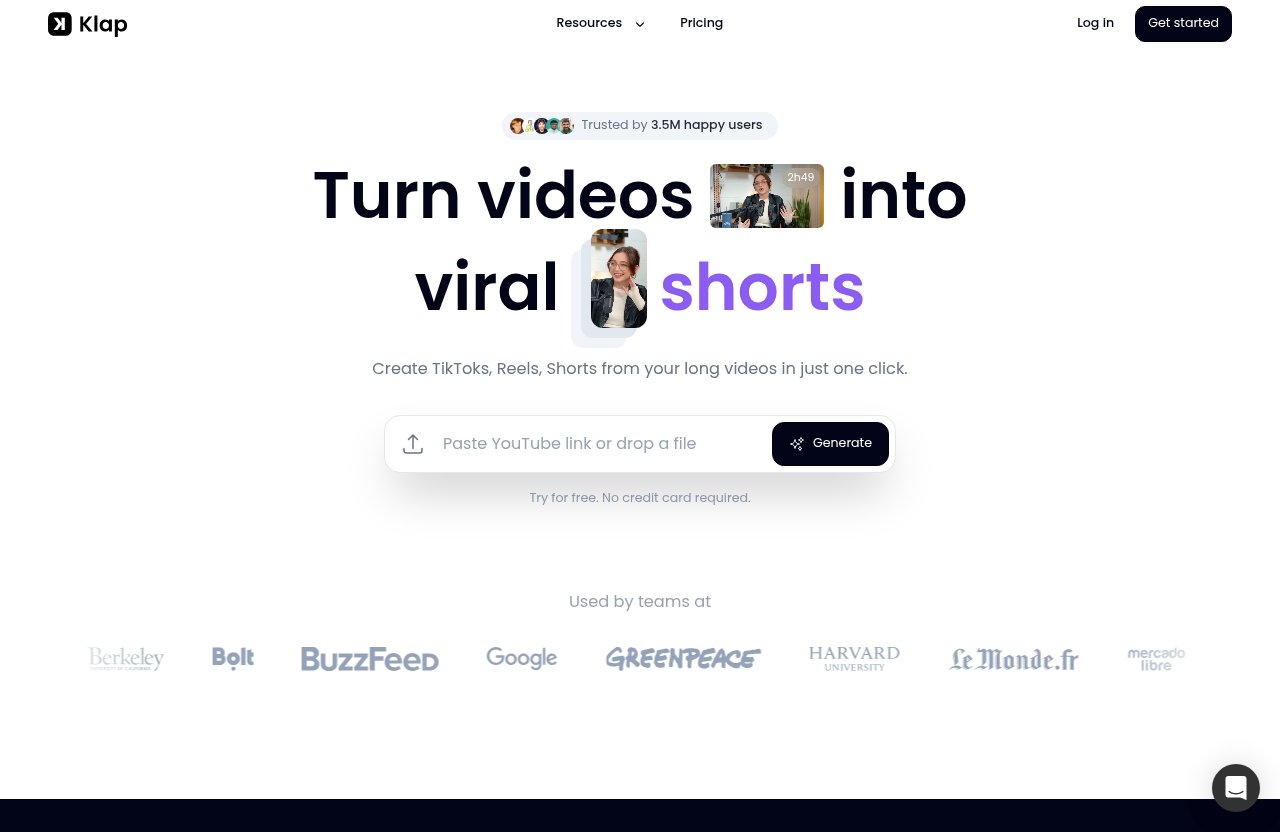
Klap is an AI video editor designed to turn long videos into short-form clips for TikTok, Reels, and YouTube Shorts. According to its official homepage, users can upload a YouTube link or a video file and create short clips in one click.
The platform says a one-minute long video produces about five video clips. This is best understood as a general workflow claim rather than a promise that every source video will produce the same number of strong, publishable clips.
Among tools like Klap, its stated purpose is clear: help creators make multiple short videos from longer content with AI clipping, reframing, and captions. Klap also says it has made 8.5 million clips for 3.5 million creators.
Core workflow from upload to export
The official Klap process begins with a YouTube link or uploaded video file. From there, the product is positioned to identify clips, create captions, and reframe content for social formats.
Klap highlights AI Reframe 2, which analyzes scenes and applies different layouts such as Split Screen, Screencasts, and Gaming. That is relevant for buyers who work with more than face-to-camera footage and need the visual layout to adapt to the source.
Klap also states that users can export in high resolution. Before adopting any video repurposing software, it remains sensible to check the exported files yourself for sharpness, caption placement, audio sync, and whether the crop supports your intended platform.
Verified plan structure and included features
Klap’s verified annual-billing plan structure is straightforward. The plan descriptions below reflect the official pricing information provided by Klap.
| Plan | Intended User | Clips Per Month | Price When Billed Yearly |
|---|---|---|---|
| Basic | Individuals | 100 clips | $14/month |
| Pro | Professionals | 300 clips | $39/month |
| Pro+ | Teams | 1,000 clips | $94/month |
All Klap plans include AI Clipping, unlimited social accounts, and Analytics. Klap also states that buyers needing more capacity can contact the company.
This structure gives tools like Klap shoppers a practical baseline for comparison. Rather than guessing about value, estimate your monthly clip needs, include room for testing and rejected outputs, and then compare the resulting cost with your actual publishing plan.
Who Klap is best for
Klap is a sensible starting point for creators who already produce longer videos and want to build a reliable short-form pipeline. It may fit podcasters, interview-led channels, coaches, educators, and brands republishing webinars or explainers.
It can also suit professionals who want a defined monthly clip allowance and teams that need a higher-volume plan. If Reels are your main focus, our Klap for Reels review can help you think through the workflow from source video to vertical posts.
Top Tools Like Klap to Consider
AI Video Cut
AI Video Cut appears in search results as an alternative page for buyers exploring automated video clipping. It is worth including on a short comparison list because it is directly positioned around the same broad evaluation problem: turning longer video material into shorter content.
However, shoppers should avoid assuming that alternative products match Klap’s verified plan limits, social account access, analytics, captions, or reframing approach. Those details should be confirmed on the provider’s current page before you make a decision.
When comparing AI Video Cut with tools like Klap, use the same source video in each product if possible. This is the fairest way to evaluate clip selection, caption accuracy, vertical framing, review time, and whether the final output feels native to your platform.
ZapCap
ZapCap is another option surfaced through an alternative-focused page. Its presence in this comparison is useful for creators who want to explore more than one AI-assisted short-form workflow before settling on a subscription.
The right approach is to treat ZapCap as a candidate to test, not as an interchangeable copy of Klap. Review its currently published capabilities, trial terms, export options, and any restrictions that affect your actual production process.
For readers exploring tools like Klap, the important point is that a competitor may be a better fit when its interface or editing method aligns more closely with your content. That can be especially true for creators with a specific caption style, source format, or review process.
G2 marketplace listings for broader discovery
Marketplace listings such as G2 can be a useful discovery route when you want a wider list of video software to investigate. They can help you identify product categories and compare the types of workflows vendors emphasize.
Still, marketplace pages should be a starting point rather than the final authority on plan details. Features, limits, and trial policies change, so verify your shortlist directly through each provider’s official product and pricing information.
If you are broadening your stack beyond clipping, related resources such as a Podsqueeze tutorial, a Contentstudio tutorial, and Foreplay creative research may help you map how creation, distribution, and creative research connect. The best tools like Klap are often the ones that complement—not complicate—your existing process.
Official website · Latest pricing & offers
How Klap Compares on the Features Buyers Care About
AI clipping workflow
Klap’s verified workflow centers on uploading a YouTube link or video file and turning longer videos into multiple short clips. Its homepage describes creating TikToks, Reels, and Shorts from long videos in one click.
That makes Klap easy to assess against other AI video clipping tools: upload similar footage and evaluate the results. Focus on the usefulness of the clips, not just the number produced. A smaller set of clips that need little editing can be more valuable than a larger set of weak suggestions.
Social platform output needs
Short-form platforms have different visual conventions, but all reward clarity in the first few seconds. Your clips need an understandable hook, properly framed subjects, readable captions, and a format that makes sense for vertical viewing.
Klap says it can resize videos for any platform and supports creating Reels, TikToks, and Shorts from long-form footage. Its AI Reframe 2 layouts are particularly relevant when the content is not a straightforward single-camera talking head.
For tools like Klap, do not choose based solely on a platform label. Export a test clip and view it on a phone. Check whether captions are covered by interface elements, whether faces are cropped, and whether the main visual is still clear without sound.
Analytics and unlimited social accounts
Klap’s official pricing page says all plans include Analytics and unlimited social accounts. For a creator managing multiple brands or client profiles, that inclusion can simplify the decision because you do not need to assume a separate social-account limit within the stated plans.
Analytics should be treated as a practical feedback loop. The most useful question is whether the information helps you notice patterns in what you publish, such as which hooks, themes, speakers, or source formats produce stronger audience response.
Competitor pages may present analytics differently, or not mention them at all. That is why buyers comparing tools like Klap should ask direct questions about what they need to track and how the information fits into their overall content reporting.
Creator vs team use cases
The Basic plan is positioned for individuals, Pro for professionals, and Pro+ for teams. The verified clip allowances are 100, 300, and 1,000 clips per month respectively, with annual-billing prices of $14, $39, and $94 per month.
For a team, the decision involves more than volume. Consider who uploads source files, who reviews AI choices, who corrects captions, and who approves final posts. A tool is only efficient if these handoffs remain simple.
Readers also considering a broader marketing workflow may find a Syllaby affiliate program review helpful for understanding a different type of creator-focused software evaluation. Keep the clipping decision separate from other software purchases until you know exactly where your bottleneck is.
Which Tool Is Best for Your Use Case?
Solo creator or individual
A solo creator should prioritize low friction. If you publish a podcast, commentary video, course lesson, or interview, Klap’s Basic plan may be worth considering if 100 clips per month matches your anticipated output.
The best tools like Klap for an individual are usually those that reduce editing time while still letting you check every clip. Avoid paying for large capacity simply because it sounds productive; start with your actual content calendar.
Professional creator or freelancer
Freelancers and professional creators often need more predictable throughput. Klap’s Pro plan is positioned for professionals and includes 300 clips per month at $39 per month when billed yearly.
This level may suit someone creating short-form assets from recurring client interviews, branded shows, or educational content. Still, run a test with content that resembles your paid work, including client-specific terminology and visual formats.
Small team or agency
Small teams and agencies need capacity, repeatability, and clear review habits. Klap’s Pro+ plan is positioned for teams, includes 1,000 clips per month, and costs $94 per month when billed yearly.
For a team assessing tools like Klap, unlimited social accounts and included Analytics are notable verified inclusions. Yet the best option will still depend on whether your internal approval process is smooth and whether everyone can consistently maintain brand standards.
Budget-first shoppers
Budget-first buyers should begin with a trial where available and compare the cost against the editing time saved. Klap’s homepage says users can try it for free with no credit card required, making it possible to examine the workflow before committing.
Do not evaluate only the subscription price. Consider the time spent fixing captions, adjusting framing, downloading files, and preparing posts. The most affordable option is the one that produces publishable clips with the least avoidable manual work.
Users who want broader experimentation
If you are not yet sure what kind of AI Shorts generator works best for your content, test a short list. Include Klap, AI Video Cut, ZapCap, and any other provider you can verify through an official page.
This approach is especially useful for experimental formats such as panel discussions, tutorials, reaction videos, gameplay, or screen-recorded demos. Different tools like Klap may handle the same source material differently, so direct testing is more useful than relying on broad marketing descriptions.
How to Choose a Klap Alternative Without Regret
Check whether the tool has a free trial or free plan
A trial gives you a chance to test the entire experience, from upload to export. Klap officially says it can be tried for free without a credit card, but review the current trial conditions when you begin because providers can update their offers.
A free plan and a free trial are not necessarily the same. Confirm whether you can export clips, whether a watermark applies, and whether the test period is enough to assess real footage instead of a single easy sample.
Confirm export quality and formatting
Always inspect the exported file, not just the in-app preview. Watch it on a mobile device and verify that the image is sharp, the sound is in sync, the captions are clear, and the framing supports vertical viewing.
For tools like Klap, source content changes the outcome. A studio podcast may reframe easily, while a wide-screen product demonstration, slide deck, or multi-person roundtable needs more careful visual handling.
Review social account limits
If you manage more than one brand or client, social connections can influence the value of a plan. Klap lists unlimited social accounts across all of its plans, which is a verified detail worth including in your checklist.
For other providers, do not assume the same policy. Ask whether account connections, workspace access, client separation, or analytics access are limited by plan before building the tool into an agency workflow.
Look for caption and analytics support
Captions make short clips easier to follow, while analytics can help you learn what content is worth repeating. Klap officially includes AI-generated captions on its homepage and includes Analytics on every pricing plan.
The right depth of reporting depends on your goals. Some creators need only enough feedback to improve their hooks and topics, while teams may need information that supports regular client reporting and editorial decisions.
Test on speech-heavy content first
Speech-heavy recordings are usually the best first test for an automatic video clip creator. Podcasts, interviews, talking-head lessons, product reviews, training sessions, and webinars provide clear language for AI systems to analyze.
Use a recording with real-world challenges, such as interruptions, specialist vocabulary, multiple speakers, or screen shares. Testing only a polished studio clip can make any tool look better than it will in your normal production environment.
Final Verdict: Is Klap the Right Starting Point?
Best-fit summary
Klap is a strong starting point for creators who want to turn long videos into multiple social clips through a single AI-assisted workflow. Its verified offer includes AI clipping, AI-generated captions, AI Reframe 2, high-resolution exports, unlimited social accounts, and Analytics across its paid plans.
For buyers comparing tools like Klap, the clearest advantage is a transparent starting structure: Basic offers 100 clips monthly for $14 per month billed yearly, Pro offers 300 for $39, and Pro+ offers 1,000 for $94.
When an alternative may be better
An alternative may be better when its current workflow better suits your preferred editing style, source footage, or testing budget. AI Video Cut and ZapCap are sensible names to investigate alongside Klap, but confirm all present-day capabilities directly before treating them as equivalent.
Your choice should come down to the quality of a test run. Select the product that gives you clips you would feel comfortable publishing after a realistic amount of review and refinement.
CTA to compare pricing and try the workflow
The most practical next step is to test Klap with one of your own long-form recordings, then compare the output with your shortlist. You can use this Klap evaluation page to review the official workflow and pricing before deciding.
For many shoppers, tools like Klap are less about finding a magical “viral” button and more about building a dependable process for turning valuable long content into useful short-form posts.
Official website · Latest pricing & offers
FAQ
What are the best tools like Klap for automatic video clip creation?
The best tools like Klap are AI video clipping tools that help transform long recordings into short-form content. Klap, AI Video Cut, and ZapCap are relevant options surfaced for this type of comparison. Test them with the same real video and compare clip quality, captions, reframing, export results, and the time needed for final edits.
Does Klap offer a free trial?
Yes. Klap’s official homepage says you can try it for free and that no credit card is required. Check the current terms during signup so you understand the available trial workflow and any applicable conditions.
How much does Klap cost?
Klap’s verified annual-billing plans are Basic at $14 per month for 100 clips monthly, Pro at $39 per month for 300 clips monthly, and Pro+ at $94 per month for 1,000 clips monthly. Klap says users needing more can contact the company.
What features are included in Klap plans?
All Klap plans include AI Clipping, unlimited social accounts, and Analytics. Klap’s homepage also highlights AI-generated captions, AI Reframe 2, uploads through YouTube links or video files, and high-resolution exports.
What kind of content works best with AI clipping tools?
Speech-heavy content is often a strong fit. Podcasts, interviews, educational videos, product reviews, webinars, coaching sessions, and training recordings can provide clear topics and self-contained moments for short clips. Always review the AI output for context, accuracy, caption quality, and framing before publishing.
Related Reading
References
- Klap | Turn videos into viral TikToks, Reels & Shorts
- Klap Pricing | Plans for Creators, Teams & API Users
- Best Free Klap Alternative – AI Video Cut
- The Best Klap App Alternative – ZapCap