Skool Course Creator Review: Is It Worth It for Courses and Community?
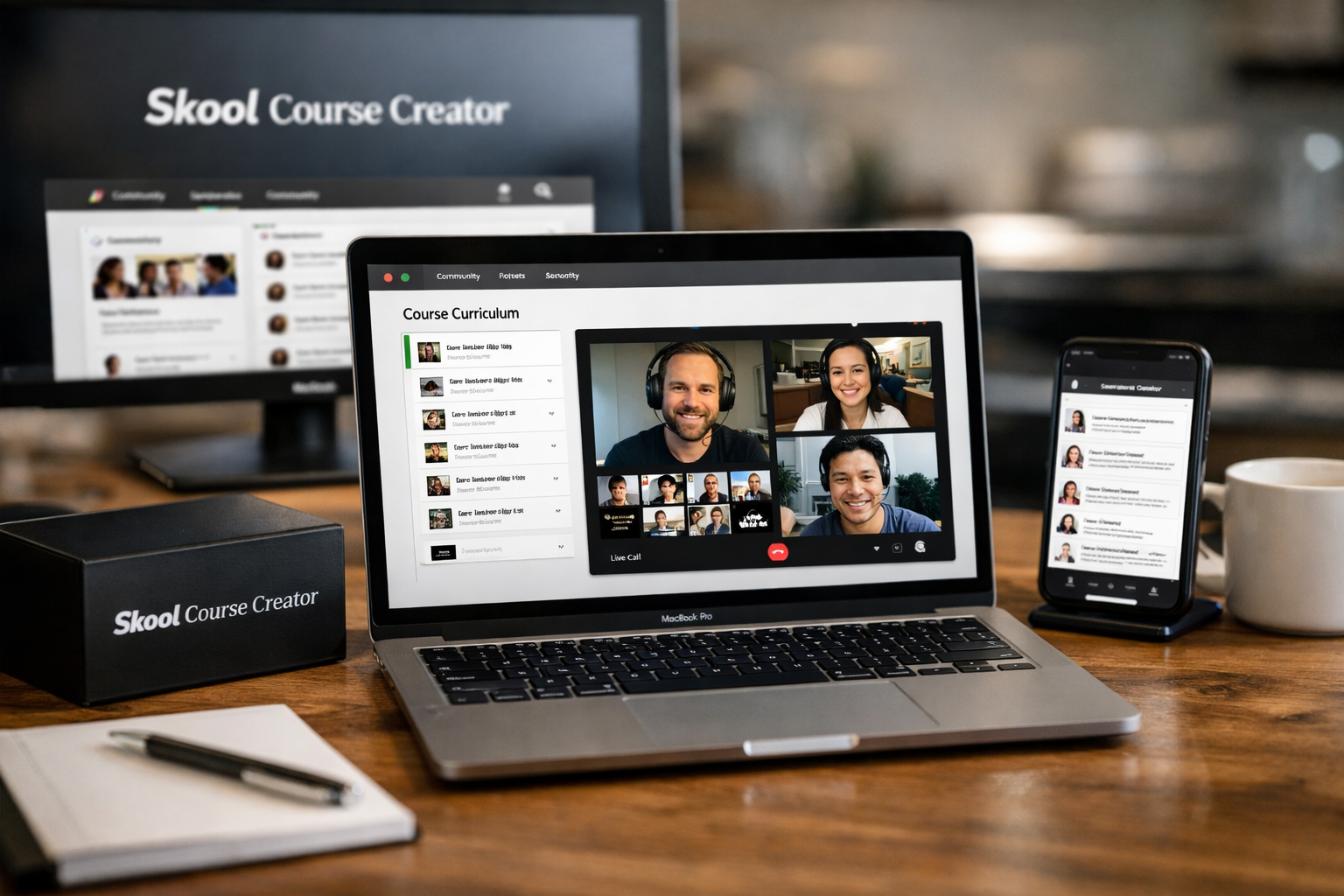
If you want to teach online without splitting your audience between a course portal, a chat group, and a live-call tool, this skool course creator review is for you. Skool brings courses, videos, live calls, and community interaction into one membership environment, which can be a practical setup for coaches and educators focused on participation as much as lessons.
My early verdict: Skool is a strong option for community-first creators who value simplicity and want members to learn, discuss, and attend live sessions in the same place. This skool course creator review also makes one point clear: it is not designed to be a feature-heavy, deeply customizable learning management system (LMS).
Official website · Latest pricing & offers
Skool Review for Course Creators: Quick Verdict
For creators who have felt the frustration of sending students from one tool to another, Skool has a straightforward appeal. Its platform combines a community environment with course access, videos, and live calls, reducing the number of moving parts members need to learn.
In this honest Skool review, the biggest value is not simply hosting a course. It is creating an environment where the course can support ongoing conversations, accountability, coaching, and member connections.
Who Skool is best for
Skool is best suited to coaches, consultants, membership founders, and course creators whose students benefit from interaction. Think group coaching programs, expert communities, paid accountability groups, and courses where learners need encouragement to follow through.
The ideal user does not need a highly technical academic LMS. Instead, they want a simple member experience with lessons and a place for discussion. In that context, this skool course creator review finds the platform particularly compelling.
Who should skip it
Skool may not be the right purchase for creators who require elaborate lesson paths, sophisticated assessments, detailed quizzes, extensive automation, or a fully custom-branded learning portal. If those capabilities are central to your offer, a traditional LMS may provide a better long-term fit.
It may also be less attractive if you sell standalone, self-paced courses and have little interest in building an active member community. Paying for a community-centered setup makes less sense when students mainly want to watch lessons and leave.
Bottom-line rating snapshot
| Buying factor | Practical assessment |
|---|---|
| Course and community in one place | Strong fit |
| Simplicity for members | Strong fit |
| Live-call-based programs | Strong fit |
| Advanced LMS requirements | Less suitable |
| Highly customized branding needs | Less suitable |
| Lower transaction fees | Pro plan is more favorable than Hobby |
Overall, my skool course creator review verdict is positive for creators selling participation, transformation, and access—not just a video library.
What Is Skool?
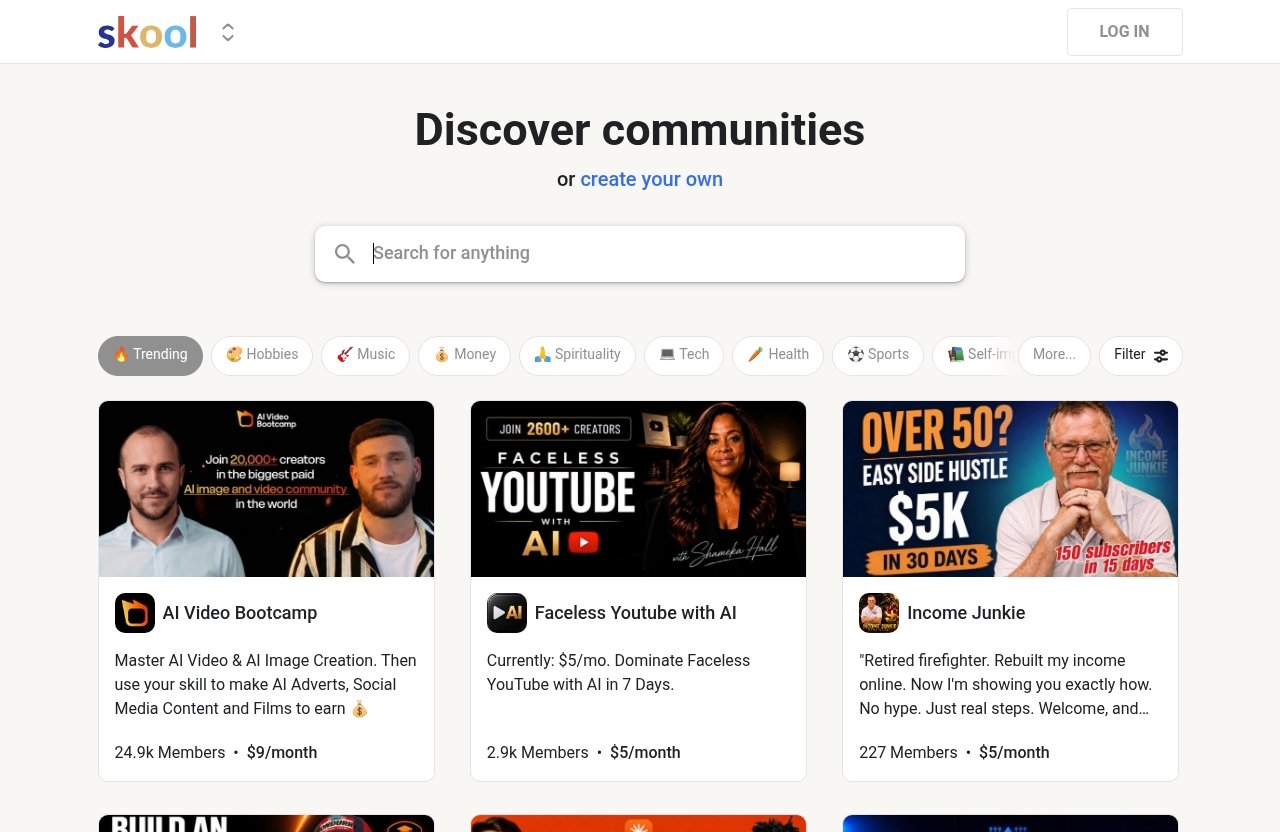
Skool is a community platform where creators can discover communities or create their own. For an educator, that means building a dedicated space around a paid or free learning community rather than treating course content as a separate product.
Skool in one sentence
Skool is a community-first platform that lets creators bring courses, videos, live calls, and members together in one place.
That simple positioning matters. In many Skool reviews, the attraction is not an enormous feature checklist; it is the potential to simplify the creator’s delivery stack and the learner’s day-to-day experience.
How it combines courses and community
A typical creator setup can become fragmented quickly. A member may buy through one system, access lessons somewhere else, join conversations in a third app, and receive live-call links by email.
Skool’s approach is to put the learning and group experience under one roof. In practical terms, a coach can share course material while maintaining an ongoing community where members can ask questions, reflect on lessons, and stay connected around live calls.
This part of the skool course creator review is especially relevant for offers where outcomes depend on momentum. Students often complete more when they feel visible, supported, and accountable to a group.
Why creators care
Community can turn a course from a one-time content purchase into an ongoing experience. That does not guarantee engagement—creators still need a good offer, thoughtful prompts, and active leadership—but it removes the friction of asking members to use disconnected tools.
The Skool community platform model is therefore most useful when your program includes discussion, coaching, peer feedback, or recurring events. If your business relies on those elements, consolidation can be a meaningful operational advantage.
Skool Pricing Explained
Skool pricing is refreshingly simple based on the official pricing page: there are two plans, Hobby and Pro. Both are available with Monthly and Yearly billing options, and the yearly option is presented with “2 months free!”
The important decision is not just the monthly subscription price. Course creators should also evaluate transaction fees, especially if they expect membership revenue to grow.
Hobby plan at $9/month
The Hobby plan costs $9 per month. It includes unlimited members, unlimited courses, unlimited videos, unlimited live calls, a custom URL, and affiliates.
The trade-off is a 10% transaction fee. For a newer creator validating a small community or first offer, the low monthly cost may feel accessible. But the fee deserves careful consideration once you begin processing meaningful sales volume.
Pro plan at $99/month
The Pro plan costs $99 per month and is labeled “Good choice!” on Skool’s official pricing page. It includes unlimited members, unlimited courses, unlimited videos, unlimited live calls, a custom URL, and affiliates.
The key financial distinction is the lower 2.9% transaction fee. This makes Pro easier to justify for creators with stronger recurring revenue, although the right choice depends on your actual sales, pricing, and margins.
2 months free on yearly billing
Skool offers both Monthly and Yearly billing. The official pricing page says “2 months free!” for yearly billing.
That statement is useful, but I would avoid assuming a specific annual total without checking the current checkout details yourself. Plans, billing terms, and promotions can change, so confirm the current terms before committing.
Transaction fees and what they mean
The practical difference between plans is easiest to understand through the fee percentage:
| Plan | Monthly price | Transaction fee | Included core capacity |
|---|---|---|---|
| Hobby | $9/month | 10% | Unlimited members, courses, videos, and live calls |
| Pro | $99/month | 2.9% | Unlimited members, courses, videos, and live calls |
A creator earning modest revenue may prefer Hobby’s lower monthly cost. A creator with a successful paid membership should compare the cumulative effect of 10% versus 2.9% on transactions, rather than focusing only on the subscription fee.
This is one of the most important findings in this skool course creator review: your best plan is tied to revenue economics, not merely audience size.
Key Features Course Creators Actually Need
For the right type of educator, Skool’s stated inclusions cover the fundamentals needed to operate a course-and-community offer. Both Hobby and Pro include unlimited courses, videos, members, and live calls.
That combination is valuable because it gives creators room to expand their library and community without needing to monitor a published content limit.
Unlimited courses and videos
Both plans include unlimited courses and unlimited videos. For a creator, that means you can organize a growing catalog of lessons without paying based on the number of courses or videos listed in the official plan details.
This is useful for memberships that regularly add training, coaches who build a resource library over time, and educators who want to separate introductory material from advanced programs. The skool course creator review takeaway is that content growth is not the primary pricing constraint here.
Unlimited live calls
Unlimited live calls are included on both plans. This is a significant fit for cohort programs, weekly office hours, group coaching, workshops, and recurring community events.
Live interaction often creates the real value in a high-touch offer. If your audience buys for access to you and fellow members—not only recorded content—this inclusion supports a more engaged delivery model.
Custom URL
Both Hobby and Pro include a custom URL. This gives creators a more direct, dedicated link for their community than relying only on a generic destination.
A custom URL is a practical convenience, although it should not be confused with unlimited control over branding or design. Creators who need every visual and user-experience detail to match an established brand should assess their expectations carefully.
Affiliates
Both plans include affiliates. This matters for creators who want partners, past students, or trusted peers to help introduce their program to relevant audiences.
Affiliates do not replace a clear offer or customer trust. Still, including them can be useful for a membership business that grows through referrals and collaborations.
Member capacity and scalability
Unlimited members are included with both plans. For a creator whose goal is to grow a community over time, that is easier to plan around than a platform that charges by member count.
However, operational scalability is more than a member limit. As your group grows, you will still need moderation practices, clear onboarding, useful content organization, and a way to maintain the culture that made the community valuable in the first place.
Official website · Latest pricing & offers
What Skool Does Well
The best Skool reviews tend to focus on a simple truth: many creators do not need more software; they need fewer disconnected systems. Skool’s strength is making course delivery and community participation feel like parts of one offer.
Simple setup and low friction
Skool’s core proposition is easy to understand. You create a community, provide course material, host live calls, and invite members into a shared environment.
That simplicity can reduce friction for both the creator and the learner. In my view, this is where the skool course creator review has its strongest recommendation: fewer destinations can make it easier for members to know where they should go next.
Community-first engagement
A traditional course can be passive. Members watch a lesson, download a resource, and may never return unless they need help.
A community-first model encourages a different behavior pattern. Creators can frame learning as an active process involving questions, wins, discussion, and recurring participation. The platform alone cannot create engagement, but it supports an offer built around it.
All-in-one experience
Using one environment for lessons, videos, live calls, and community can reduce tool sprawl. That matters when you are a solo creator or lean team managing content, students, support, and sales at once.
This does not mean Skool replaces every tool in every business. It means the core member-facing experience can be more consolidated than a stack of separate course and group platforms.
Easy monetization for creators
The inclusion of affiliates, unlimited members, and unlimited courses supports creators building paid knowledge businesses. You can structure an offer around membership access, courses, live support, or a combination of all three.
Before buying, be realistic about fees and your sales model. The platform can support monetization, but no platform substitutes for audience research, positioning, or a compelling reason for people to join.
Where Skool Falls Short
No balanced Skool platform review should treat simplicity as a universal advantage. The same streamlined experience that appeals to community-first creators can feel restrictive to businesses with specialized educational or branding requirements.
Limited branding customization
If your business needs a deeply customized learning environment that mirrors a very specific brand identity, Skool may not be the ideal fit. A custom URL is included, but a custom URL alone is not the same as comprehensive design control.
This is especially relevant for established companies, premium academies, or agencies that have strict brand standards. Review the current interface personally before assuming it will match your desired presentation.
Not a deep LMS
Skool is not best viewed as a deep, traditional LMS. Creators who need intricate curriculum logic, advanced assessments, formal certification workflows, or highly granular learning controls may find a dedicated LMS more aligned with their requirements.
That does not make Skool weak; it simply reflects a different priority. This skool course creator review recommends Skool when community and simplicity matter more than academic-style course infrastructure.
Potential cost pressure at scale
The Hobby plan’s 10% transaction fee can become material as sales increase. While its $9 monthly cost is low, creators should calculate the total cost against their projected membership or course revenue.
Pro lowers the transaction fee to 2.9%, but costs $99 per month. The right plan depends on your numbers, and you should review the economics before treating either option as automatically cheaper.
Missing advanced marketing depth
Skool’s official plan information highlights community, courses, videos, live calls, custom URLs, and affiliates. Creators who require an advanced, highly tailored marketing operation should avoid assuming every marketing need will be handled within the platform.
It is wiser to define what you need before buying: lead capture, sales workflows, segmentation, reporting, or other specialized processes. If those are essential, confirm how Skool fits into your wider business setup.
Best Use Cases for Course Creators
The question “Is Skool worth it?” has different answers depending on how you deliver value. It is most persuasive when the community itself contributes directly to member outcomes and retention.
Coaching programs
A coach can use Skool to place foundational lessons beside ongoing discussion and live calls. Members can consume material at their own pace while still having a central place to ask questions and stay connected between sessions.
This setup works well for business coaching, career guidance, fitness accountability, creative mentorship, and other transformations that benefit from regular support.
Membership communities
Membership founders can use Skool as the main destination for recurring value. New resources, ongoing conversations, and live calls can all support a reason for members to remain active month after month.
For this use case, the skool course creator review conclusion is particularly favorable. The platform’s community-first orientation closely matches the needs of a membership offer.
Cohort-style courses
Cohort programs benefit from a shared place where participants move through a curriculum together. Students can discuss assignments, share progress, and attend scheduled live calls without being directed across several systems.
The creator should still set clear start dates, expectations, and communication rhythms. The platform supports the group environment; it does not replace program design.
Paid mastermind groups
A mastermind often needs more than a content library. It needs conversation, peer accountability, access to a host, and a dependable home for recurring interactions.
Skool can make sense when the group experience is the main product and course material serves as supporting value. For a mastermind built around connection, that is often a better alignment than a standalone course portal.
Skool vs Traditional Course Platforms
The Skool vs course platform decision is really a choice between business models. A traditional course platform typically centers on delivering a structured curriculum, while Skool’s stated positioning centers on communities that can also include courses and live calls.
When Skool is the better choice
Choose Skool when your members should regularly interact with you and each other. It is a particularly logical option if you sell coaching access, ongoing accountability, group learning, or a membership where fresh discussions matter.
It is also attractive if you want a simpler member journey. Rather than asking people to navigate a course site plus a separate community, you can create one primary home for the program.
When a full LMS may be better
A full LMS may be a better choice when formal learning design is your central priority. Consider that direction if your offer relies on complex learner progression, detailed testing, highly customized educational experiences, or rigorous course administration.
The same applies to brands that need broad visual customization. Skool can be practical, but practical is not always the same as flexible enough for every business model.
Choosing based on your business model
Ask what customers are truly paying for. If they are primarily buying your recorded curriculum, compare platforms through the lens of course delivery needs.
If they are buying access, accountability, live calls, peer relationships, and an evolving resource library, Skool becomes more compelling. This distinction is more useful than trying to declare one platform category universally better.
Official website · Latest pricing & offers
FAQ
How much is it to make a course on Skool?
Official Skool pricing shows two paid plans: Hobby at $9 per month and Pro at $99 per month. Both plans include unlimited members, unlimited courses, unlimited videos, and unlimited live calls, so there is no stated limit on how many courses you can create within those plans.
The main pricing difference to assess is the transaction fee: 10% on Hobby and 2.9% on Pro.
Is Skool free?
No official free plan is shown on Skool’s pricing page. The available paid options are Hobby and Pro.
Skool does offer Monthly and Yearly billing, and the pricing page states that yearly billing includes “2 months free!” Check the current pricing page before purchasing because billing terms may change.
Is Skool good for course creators?
Yes, Skool is good for course creators who want course content and a community in one place. It is particularly suitable when discussion, accountability, and live interaction are important parts of the customer experience.
However, it is not necessarily the best choice for educators who need a deep LMS with advanced learning structures or extensive customization.
What’s the difference between Hobby and Pro?
Hobby costs $9 per month and has a 10% transaction fee. Pro costs $99 per month and has a 2.9% transaction fee.
Both plans include unlimited members, courses, videos, and live calls, plus a custom URL and affiliates. The most practical choice depends largely on your revenue and how much transaction-fee exposure you expect.
Can I sell memberships or courses on Skool?
Yes. Skool’s official plan details include unlimited members, unlimited courses, and affiliates, which makes it suitable for paid creator businesses offering memberships, courses, coaching communities, or related programs.
Your actual results will depend on your offer, pricing strategy, audience, and ability to create ongoing member value.
How to Decide If Skool Is Worth It
The most useful way to answer “Is Skool legit?” or “Is Skool worth it?” is to move beyond broad online opinions. A Skool course creator review Reddit thread may surface real user perspectives, but your own business model and fee math should lead the decision.
Decision checklist
Skool is likely worth serious consideration if most of these statements are true:
- Your members benefit from peer discussion and accountability.
- You want lessons, videos, live calls, and community in one environment.
- You plan to grow a coaching program, membership, cohort, or mastermind.
- You value a simple member experience over a complex feature set.
- You are comfortable evaluating the 10% Hobby fee against the 2.9% Pro fee.
- You do not need highly advanced LMS functionality or extensive brand customization.
Questions to ask before you buy
First, decide whether community is essential or merely optional. If your course would deliver the same outcome without member interaction, a simpler course-only product may suit your audience better.
Second, run the numbers. Estimate monthly sales volume and compare the effect of Hobby’s 10% transaction fee against Pro’s 2.9% fee and higher monthly price. Finally, think about your delivery style: will unlimited live calls support your offer, or will they go unused?
Final recommendation
My final skool course creator review recommendation is straightforward: Skool is worth considering for creators who want to run a community-centered education business without forcing members across separate course, discussion, and live-call tools.
It is not the best match for everyone. If you need a deeply customized, feature-heavy LMS, look elsewhere. But if your goal is to unite lessons with accountability, group conversation, and recurring access, you can review Skool’s current plans and details here and decide whether the pricing and transaction fees fit your own business before purchasing.
Related Reading
- How to Build a Paid Community on Skool
- Systeme.io Pros and Cons: Systeme.io Review 2026
- Gohighlevel Affiliate Program Review 2026
References
- Skool: Discover Communities or Create Your Own
- Skool: Pricing
- Brutally Honest Skool Review 2026: Pros, Cons, And Is It Worth It?
- Is Skool Worth It in 2026? The Pro Fee Tier Reviews Miss