Detect Fake Receipts AI: 2026 Guide to Stopping Fraud
To successfully detect fake receipts ai tools generate, modern finance and risk teams can no longer rely purely on manual visual reviews or conventional optical character recognition (OCR) software. Modern generative models can produce photorealistic transaction documents, complete with authentic merchant logos, accurate sales taxes, and plausible line items, in under sixty seconds. Stopping this synthetic documentation requires forensic inspection targeting file metadata, localized pixel anomalies, and structural document signatures.
Affiliate disclosure: This article may contain affiliate links. If you buy through them, we may earn a commission at no extra cost to you. Details were checked on November 23, 2026 and can change.
Official website · Latest pricing & offers
Quick Answer: How Organizations Detect Fake Receipts Made With AI
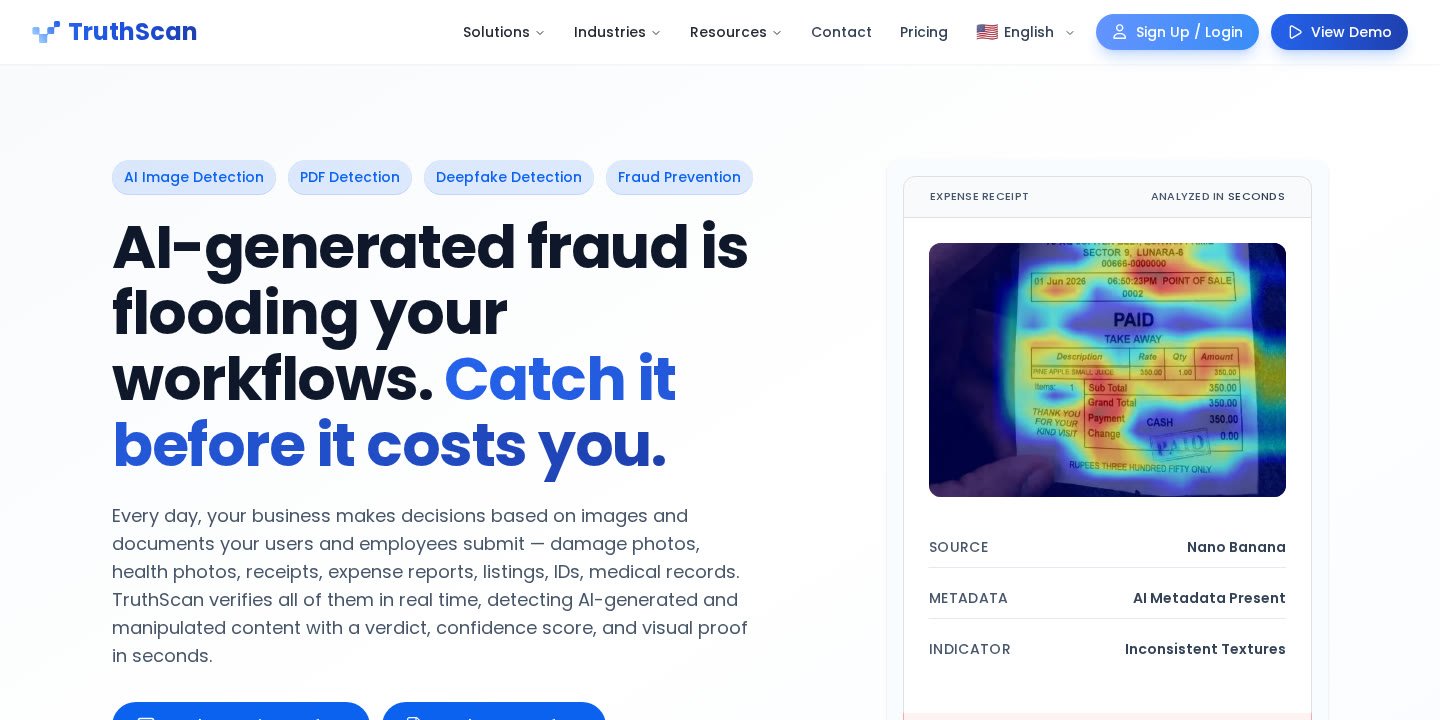
Modern generative AI enables users to create synthetic receipts and altered invoices from simple text prompts or web templates. Because these files contain clean fonts and internally consistent totals, traditional OCR systems and visual screeners frequently approve them without question. Automated forensic platforms like TruthScan analyze user-submitted media at the pixel and metadata level, delivering verdicts, probability scores, and visual heatmaps within one to two seconds.
- The Core Vulnerability: Generative models produce sharp typography, valid mathematical totals, and authentic brand styling, rendering basic text-matching and math checks ineffective.
- The Forensic Solution: Detecting AI-generated receipts requires automated screening of mathematical compression patterns, structural PDF tags, and localized pixel edits rather than relying on extracted text.
- Automated Tooling: Platforms such as TruthScan offer specialized engines achieving a documented 99.3% accuracy rate on receipt submissions across more than 500 generative models.
- Actionable Risk Routing: Clean submissions process instantly, while suspicious files are flagged with audit-ready heatmaps or routed to real-time verification tools like live camera re-takes.
The Growing Threat of AI Receipt Fraud in Finance and Retail
Document-based fraud has undergone a structural shift. Historically, forging a proof-of-purchase document or doctoring an expense receipt required specialized design skills, software proficiency in desktop image editors, or clumsy physical manipulation involving scissors, scanners, and glue. These legacy attempts frequently left obvious visual artifacts: mismatched fonts, misaligned margins, visible blur borders around altered digits, or glaring mathematical errors across subtotal and tax calculations.
The widespread accessibility of generative AI platforms has eliminated those historical barriers. Industry data shows that fraudulent returns and warranty claims cost retailers over $103 billion annually even before generative AI simplified synthetic evidence creation. Today, free consumer artificial intelligence tools can generate a photorealistic “damaged item” photo or a pristine, fabricated itemized receipt in roughly sixty seconds.
This capability affects several operational surfaces:
- Corporate Travel and Expense (T&E): Employees generating synthetic meal, ride-share, or hotel invoices to claim reimbursement for personal expenses or inflated totals that never occurred.
- E-Commerce Returns and Warranties: Fraudulent buyers submitting generated invoices to claim refunds, warranty replacements, or gift cards for merchandise they never purchased.
- Delivery and Marketplace Claims: Customers uploading synthetic digital receipts or altered paper slips alongside AI-edited photos to trigger automated refund credits.
- Commercial Lending and Accounts Payable: Bad actors introducing fabricated supplier bills, altered service invoices, or synthetic proof-of-payment receipts into automated accounting pipelines.
Because the cost of generating synthetic documents has fallen to near zero, fraud rings and opportunistic individuals can execute these attacks at massive scale, overwhelming internal review queues.
Why Manual Checks and OCR Fail to Detect Fake Receipts AI Models Create
Most corporate reimbursement and accounts payable workflows depend on two primary lines of defense: human review by an audit clerk, or automated extraction powered by optical character recognition (OCR). Unfortunately, when teams attempt to detect fake receipts ai systems generate using these conventional methods, both approaches fail consistently.
The Failure of Visual Human Review
Human eyes look for semantic and aesthetic consistency. Reviewers verify that a receipt displays an identifiable merchant name, an address, a sensible date and timestamp, line items corresponding to the expense claim category, and a plausible payment tender summary (such as the last four digits of a credit card). Generative image models excel at these macro-level aesthetics. Advanced tools produce crumpled paper textures, thermal paper sheen, accurate background countertop surfaces, and realistic lighting reflections. When an auditor glances at a thumbnail or PDF preview, the receipt looks entirely genuine.
The Structural Blindspot of OCR Platforms
OCR technology is engineered to read characters, not verify their physical authenticity. An OCR engine scans an uploaded image or PDF, extracts strings of text, identifies data labels (such as “Subtotal,” “Sales Tax,” and “Grand Total”), and validates that the mathematical equations match. When presented with an AI-generated receipt, OCR behaves as follows:
- The digital characters are crisp and uniformly spaced, meaning the OCR parses the text with near-100% extraction accuracy.
- Because generative engines generate or calculate correct subtotal and tax sums, automated business logic rules pass without raising flags.
- The document structure cleanly fits expected invoice data schemas.
To an OCR engine, a clean synthetic receipt often looks higher quality and more trustworthy than an authentic, crumpled receipt photographed under dim restaurant lighting. Because the data parses cleanly, the system marks the document valid. As explained in our guide to TruthScan document fraud detection, relying solely on text extraction creates an invisible blindspot for modern organizations.
How Automated Forensic Detection Works on Synthetic Invoices and Receipts
Because synthetic receipts easily satisfy human screeners and OCR engines, verification must shift from semantic content analysis to pixel-level and structural forensics. Forensic document engines inspect the mathematical and structural characteristics of the image or container file.
| Inspection Dimension | Authentic Receipt Behavior | AI-Generated or Doctored Receipt Behavior |
|---|---|---|
| Pixel Frequency & Noise Distribution | Uniform sensor camera noise across paper, ink, background surfaces, and ambient shadows. | Disrupted noise signatures, synthetic generation artifacts, or smoothed micro-textures in altered zones. |
| Compression Analysis (JPEG/Artifacting) | Consistent compression grids throughout the file corresponding to the capturing camera device. | Dual-compression artifacts where edited digits or synthetic logos have been introduced onto existing backgrounds. |
| Container & Metadata Forensics | Standard mobile EXIF tags or standard commercial point-of-sale PDF generation streams. | Missing device metadata, consumer generative software tagging, synthetic PDF generation streams, or mismatched color profiles. |
| Localized Region Consistency | Continuous physical wear, ink bleeding, thermal printing fading, and paper grain uniformity. | Sharp, digitally inserted line items or totals pasted over weathered, wrinkled paper textures. |
When an image file undergoes manipulation—such as an employee using an inpainting model to change “$14.20” to “$140.20” on an otherwise real lunch receipt—traditional whole-image detectors often average out the change across the rest of the authentic pixels. Advanced forensic engines conduct localized region analysis, isolating altered characters or modified blocks from untouched source data.
Using TruthScan to Detect Fake Receipts AI Tools Generate
TruthScan (operated by Undetectable Inc. dba TruthScan, headquartered at 1309 Coffeen Ave. Sheridan, WY 82801) is an enterprise verification platform built specifically to address this challenge. It provides an automated forensic layer that integrates directly into enterprise upload workflows via a REST API, webhooks, or browser dashboard.
TruthScan operates two purpose-built engines:
- AI Image Detection Engine: Evaluates user-submitted receipt images (supporting JPG, PNG, JPEG, TIF, and WEBP formats up to 10 MB per file) across localized pixel grids.
- PDF Detection Engine: Evaluates digital PDF invoices, reimbursement receipts, and multi-page documentation to uncover synthetic PDF generation, font discrepancies, and digital manipulation.
Empirical Accuracy on Receipt Media
According to TruthScan’s published production metrics, the system delivers an average detection accuracy of 99.3% across 92 distinct image generators and 250,000 real images, maintaining a false positive rate below 1%. For organizations aiming to detect fake receipts ai models generate, TruthScan measures specific performance across individual document types:
- Receipts: 99.3% detection accuracy
- Invoices: 98.1% detection accuracy
- General Documents: 99.3% detection accuracy
- Cards & Payment Credentials: 98.1% detection accuracy
The platform supports detection across more than 500 generative models, including frontier architectures such as Nano Banana 2 (100% accuracy in testing), Seedream 4.5 (100%), Imagen 4 (99.9%), Grok (99.9%), Flux 2 Pro (99.4%), GPT-Image 1.5 (99.2%), and Midjourney (98.6%). Understanding these metrics is critical when setting operational thresholds, as detailed in our analysis of TruthScan accuracy scores.
Localized Heatmaps and Visual Proof
A primary difficulty with traditional fraud flagging is defending rejection decisions to internal auditors, employees, or customers. TruthScan does not simply return a binary pass/fail score. In one to two seconds, it returns:
- An overall verdict and statistical probability score.
- A plain-language forensic explanation detailing what anomalies were detected.
- A visual detection heatmap highlighting the exact pixel regions that were generated or manipulated.
If an employee submits an authentic hotel folio where only the final balance line was doctored with an AI editing tool, the heatmap highlights that specific dollar amount while confirming the surrounding background is authentic. This localized visibility prevents whole-image false negatives.
Step-by-Step: How to Screen Receipts for AI Manipulation
Organizations handling financial reimbursements, retail returns, or claims submissions can implement automated forensic detection through structured operational steps:
Step 1: Capture Media at Native Resolution
Forensic engines analyze subtle pixel relationships and compression signatures. Encourage users to upload native camera photos or original digital PDFs rather than screen captures. Recompressing an image by taking a screenshot of a thumbnail degrades pixel-level data and weakens forensic certainty.
Step 2: Submit Files to the Detection Layer
Submissions can be processed through multiple TruthScan interfaces:
- In-Line REST API: Pass image files directly from your mobile app, expense portal, or claim submission intake form into TruthScan’s API. Submissions process end-to-end in 1–2 seconds.
- Bulk ZIP Upload: Internal audit teams can upload ZIP archives containing up to 500 receipt images at a time directly in the browser dashboard for batch analysis.
- Chrome Extension: Reviewers evaluating receipts inside web-based expense management software or ticketing platforms can use TruthScan’s free Chrome extension to scan on-screen images without leaving their workflows.
Step 3: Establish Risk-Based Routing Thresholds
Rather than manually reviewing every claim, configure automated business logic based on TruthScan confidence scores:
- Clean Submissions (Low AI Probability): Route directly to automated payout or instant reimbursement workflows, preserving a seamless user experience for honest claimants.
- High-Risk Submissions (High AI Probability): Automatically route the file to a specialized fraud review queue with the forensic report and detection heatmap attached for immediate validation.
- Borderline Scores: Utilize TruthScan Capture (currently in beta). This feature sends a secure link to the submitter’s mobile device, instructing them to capture a verified, live photo of the physical receipt in real time. The verified capture links directly back to the original case file.
TruthScan Pricing and Inspection Plans Explained
TruthScan calculates usage based on results processed, where one result equals one submitted image or one individual page of a PDF document (for example, a three-page invoice counts as three results). The platform does not charge seat fees; organizations can invite unlimited team members under their account to share the central pool of monthly results.
| Plan Name | Monthly Cost | Annual Billing | Included Results / Month | Overage Rate | Key Features Included |
|---|---|---|---|---|---|
| Free | $0 /mo | $0 | 25 results | N/A (Capped) | Full API access, detailed indicators, detection history, Chrome extension, unlimited seats. No credit card required. |
| Starter | $24 /mo | $290 /yr | 1,000 results | $0.03 / result | Batch uploads, CSV export of history, audit-ready reports, standard support, Chrome extension, unlimited seats. |
| Professional | $83 /mo | $990 /yr | 5,000 results | $0.02 / result | Priority processing queue, higher API rate limits, audit reports, batch uploads, Chrome extension, unlimited seats. |
| Business | $333 /mo | $3,990 /yr | 40,000 results | $0.01 / result | Zero Data Retention (ZDR), highest self-serve rate limits, priority support, DPA available, Chrome extension. |
| Enterprise | Custom | Contact Sales | Custom volume | $0.005 or less | Volume discounts, custom SLAs, Zero Data Retention (ZDR), dedicated throughput, 24/7 team, on-prem/dedicated deployment. |
Annual prepayment provides two months free across all paid tiers. Paid plans operate month-to-month without long-term contract lock-ins, and unused monthly results reset at the start of each billing cycle without rollover. If an organization exceeds its quota, overage is billed automatically at the plan’s flat per-result rate, with running totals visible from 80% usage onward. For comprehensive plan structures, consult our guide to TruthScan pricing and plans.
Advantages and Limitations of Automated Receipt Verification
Integrating an automated forensic engine provides major operational efficiency gains, but risk teams must recognize its practical boundaries.
Operational Advantages
- Fast Verification Speed: Returning verdicts in 1–2 seconds enables organizations to maintain instant payout and refund experiences for legitimate users while blocking fraudsters in real time.
- Auditable Visual Evidence: Instead of vague automated denials, investigators receive localized heatmaps showing exactly which numbers, dates, or logos were altered, ensuring compliance with audit and legal standards.
- Resistance to Adversarial Laundering: TruthScan’s models are trained to survive common evasion techniques, including deliberate noise injection, re-filtering, color grading, and standard multi-generation compression.
- Enterprise Compliance: TruthScan maintains SOC 2 Type II, ISO 27001, and GDPR compliance, utilizing AES-256 encryption. Businesses processing sensitive financial records can enable Zero Data Retention (ZDR) on Business and Enterprise tiers to ensure files are purged immediately post-analysis.
System Limitations
- Severe Image Degradation: If a submitter uploads a low-resolution thumbnail, an aggressive re-compression of a screen capture, or an extremely blurry photo, subtle pixel-level noise signatures can be lost. No forensic detector can reliably analyze signals that have been discarded by extreme compression.
- Legitimate Document Edits: Standard image adjustments—such as cropping an image or adjusting exposure on an underexposed receipt—can occasionally register abnormal localized signatures. Teams should utilize review queues or TruthScan Capture live retakes for borderline results rather than auto-rejecting.
- Real Receipts for Illegitimate Purchases: Automated AI detection determines whether a receipt image or PDF is synthetic or digitally doctored. It cannot tell you if an employee submitted an authentic, unaltered receipt for an expense that violates internal travel policy.
Who Needs Automated Receipt Screening (and Who Might Not)
Evaluating whether your organization requires dedicated tools to detect fake receipts ai generators produce depends heavily on claim volume, processing speed, and financial exposure.
Who Benefits Most
- High-Volume E-Commerce and Delivery Marketplaces: Platforms issuing real-time refunds or item replacements based on customer-submitted photos and purchase receipts.
- Corporate Finance and Shared Services: Enterprise accounting teams auditing thousands of employee expense reports, travel reimbursements, and digital supplier invoices monthly.
- Insurance Adjusters and Warranty Providers: Claims departments verifying proof-of-purchase documents, contractor repair receipts, and medical superbills prior to claim payout.
- Third-Party Logistics and Fleet Operators: Organizations processing fuel, maintenance, and toll receipts across distributed field operations.
Who Might Not Need Dedicated Tooling
- Small Businesses with Centralized Purchasing: Companies where all corporate purchasing occurs via linked corporate credit cards that automatically sync transaction feeds directly from banks, removing user-uploaded receipt reliance.
- Low-Volume Operations: Organizations handling fewer than 20–30 total receipts per month, where an auditor can directly contact vendors to verify transaction authorization numbers manually.
Alternative Verification Categories for Expense and Return Fraud
While TruthScan provides purpose-built forensic image and PDF detection, risk managers often evaluate several complementary categories of software to protect their reimbursement and claim surfaces:
- Corporate Card Direct Feeds: Expense management platforms that bypass receipt uploads entirely by pulling verified Level 3 transactional data directly from financial card networks (Visa, Mastercard, Amex).
- Merchant Portal Integrations: API connectors that directly query retailer or airline databases using order confirmation numbers to verify whether a claimed transaction exists on the merchant’s servers.
- Traditional OCR and Rule Engines: Text-parsing software that validates internal mathematical formulas, cross-references internal employee schedules, and identifies duplicate receipt numbers across historical expense filings.
- Database Blacklists and Consortia: Collaborative fraud prevention databases that flag known fraudulent credit card credentials, suspect phone numbers, or repeated shipping addresses across retail networks.
These category alternatives address administrative compliance and data consistency, but they do not solve the vulnerability created when an untrusted user uploads an unverified visual file. Pairing forensic document screening alongside business rule engines provides comprehensive defense.
Common Problems and Failure Points in AI Receipt Detection
When organizations deploy systems to detect synthetic receipts, several common operational challenges arise:
1. Heavy Compression Laundering
Fraudsters frequently attempt to “launder” synthetic receipts by taking a screenshot of an AI-generated document, messaging it across communication apps (such as WhatsApp or Telegram) to strip metadata, and re-exporting it as a heavily compressed JPEG. While TruthScan’s models are trained to detect manipulation despite generational loss, severe downsampling to very low resolutions (e.g., 200×200 thumbnails) removes critical forensic signal. Organizations should enforce minimum upload resolution rules within intake forms.
2. Rigid Hard-Denial Rules
Configuring automated systems to immediately deny an expense report or return claim on any borderline score creates friction with honest employees and valued customers. The recommended practice is establishing tiered thresholds: clean files auto-approve, clearly manipulated files trigger automated rejection reports, and borderline files route to audit review or trigger a live photo retake via TruthScan Capture.
3. Neglecting Data Retention Policies
Processing financial documents containing employee names, card numbers, or proprietary supplier pricing requires strict compliance with privacy standards. Organizations deploying forensic screening should confirm whether their vendor stores image uploads for model training. TruthScan retains images by default on entry tiers, but provides complete Zero Data Retention (ZDR) and custom Data Processing Addendums (DPAs) on Business and Enterprise plans.
Official website · Latest pricing & offers
FAQ
Can standard OCR software detect fake receipts created by AI?
No. Standard OCR software is designed to recognize and extract text characters, not verify image or container authenticity. Because AI-generated receipts feature clean typography, valid formatting, and mathematically correct calculations, OCR systems parse them successfully and often rate them as high-quality documentation.
How does TruthScan detect localized alterations on an otherwise real receipt?
TruthScan analyzes media at the localized pixel and region level rather than relying on whole-image averaging. If a user modifies only the dollar total or date on an authentic physical receipt using an AI tool, TruthScan’s detection engine surfaces the altered region and displays it via a visual forensic heatmap.
What image and document file formats are supported for receipt screening?
TruthScan supports JPG, PNG, JPEG, TIF, and WEBP image files up to 10 MB per file, along with multi-page PDF documents. Submissions can be analyzed via the browser dashboard, bulk ZIP archives up to 500 files, the free Chrome extension, or the REST API.
What does one “result” mean in TruthScan’s pricing plans?
One result corresponds to one submitted image or one individual page of a PDF document. For example, a receipt uploaded as a single JPEG image consumes one result, whereas a three-page PDF invoice consumes three results from your monthly pool.
Does TruthScan store employee or customer receipt images?
Images are retained by default on Free, Starter, and Professional plans. Zero Data Retention (ZDR) is available on Business and Enterprise tiers. Under ZDR, submitted images and PDFs are processed in real time, immediately discarded, and never stored or used for model training.
What happens if an authentic, crumpled receipt gets flagged as suspicious?
Because TruthScan maintains a false positive rate below 1%, accidental flags on real media are rare. When borderline cases occur, organizations can route the file to an audit queue with the forensic heatmap attached or send the submitter a TruthScan Capture link to retake a verified live photograph of the physical receipt.
Related Reading
- TruthScan Document Fraud Detection: Forensic Guide 2026
- TruthScan Accuracy Explained: What Detection Scores Mean (2026)
- TruthScan Pricing Explained: Plans, Results, and Features (2026)
- TruthScan Review 2026: AI Content and Fraud Detection Explained