Klap vs Riverside: Best Platform for Podcast Clip Creation
Official website · Latest pricing & offers
Klap vs Riverside: Quick Verdict for Podcasters
If you are comparing klap vs riverside, the key question is not “Which platform is better?” It is “Where is your bottleneck: recording or repurposing?”
Klap is the better fit when you already have long-form podcast videos, YouTube episodes, webinars, or interviews and want to turn them into TikToks, Reels, and Shorts quickly. Riverside is the better fit when your primary need is a recording-first workflow with more emphasis on source capture, production control, and recording stability.
For many podcasters, the smartest setup is not either/or. It is Riverside for recording, then Klap for clipping and short-form distribution.
Who should choose Klap
Choose Klap if your biggest challenge is creating short-form video for podcasts at scale. Klap is built around a clipping-first workflow: paste a YouTube link or upload a video file, then generate multiple clips from one long video.
That makes it especially useful for solo podcasters, YouTube creators, podcast editors, and agencies that need a repeatable podcast repurposing workflow. If you publish interviews, guest episodes, livestreams, webinars, or educational videos, Klap is designed to help convert that long-form material into social-ready shorts.
In this klap vs riverside review, Klap has the clearest advantage when your priority is speed. It is not trying to be a full podcast recording studio; it is focused on turning existing content into short clips.
Who should choose Riverside
Choose Riverside if your biggest challenge happens before clipping: getting the episode recorded cleanly, managing the production process, and capturing usable source material. Riverside fits a recording-first workflow.
That matters if your team cares most about the original podcast capture stage. If the recording is poor, even the best ai podcast clipping tool will have less to work with.
In a practical klap vs riverside decision, Riverside is stronger when your core workflow starts with recording. Klap is stronger when your growth strategy depends on repurposing finished episodes into social clips.
Bottom-line recommendation by workflow
Here is the simplest way to decide:
| Workflow Need | Better Fit | Why |
|---|---|---|
| Turn existing episodes into Shorts, Reels, and TikToks | Klap | Clipping-first workflow built for fast repurposing |
| Record podcast conversations | Riverside | Recording-first workflow focused on source capture |
| Publish more clips from each episode | Klap | Generates multiple clips from long videos |
| Improve production capture before editing | Riverside | Better fit when recording quality/control is the bottleneck |
| Full content engine | Both | Record in Riverside, clip in Klap |
If your goal is the best podcast clip creation tool for existing content, Klap is the more direct choice. If your goal is to improve the original podcast recording workflow, Riverside is the more natural starting point.
What Klap Is Built to Do
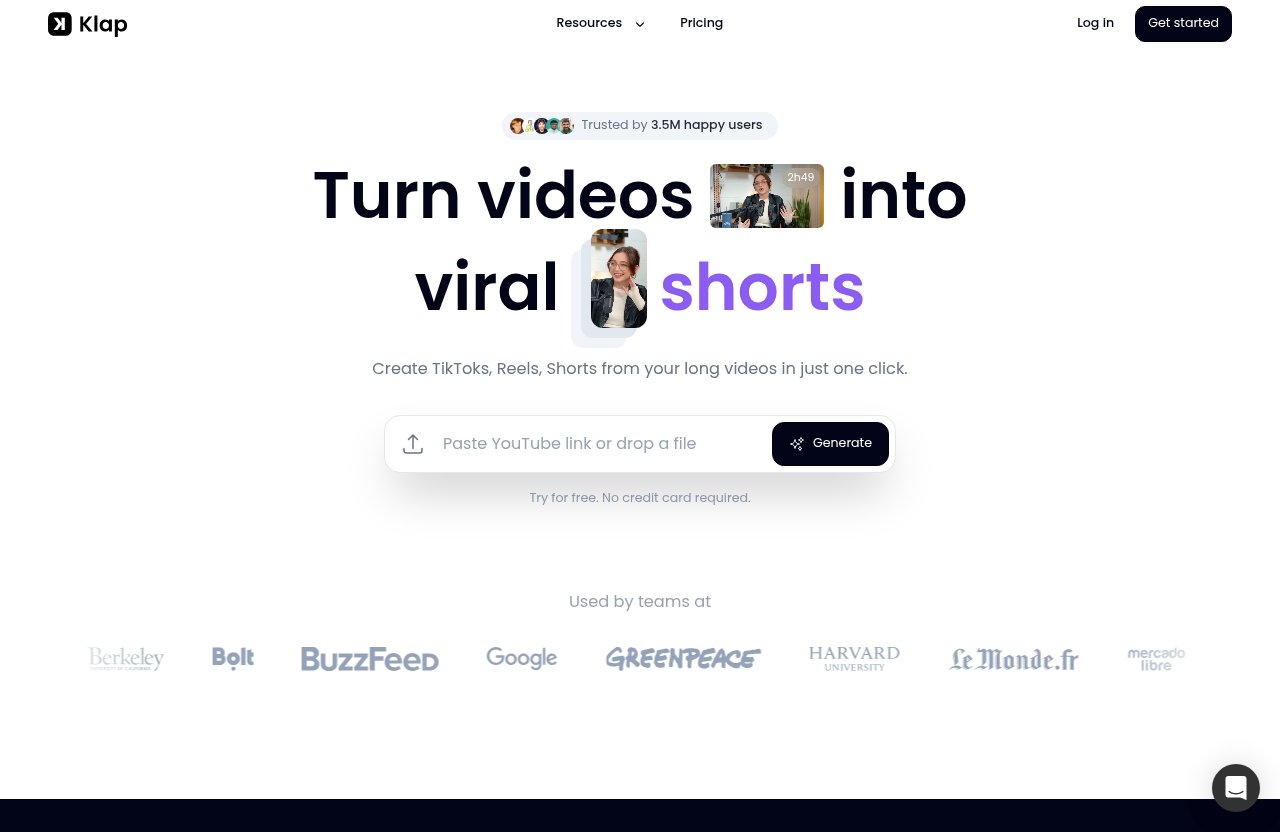
Klap is built to turn long videos into viral shorts and help creators create TikToks, Reels, and Shorts from long videos in one click. In the klap vs riverside comparison, that makes Klap the clipping-first option.
The product is especially relevant for creators who already have a library of long-form videos. Instead of manually scrubbing through an hour-long episode, you can upload a video or paste a YouTube link and let Klap generate multiple short clips.
Core use case: turn long videos into short clips
Klap’s main use case is straightforward: take one long video and create multiple short-form clips from it. According to Klap’s homepage workflow, users can paste a YouTube link or upload a video file, and Klap creates multiple clips from one video.
The homepage also says a one-minute video produces about five video clips. That gives podcasters a clear sense of the platform’s orientation: it is designed for output volume, not just manual trimming.
Klap also supports AI-generated captions, which are important for short-form video for podcasts. Social clips often need captions because viewers may watch without sound, and captions can make highlights easier to understand quickly.
How Klap works in practice
In practice, Klap fits after you have the recording. You finish an episode, webinar, or YouTube video, then use Klap to identify and format clips for social platforms.
The workflow is simple:
- Paste a YouTube link or upload a video file.
- Let Klap create multiple clips from the source video.
- Use AI-generated captions to make the clips more social-friendly.
- Apply resizing and layouts for different platforms.
- Export or prepare the clips for distribution.
Klap also introduced AI Reframe 2, which resizes videos for any platform by analyzing scenes and applying layouts such as Split Screen, Screencasts, Gaming, and more in one click. For podcasters, this matters because interview videos often need reframing for vertical platforms.
If you want to test the workflow, Klap offers a try-for-free option with no credit card required. Readers focused on fast clip creation can start from the official affiliate destination here: try Klap for podcast clips.
Best fit for podcasts, webinars, and YouTube repurposing
Klap is strongest when the source content already exists. That includes podcast episodes, webinars, interviews, livestreams, courses, and YouTube videos.
For a podcast repurposing workflow, this is valuable because one episode can become several social assets. A creator might publish the full episode on YouTube, then turn the strongest moments into Shorts, Reels, and TikToks.
Klap says it has 3.5M happy users and 8.5M clips made by 3.5M creators. Those figures support the idea that Klap is built for high-volume clipping and repurposing rather than only traditional video editing.
In the klap vs riverside decision, Klap is the better fit when the main job is turning long-form content into short-form video quickly.
What Riverside Is Built to Do
Riverside is best understood as a recording-first platform in this comparison. That means it typically sits earlier in the podcast pipeline than Klap.
Where Klap is focused on clipping existing content, Riverside is more relevant when creators need a platform for the original recording and capture process. This article does not invent Riverside pricing, technical specs, or plan limits because no official competitor pricing page was provided for verification.
Recording-first workflow
A recording-first workflow starts with capturing the episode. The priority is getting usable source material before the editing and repurposing stages begin.
That is where Riverside typically fits. Podcasters look at Riverside when they want more control and confidence around the recording stage of production.
This distinction is important in any klap vs riverside comparison. Klap helps after the recording exists. Riverside helps when the recording itself is the central job.
Why podcasters choose Riverside
Podcasters usually consider Riverside because they care about quality, control, and stability at the source-capture stage. In other words, they want the original episode to be strong before they worry about clips.
That makes sense for interview shows, branded podcasts, client productions, and higher-stakes recordings. If you regularly bring on guests, run remote conversations, or need a predictable production process, the recording layer matters.
However, choosing a recording-first platform does not automatically solve the clipping problem. If your team’s growth depends on publishing more short clips, you may still need a dedicated riverside alternative for clipping, or a companion tool like Klap.
Where Riverside typically fits in a content pipeline
A typical Riverside-style workflow looks like this:
- Plan the episode.
- Record the conversation.
- Review or edit the source material.
- Publish the long-form episode.
- Repurpose highlights into clips.
Klap usually enters at step five. Riverside typically belongs closer to steps two and three.
That is why klap vs riverside is not always a direct replacement question. For many teams, Riverside is the capture layer and Klap is the repurposing layer.
Klap vs Riverside: Feature-by-Feature Comparison
The fairest way to compare these tools is by workflow role. Klap is clipping-first. Riverside is recording-first.
This section avoids unsupported Riverside feature claims and focuses on practical decision points. The goal is to help podcasters, editors, creators, and agencies choose the right tool for the actual job.
Content creation workflow
Klap’s workflow starts with existing video. You paste a YouTube link or upload a file, then the platform creates clips from that content.
Riverside’s workflow starts earlier, with recording and capture. It is more relevant before you have the final long-form episode ready for repurposing.
| Category | Klap | Riverside |
|---|---|---|
| Primary role | Clipping and repurposing | Recording and source capture |
| Best input | Existing long-form video | Podcast recording session |
| Best output | TikToks, Reels, Shorts | Recorded podcast source material |
| Main user goal | Publish more clips faster | Improve recording workflow |
| Ideal bottleneck | Clipping volume | Capture quality/control |
For creators comparing klap vs riverside vs opus clip, the same workflow logic applies: first identify whether you need recording, clipping, or a broader editing workflow. Klap belongs clearly in the clipping and viral shorts creator category.
Clip speed and automation
Klap has the advantage for clip speed because its core promise is one-click conversion from long videos into short clips. It is designed to create multiple clips from a single source video.
That is useful when your weekly episode needs to become five, ten, or more social posts. Editors and agencies can also benefit because the workflow reduces the amount of manual searching required at the start of the clipping process.
Riverside can be part of a podcast production pipeline, but in this klap vs riverside comparison, Klap is more directly aligned with automated short-form output.
Editing control and polish
Klap provides practical polish for social distribution, including AI-generated captions and AI Reframe 2. The reframe feature is especially useful when horizontal podcast footage needs to become vertical content for mobile-first platforms.
Riverside is better framed as a production and capture tool rather than a dedicated clipping-first tool. If your team wants hands-on control over the recording environment and source material, that is where Riverside makes more sense.
For deep manual editing, some teams may still use a separate editor. But if the priority is fast podcast clip creation, Klap gives a more direct path from episode to clip.
Distribution readiness for social platforms
Klap is explicitly built to create TikToks, Reels, and Shorts from long videos. That makes it highly relevant for creators focused on short-form video for podcasts.
AI Reframe 2 helps resize videos for different platforms by analyzing scenes and applying layouts such as Split Screen, Screencasts, Gaming, and more. This is valuable because social clips often need different framing from the original podcast recording.
In a klap vs riverside workflow, Klap is the platform you would use when distribution readiness is the bottleneck. Riverside is more relevant before that, when the episode is being recorded.
Best use case by team size
Solo podcasters usually need speed. Klap is attractive because it can turn one long video into several clips without requiring a full editing team.
Podcast studios may need both tools. Riverside can support the recording-first part of the process, while Klap can help the producer or editor create social assets afterward.
Agencies benefit most when they can standardize a repeatable workflow. For client content, a clipping-first tool like Klap can help deliver more visible outputs from each recorded episode.
Klap vs Riverside Pricing and Value: Which Tool Is More Cost-Effective for Clipping?
For clipping value, Klap is easier to evaluate because official pricing and clip volumes are available from the product facts provided. Riverside pricing is not covered here because no official competitor pricing source was provided, and this review avoids guessing.
That limitation is intentional. A trustworthy klap vs riverside comparison should not invent competitor plan names, prices, or limits.
Klap pricing plans
Klap’s official pricing page lists the following paid plans when billed yearly:
| Klap Plan | Monthly Price Billed Yearly | Monthly Clip Volume |
|---|---|---|
| Basic | $14/month | 100 clips monthly |
| Pro | $39/month | 300 clips monthly |
| Pro+ | $94/month | 1000 clips monthly |
Klap also states: no hidden fees, cancel anytime, and “Need more? Let’s talk.” The homepage also offers a try-for-free option with no credit card required.
For a creator focused on the best podcast clip creation tool, those clip volumes make the value proposition easy to map against publishing goals.
How to evaluate value by clip volume
The right way to judge value is not simply by monthly price. It is by how many usable clips you need, how often you publish, and how much editing time you currently spend.
A weekly podcaster might need several clips per episode. An agency managing multiple clients may need hundreds of clips monthly. A YouTube creator with a large archive might need even more.
In that context, Klap’s 100, 300, and 1000 monthly clip tiers are useful because they align with different production volumes. If clipping is the bottleneck, Klap’s pricing is easier to justify than paying for a tool that does not directly solve clip output.
Why pricing model matters for podcasters
Podcasters often underestimate the cost of repurposing. The real expense is not only software; it is editor time, review cycles, missed posting opportunities, and inconsistent publishing.
If you already have episodes recorded, paying for a recording-first tool alone may not solve your short-form growth problem. You need a workflow that creates clips quickly enough to support a real publishing schedule.
That is where Klap becomes a practical klap vs riverside winner for clipping value. Riverside may still be worth it for recording, but Klap is the more direct value play when the goal is short-form output.
Official website · Latest pricing & offers
Real-World Workflow Scenarios
The best choice depends on what your team actually does each week. A solo creator does not have the same bottleneck as a podcast agency.
These scenarios show where Klap, Riverside, or both fit into a realistic podcast repurposing workflow.
Solo podcaster repurposing weekly episodes
A solo podcaster usually has limited time. Recording, editing, writing descriptions, publishing, and promoting all compete for attention.
If that creator already records episodes and publishes them on YouTube, Klap is the better fit for turning those videos into Shorts, Reels, and TikToks. The workflow is simple: upload or paste the episode link, generate clips, review, and post.
In this klap vs riverside scenario, Riverside only becomes the priority if recording quality or capture consistency is the main problem. If the recordings are already good enough, Klap solves the more urgent growth bottleneck.
Podcast studio with a producer/editor
A podcast studio may care more about production standards. The producer needs clean source material, organized recordings, and a reliable process before editing begins.
In that case, Riverside can be the recording-first layer. After the long-form episode is ready, Klap can help the editor create clips for social distribution.
This is one of the strongest “use both” scenarios. Riverside supports the upstream production workflow, while Klap supports downstream short-form publishing.
Agency managing multiple clients
Agencies need consistency and volume. They may handle several client podcasts, each requiring multiple clips per episode.
Klap is especially relevant here because its paid plans include clear monthly clip volumes: 100, 300, or 1000 clips depending on the plan. That makes it easier for agencies to estimate whether the tool matches client output requirements.
In an agency-level klap vs riverside decision, the question is usually not which tool is universally better. The question is whether the agency needs a recording platform, a clipping engine, or both.
YouTube creator turning episodes into Shorts
YouTube creators often have a major advantage: a library of existing long-form content. The problem is that most of it sits unused after the initial upload.
Klap is a natural fit for this use case because the homepage workflow supports pasting a YouTube link or uploading a video file. That reduces the friction between old content and new short-form posts.
For creators searching “klap vs riverside reddit” to see what real users think, the practical question remains the same. If you want to repurpose existing YouTube videos into Shorts quickly, Klap is the more relevant tool.
Pros and Cons of Klap for Podcast Clip Creation
Klap has a clear role in the podcast content stack. It is not trying to replace every part of podcast production.
For an ai podcast clipping tool, that focus is a strength. But it also creates limits that buyers should understand before choosing it.
Pros
Klap’s biggest advantage is speed. It is built to turn long videos into short clips in one click, which is exactly what many podcasters need after recording an episode.
The platform also supports AI-generated captions, which are useful for short-form social viewing. Captions can help clips perform better in silent or mobile-first environments.
AI Reframe 2 is another important advantage. It resizes videos for different platforms by analyzing scenes and applying layouts such as Split Screen, Screencasts, Gaming, and more in one click.
Klap’s official clip volumes are also practical for planning. Basic includes 100 clips monthly at $14/month billed yearly, Pro includes 300 clips monthly at $39/month billed yearly, and Pro+ includes 1000 clips monthly at $94/month billed yearly.
Cons
Klap is not a full recording-first podcast studio. If your main problem is capturing the episode in the first place, Klap is not designed to replace that workflow.
It may also offer less manual control than a deep traditional editor. That is normal for a clipping-first product focused on speed and automation.
In a klap vs riverside comparison, Klap can win the clipping job while still not being the best tool for recording. Buyers should be clear about that distinction.
Best-fit limitations
Klap works best when you already have long-form video content. If you do not have recorded material yet, you need to solve the recording workflow first.
It is also best for teams that value speed and volume over highly customized manual editing. If every clip needs frame-by-frame creative direction, you may still use a deeper editor in the final polish stage.
Klap is not a general “everything” tool. It is a focused klap alternative for podcasts when the job is repurposing long-form video into social clips.
Pros and Cons of Riverside for Podcast Clip Creation
Riverside can be valuable in the broader podcast production stack, but it should be evaluated according to its main workflow role. In this article, Riverside is treated as recording-first rather than clipping-first.
That matters because a creator searching klap vs riverside may actually need two different things: better recordings and faster clips.
Pros
Riverside is a strong fit when capture quality, production control, and recording stability are the priority. Those are important concerns for serious podcasters, agencies, and branded content teams.
It also fits naturally at the beginning of the podcast workflow. If you regularly record guest conversations, a recording-first platform can help standardize the production process.
For teams that care deeply about the original source material, Riverside may be worth evaluating before choosing any downstream clipping tool.
Cons
Riverside is not the most direct answer if your main goal is fast clip output from existing videos. A recording-first workflow does not automatically solve social repurposing.
If your growth strategy depends on publishing frequent TikToks, Reels, and Shorts, you may still need a dedicated clipping tool. That is where Klap becomes the more direct riverside alternative for clipping.
This review does not claim specific Riverside limits, pricing, or technical specs because those were not provided from an official source. That is important for keeping the comparison fair and evidence-based.
Best-fit limitations
Riverside’s best-fit limitation is that it belongs earlier in the content pipeline. It helps most when the episode still needs to be recorded.
If you already have finished videos, Riverside may not be the fastest path to repurposing. In that situation, Klap is usually the cleaner fit.
For many teams, the practical answer is not replacing Riverside with Klap. It is using Riverside for recording and Klap for short-form repurposing.
Which Tool Wins for Different Podcaster Goals?
The right choice depends on your goal. A creator trying to publish more Shorts has a different need than a producer trying to capture a high-quality remote interview.
This section turns the klap vs riverside comparison into a direct recommendation matrix.
Best for fastest clip output
Winner: Klap.
Klap is the better choice when you want to turn existing podcast episodes, webinars, or YouTube videos into short clips quickly. Its one-click clipping workflow, AI-generated captions, and AI Reframe 2 all support faster short-form publishing.
This is also where toptrustreview.com may recommend Klap as the preferred affiliate partner. The recommendation is specifically for readers whose goal is fast social clip creation, not for those who primarily need a recording-first production platform.
Best for recording quality and control
Winner: Riverside.
Riverside is the stronger fit when your main concern is the recording stage. If your team needs a capture-focused workflow before editing and repurposing, Riverside is the more relevant platform to evaluate.
That does not make Riverside the better clipping tool. It simply means it solves a different problem earlier in the podcast pipeline.
Best all-in workflow
Winner: Both.
For serious podcast teams, the best all-in workflow is often Riverside plus Klap. Record in Riverside, publish the full episode, then use Klap to create social clips.
This approach separates the production workflow from the repurposing workflow. It also prevents one tool from being judged unfairly for a job it was not primarily built to do.
In practical klap vs riverside terms, “both” is often the most mature answer for studios, agencies, and growth-focused creators.
Best budget-conscious option
Winner for clipping value: Klap.
If your budget is specifically for clip creation, Klap is easier to evaluate because its official pricing and monthly clip volumes are clear. You can match 100, 300, or 1000 clips monthly to your publishing goals.
Riverside pricing is not stated here because no verified official competitor pricing source was provided. For a budget-conscious podcaster, the better question is whether the money should go toward recording, clipping, or both.
If you already have usable recordings, Klap is likely the more cost-effective choice for short-form output.
Final Recommendation: Should You Use Klap, Riverside, or Both?
The final klap vs riverside recommendation is simple: choose based on workflow stage.
Klap is better for clipping-first creators. Riverside is better for recording-first teams. Many serious podcasters should use both.
Choose Klap if…
Choose Klap if you already have long-form podcast videos and want to publish more short-form content from them. It is the stronger fit for TikToks, Reels, and Shorts because that is exactly what the product is built to create.
Klap is also the better choice if you need an ai podcast clipping tool with clear clip-volume pricing. The Basic, Pro, and Pro+ plans give podcasters and agencies a practical way to plan monthly output.
If your next step is to test a clipping-first workflow, you can use Klap’s try-for-free option with no credit card required through this link: try Klap for short-form podcast clips.
Choose Riverside if…
Choose Riverside if your main problem is the recording process. If capture quality, control, and production stability matter more than clip volume right now, Riverside is the more logical starting point.
This is especially true for podcasters who are still improving their core production workflow. Strong source material makes every later step easier.
Riverside is not being dismissed in this klap vs riverside comparison. It is simply better suited to a different stage of podcast production.
Use both if…
Use both if you want a complete podcast content engine. Record with Riverside, then use Klap to turn the finished episode into Shorts, Reels, and TikToks.
This is the most practical recommendation for podcast studios, agencies, and creators who care about both production quality and social reach. Riverside handles the recording-first workflow, while Klap handles the clipping-first workflow.
For creators who already have content and want faster repurposing, Klap is the better immediate choice. For teams that need better source capture first, Riverside comes first. For growth-focused podcasters in 2026, the smartest workflow may be both.
Official website · Latest pricing & offers
FAQ
Is there a free alternative to Klap AI?
Klap offers a try-for-free option with no credit card required, which is the safest starting point if you want to test the workflow without committing immediately. That is different from relying on a random free tool with unclear limits or quality.
Free alternatives may exist, but they often trade off speed, clip quality, automation, captioning, or monthly output. If your podcast repurposing workflow is important to growth, it is worth testing whether Klap’s clipping-first approach saves enough time to justify a paid plan.
What is the alternative to Riverside?
The alternative depends on what you need Riverside for. If you need recording, you would compare Riverside with other recording-first podcast platforms or production tools.
If you already have recordings and need short clips, Klap is the more relevant alternative because it focuses on clipping and repurposing. Many creators do not replace Riverside directly; they pair a recording platform with Klap for downstream short-form video creation.
Is Riverside worth it?
Riverside can be worth it if your priority is recording quality, control, and a reliable source-capture workflow. For podcasters who regularly record interviews or client shows, that stage can be critical.
However, if your bigger bottleneck is creating Shorts, Reels, and TikToks from finished episodes, Riverside may not solve the main problem by itself. In that case, Klap is usually the more direct tool to evaluate.
What is the difference between Descript and Riverside?
Descript is generally associated with an editing-first workflow category, while Riverside is better understood here as recording-first. They solve different parts of the content production process.
Klap is different from both because it is even more focused on clipping and repurposing. If your main goal is turning long podcast videos into short-form social clips, Klap is the most direct fit in this comparison.
Related Reading
- Podsqueeze vs Riverside: Which Podcast Workflow Tool Is Better for Repurposing?
- Klap vs Descript: Which Tool Is Better for Video Repurposing in 2026?
- Repurpose.io Discount 2026: Any Promo Codes?
References
- Riverside vs Klap compared.
- Klap vs Riverside – A Practical Comparison
- Top 10 Klap Alternatives & Competitors in 2026
- Riverside.fm vs Klap – In-Depth AI Feature Comparison 2025