Taplio Tutorial for Beginners: Start in 30 Minutes
This taplio tutorial is a practical first-day guide for anyone who wants to post more consistently on LinkedIn without staring at a blank page. Rather than trying to master every tool at once, you will connect your account, find one relevant idea, create a useful post, and schedule or publish it in roughly 30 minutes.
PRODUCT FACTS
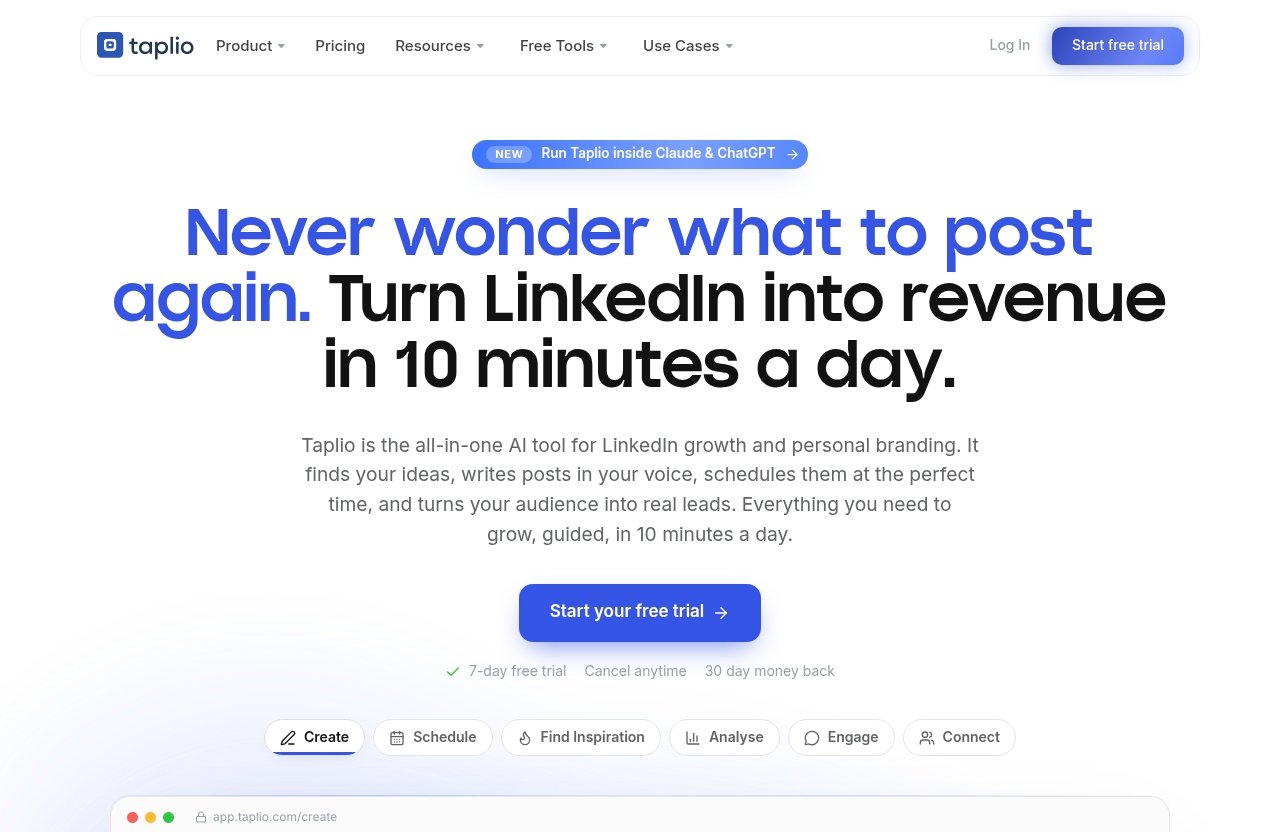
> – Taplio is an AI tool designed to help users grow on LinkedIn in 10 minutes per day.
– Verified features include post scheduling, inspiration discovery, analytics, AI-assisted writing, carousel creation, engagement tools, lead connection and DM workflows, automation, and MCP support for Claude, ChatGPT, and other MCP-enabled LLMs.
– Official pricing starts from $39/month.
– Taplio offers a 7-day free trial and a 30-day money-back guarantee, according to its official homepage.
Official website · Latest pricing & offers
What Taplio is and who this tutorial is for
Taplio in one sentence
Taplio is an AI-powered LinkedIn growth platform that helps you create content, find post ideas, schedule posts, analyze results, engage with relevant people, and manage warm leads from one workflow.
This is not a promise of instant LinkedIn results. The practical value of a taplio tutorial is that it reduces repetitive work: brainstorming, drafting, planning, and reviewing what performed well.
Who benefits most: creators, founders, recruiters, agencies
Taplio can be useful for creators who want a repeatable posting routine without spending hours researching content. It is also a sensible fit for founders who need to build authority around their expertise while still running a business.
Recruiters can use the platform’s engagement and connection workflows to stay visible among candidates and industry peers. Agencies may find the scheduling, idea generation, analytics, and lead-handling tools helpful when managing a structured LinkedIn presence.
Beginners benefit most when they already know whom they want to help. You do not need a large audience, but you should have a basic topic area, such as recruiting, marketing, software, consulting, leadership, or career development.
What you’ll accomplish in 30 minutes
By the end of this taplio beginner guide, you should have:
- A connected LinkedIn profile
- A simple content direction
- One post idea based on a real audience problem
- A polished first draft in your own voice
- One post scheduled or published
- A basic understanding of what to review afterward
Think of this as hands-on onboarding, not a generic Taplio review. Your goal is one useful LinkedIn action today, not a perfect content strategy on day one.
Taplio pricing and trial: what beginners need to know before setup
Verified pricing plans from the official page
According to the official Taplio pricing page, Taplio pricing starts from $39/month. Before choosing any paid option, check the live pricing page yourself because product details can change.
For a first-time user, it is better to evaluate the workflow before judging the monthly cost. Ask whether the platform helps you turn your existing expertise into posts more quickly and consistently than your current manual process.
If you decide to test it, you can begin through this Taplio offer and review the current terms directly during signup.
Free trial and cancellation terms
The official Taplio homepage states that users can access a 7-day free trial. It also states a 30-day money-back guarantee.
Those facts make the trial period a useful low-pressure window for following this taplio tutorial. Still, read the current checkout, billing, and cancellation information before entering payment details so you understand the terms that apply to your account.
Which plan makes sense for a first-time user
Avoid selecting a plan based on features you may never use. During the trial, test the areas that solve your immediate bottleneck: finding ideas, drafting posts, scheduling, or reviewing analytics.
For many beginners, the best decision comes after publishing several posts rather than after one login. If the tool helps you maintain a process you would otherwise skip, paid access may be easier to justify; if you will not use it consistently, the free trial may be enough.
Taplio setup checklist before you start
What to prepare in advance
A smooth taplio setup starts before you open the dashboard. Gather a few raw materials so you can create something specific rather than relying on generic AI suggestions.
Prepare these items:
| What to prepare | Why it helps |
|---|---|
| A clear niche or role | Gives your content a consistent direction |
| Three audience problems | Makes ideas more useful and relevant |
| Two recent lessons or achievements | Supplies authentic post material |
| A professional profile photo | Supports profile trust when people visit |
| A simple posting goal | Helps you decide whether to publish or schedule |
| One preferred topic | Prevents getting overwhelmed by too many ideas |
For example, a freelance designer could list: “explaining design decisions to clients,” “reducing revision cycles,” and “building a portfolio.” A recruiter might write down common candidate questions or hiring manager concerns.
Account and LinkedIn connection basics
Make sure you can access the LinkedIn account you intend to use. Confirm that your profile name, photo, headline, and about section broadly describe what you do.
Your LinkedIn profile does not need to be perfect before you start. However, it should make sense to someone who discovers your first post and clicks through to learn more about you.
What a beginner should have ready
Set one achievable goal for the next week. Examples include publishing two useful posts, creating one carousel, or spending a few minutes engaging with relevant people each day.
Also decide on a comfortable voice. You may prefer clear teaching, short stories, practical checklists, or opinion-led posts. This makes Taplio AI writing more useful because you can guide the draft instead of accepting a generic result.
How to connect Taplio to LinkedIn and finish the first-time setup
Create or sign in to your Taplio account
Begin by creating an account or signing in through Taplio’s normal onboarding flow. The official Taplio Help Center is the best place to check if the interface or connection steps look different from what you expect.
Once inside, do not rush into automation. Take a few minutes to locate the areas for creating content, finding inspiration, scheduling, analytics, engagement, and contacts or lead workflows.
A good taplio walkthrough begins with orientation. Knowing where the core tools live prevents you from hopping randomly between features and losing the first 30 minutes.
Connect your LinkedIn profile
Follow the prompts to connect the LinkedIn profile you want to use. Review permissions and account details carefully before approving anything.
After connecting, check that the profile information shown in the workspace matches your intended LinkedIn identity. If you manage more than one professional role, be especially clear about which audience and content direction this account represents.
Set your initial content and growth preferences
Choose a narrow starting focus, not a broad industry label. “Helping early-stage founders write clearer product messaging” is easier to turn into posts than “business advice.”
Taplio supports several workflows, including content creation, inspiration, analytics, engagement, scheduling, and CRM-style lead handling. You do not need to configure every part now; select a content theme and a realistic posting rhythm first.
How to use Taplio’s core features as a beginner
Find post ideas worth remixing
The inspiration feature helps you discover viral or high-performing LinkedIn posts worth studying and remixing. The key word is remixing, not copying.
Search for posts related to your niche, then identify the underlying angle: a common mistake, a surprising lesson, a framework, a story, or a list. Your first result should be a note such as, “I can explain this problem from my own experience.”
In this taplio tutorial, use inspiration to answer one question: what does my audience already care about? Borrow the structure, then add your own example, opinion, or lesson.
A safe beginner formula is:
- Open with a specific observation.
- Explain why it matters.
- Share three practical points.
- End with a simple question or takeaway.
Write posts in your voice with AI
Taplio AI writing can help generate ideas and turn a rough note into a draft. Give it useful input rather than a vague request like “write a LinkedIn post about marketing.”
A stronger prompt is: “Write a short LinkedIn post for freelance marketers about why client onboarding questions reduce revisions. Use a practical, calm tone. Include three questions I use before starting a project.”
Then review the draft line by line. Add a personal detail, remove claims you cannot support, and simplify language that does not sound like you. The best use of AI is acceleration, not publishing unedited text.
When learning how to use Taplio, start with a 120- to 220-word post. Shorter posts are easier to edit, easier to publish, and less intimidating for a first attempt.
Build a carousel from existing content
Taplio includes a carousel tool that turns content into a swipeable LinkedIn carousel. A carousel can work well when your topic is visual, sequential, or checklist-based.
For a first carousel, repurpose a post you have already written. Use a simple structure:
| Slide | Content |
|---|---|
| 1 | Clear promise or problem |
| 2–5 | One practical point per slide |
| 6 | Summary checklist |
| Final slide | A useful takeaway or discussion prompt |
The Taplio carousel generator should save formatting time, but check every slide before publishing. Keep text large, avoid overcrowding, and make sure each slide can be understood quickly on a mobile screen.
Schedule posts at the best times
Taplio’s Schedule feature can queue posts at your best times automatically. For beginners, the real advantage is not chasing a magic posting hour; it is keeping a consistent routine.
Create one post, review its preview, and place it in the queue. Your taplio post scheduler workflow should include a final check for links, formatting, line breaks, names, and accidental placeholder text.
If you are unsure whether to schedule or publish immediately, choose the option that helps you stay consistent. A scheduled useful post is usually better than an excellent draft that sits unfinished for weeks.
Engage with the right people and warm leads
Taplio’s Engage feature is designed to help you show up on the right people’s posts. Start with a short list of peers, potential clients, industry voices, or people whose audience overlaps with yours.
Leave thoughtful comments that add a point, example, or respectful question. Avoid vague replies such as “Great post!” because they rarely create meaningful conversations.
Taplio also offers Connect capabilities for auto-connecting and sending DMs to warm leads. Use this carefully. Start with people who have shown genuine interest, such as those who engage with your content, rather than treating outreach as a volume game.
For responsible taplio lead generation, personalize your message and provide context. A simple note like, “Thanks for commenting on my post about hiring processes—your point about candidate feedback was useful,” is more credible than an immediate sales pitch.
Use analytics and automation with restraint
Taplio analytics help you see what is working so you can repeat effective themes. After you have enough posts to compare, look for patterns in topics, formats, openings, and conversations—not just high view counts.
The platform also includes Automate features to put LinkedIn growth on autopilot, plus MCP support for working through Claude, ChatGPT, or another MCP-enabled LLM. These can be useful later, but beginners should first understand their own content process.
A human review step matters. Automation should support your voice and routine, never replace judgment, relationship-building, or careful communication.
Official website · Latest pricing & offers
A 30-minute Taplio first-day workflow
Minutes 1–5: connect and orient
Create your account, connect LinkedIn, and explore the main navigation. Find the content creation area, inspiration tool, scheduler, analytics, and engagement section.
Checkpoint: by minute five, you should know where to create a post and where to view scheduled content.
Minutes 6–15: find one post idea
Use the inspiration feature to review posts in your niche. Save one concept that you can honestly discuss from experience.
Choose a beginner-friendly format: a short lesson, checklist, or story-based post. For example: “Three questions I ask before beginning a client project.”
Checkpoint: write your core message in one sentence. If you cannot explain it simply, narrow the topic.
Minutes 16–25: draft and refine a post
Use Taplio AI writing to turn your idea into a first draft. Add a real example, remove inflated wording, and make the opening specific enough that the right reader recognizes the problem.
Use this structure:
I used to think [common belief].
Then I learned [specific lesson].
Here are three things that changed my approach:
1. …
2. …
3. …
The practical takeaway: …
This part of the taplio tutorial is where quality matters most. Do not publish a draft until it sounds like a person with real experience wrote it.
Minutes 26–30: schedule or publish
Read the post aloud once. Check every line break, remove unnecessary hashtags or jargon, and verify that the post gives readers a useful takeaway.
Then schedule it through the queue or publish it. Write down the topic and format in a simple note so you can compare it with future posts.
Checkpoint: your first post is live or scheduled, and you know exactly what you will measure afterward.
What to track after your first post
Views, engagement, and profile visits
Start with basic signals: views, reactions, comments, reposts, and profile visits. These metrics show different things, so do not treat any single number as a full verdict.
Views indicate reach, while comments may indicate stronger relevance or conversation. Profile visits can suggest that your topic and positioning made people curious enough to learn more.
Which ideas to repeat
After several posts, identify the ideas that created useful responses. A post with fewer views but two thoughtful comments from relevant people may be more valuable than a broad post with passive reactions.
Keep a small spreadsheet or note with the topic, hook, format, and outcome. This makes taplio analytics more actionable because you are comparing similar details over time.
How to use analytics to improve
Use your results to make one change at a time. For example, repeat a strong topic with a clearer opening, turn a popular checklist into a carousel, or write a follow-up post answering a comment.
Avoid changing your niche, writing style, post frequency, and format all at once. LinkedIn growth usually comes from patient iteration, not from one “perfect” post.
Common beginner mistakes and how to avoid them
Posting too broadly
A broad post such as “Work hard and believe in yourself” gives people little reason to stop scrolling. Specificity is more helpful: explain a situation, audience, problem, and lesson.
Use the taplio tutorial workflow to find focused angles from real conversations. The more clearly you define who the post is for, the easier it is to write and evaluate.
Skipping profile positioning
Your posts may encourage profile visits, so your headline and about section should reinforce the topic you discuss. If your content is about B2B sales but your profile does not explain your role or audience, visitors may be confused.
Update the basics before expecting content to generate meaningful opportunities. A simple, clear profile is better than a clever but unclear one.
Over-automating too early
Do not activate every available workflow before you understand its effect. Automated actions, generic DMs, and excessive connection activity can make your account feel impersonal.
Use taplio engagement tools to support thoughtful interaction. Review messages, tailor outreach to warm leads, and keep your communication relevant.
Not reviewing results
Many beginners publish once, see a modest result, and assume the approach failed. One post is data, not a conclusion.
Review your first few posts, identify the strongest topic or opening, and create a variation. This small review habit is more valuable than constantly looking for a new tool.
Is Taplio worth it for beginners?
Best-fit use cases
Taplio is best suited to beginners who already want to use LinkedIn but struggle with time, idea generation, consistency, or turning expertise into posts. It can also suit professionals who want a more organized workflow for content, engagement, and warm lead follow-up.
The main value is practical: fewer blank-page moments, easier planning, and clearer feedback from analytics. It is not a substitute for expertise, a clear offer, or authentic participation in conversations.
When a free trial is enough
The taplio free trial is enough if you simply want to test the interface, create a few posts, and see whether AI-assisted drafting fits your working style. Use the seven days intentionally: publish, schedule, review, and try one engagement workflow.
If you discover that you prefer writing manually and do not need planning or analytics support, there may be no reason to continue. A trial should help you make an informed decision, not pressure you into one.
When paid access makes sense
Paid access may make sense when you regularly lose time brainstorming, forget to post, or need a single place for content planning, scheduling, taplio analytics, and relationship-oriented follow-up.
The official starting price is $39/month, so compare that cost with the time you expect to save and the consistency you can realistically maintain. For someone who will use the platform every week, the organization may be worth more than the writing assistance alone.
Final verdict: start with one small LinkedIn win
What success looks like after day one
Success after day one is not a viral post or an inbox full of leads. It is a connected account, one relevant idea, one personalized post, and the confidence to repeat the process.
This taplio tutorial works best when you treat Taplio as a structured assistant. Let it help you research, draft, organize, and review—but keep your experience and judgment at the center.
Next steps for week one
For your first week, aim to publish two or three useful posts around one audience problem. Spend a few minutes engaging with relevant conversations, then review which topics earned the most meaningful response.
Try one new format only after you have completed the basics. For example, turn a well-received checklist into a carousel or use analytics to refine the opening of your next post.
Call to action
If you want to test whether this workflow suits your LinkedIn routine, start with Taplio’s official trial terms through Top Trust Review’s Taplio link. Focus on one small win first: publish content that is useful, accurate, and recognizably yours.
Official website · Latest pricing & offers
FAQ
How long does it take to learn Taplio as a beginner?
The basics can be learned in about 30 minutes: connect LinkedIn, find an idea, draft a post, and schedule or publish it. Becoming comfortable with your preferred workflow usually takes a few days of posting and reviewing results.
Do I need LinkedIn experience to use Taplio?
No. Taplio can help beginners with ideas, writing, scheduling, engagement, and analytics. However, having a clear niche or audience problem in mind will make the results more relevant.
Can Taplio write LinkedIn posts for me?
Yes, Taplio AI writing can help generate and refine LinkedIn post drafts. You should still review every draft, add your own examples, and remove anything that does not sound accurate or authentic to you.
Is Taplio worth paying for?
It can be worth paying for if it saves you time, improves consistency, and helps you organize content and follow-up activity. The best way to decide is to use the trial for real posting tasks rather than judging it from feature lists alone.
Does Taplio offer a free trial?
Yes. Taplio’s official homepage states that it offers a 7-day free trial and a 30-day money-back guarantee. Check the current official pricing page and checkout terms before purchasing.
Related Reading
- Taplio post scheduler guide
- Taplio for recruiters: a practical review
- How to create an email sequence in Systeme.io
References
- Taplio | AI tool to grow on LinkedIn in 10 min/day
- Taplio Pricing – Plans from $39/mo | Free Trial
- Taplio Academy | Get the most out of your Linkedin
- Taplio Help Center – Intercom