
Windsor.ai Review 2026: No-Code Marketing Data Integration
In this comprehensive windsor.ai review, we examine how the Swiss-founded ELT platform automates multi-channel reporting by connecting more than 350 data sources to popular business intelligence tools, spreadsheets, data warehouses, and large language models without requiring manual code.
Affiliate disclosure: This article may contain affiliate links. If you buy through them, we may earn a commission at no extra cost to you. Details were checked on November 16, 2026 and can change.
Official website · Latest pricing & offers
Quick Answer: Is Windsor.ai Worth It in 2026?
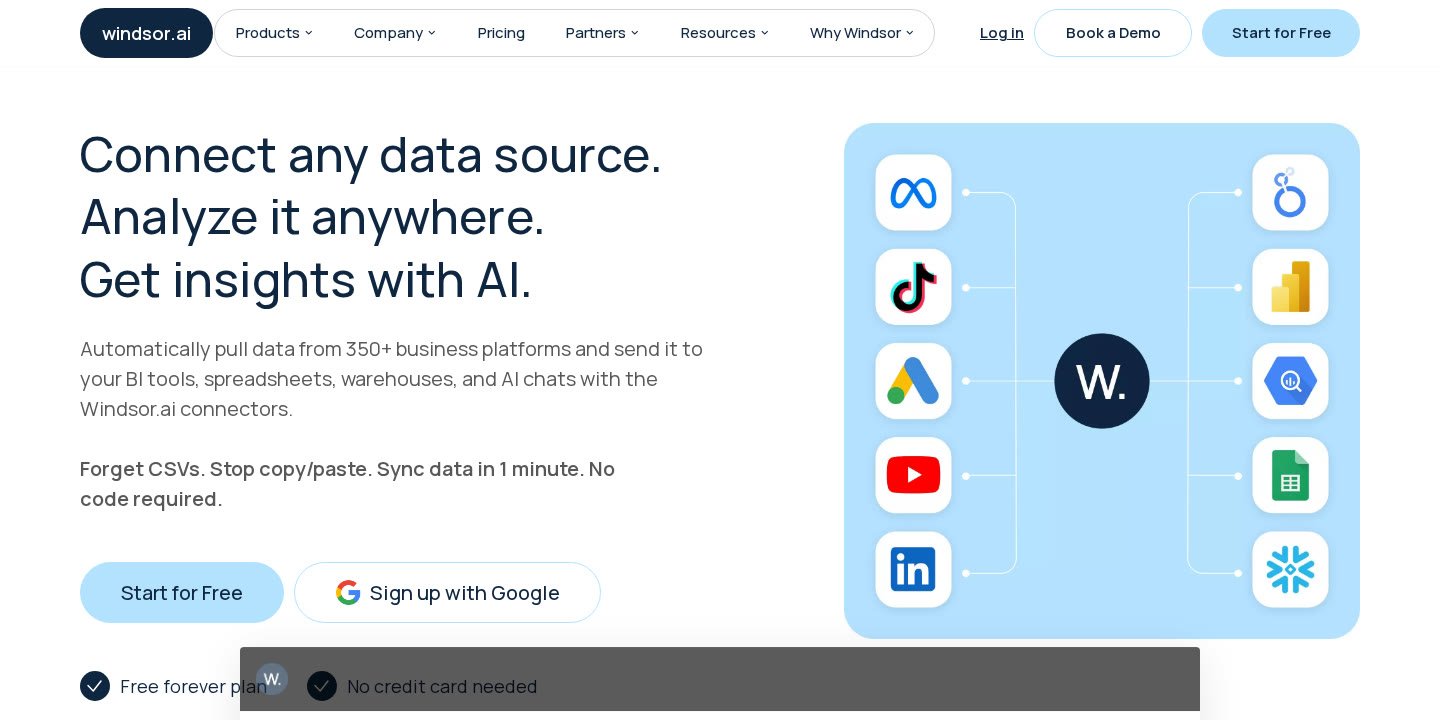
Windsor.ai is a dedicated no-code data integration platform built specifically for performance marketers, media agencies, data analysts, and internal data teams who need to eliminate repetitive CSV exports and custom API maintenance. By centralizing connectors across advertising networks, web analytics, CRM systems, and e-commerce storefronts, Windsor.ai streams normalized marketing data directly into reporting destinations like Looker Studio (Data Studio), Google BigQuery, Microsoft Power BI, Google Sheets, and AI environments like Claude and ChatGPT.
Key highlights of the platform include:
- Broad Connector Catalog: Native access to 350+ data sources, including Google Ads, Facebook Ads, Google Analytics 4 (GA4), Salesforce, Shopify, and Amazon sales data.
- Flexible Destinations: Support for BI destinations (Looker Studio, Power BI, Tableau via Google Sheets or databases), cloud warehouses (Google BigQuery, Snowflake, Azure SQL), spreadsheets, and conversational AI tools.
- User-Friendly Pricing Model: Every paid tier includes unlimited team seats, access to all destinations, and unlimited BI syncs, with plans starting at $19 per month billed annually ($23 per month billed monthly).
- Modern AI Connectivity: The Windsor Model Context Protocol (MCP) provides native app and connector workflows for Claude, ChatGPT, and other LLMs to analyze live cross-channel data using natural language.
- Generous Account Allowances: Base paid plans include up to 75 connected accounts across chosen data sources, providing strong value for agencies managing multiple client properties.
Windsor.ai Review: Core Architecture and Supported Connectors
Founded in 2017 in Zurich, Switzerland, by Niklas Kolster (formerly a data scientist at Accenture and eBay), alongside CTO Octavian R. Corlade and COO Matthias Kraaz, Windsor.ai has grown into a mature data platform processing over 500 million data points daily for more than 40,000 customers. The tool positions itself as a specialized ELT (Extract, Load, Transform) pipeline engine engineered to unify fragmented sales and advertising metrics without forcing users to construct bespoke database infrastructure.
Traditional data operations often rely on custom Python scripts or brittle Zapier webhooks to capture campaign spend, clicks, conversions, and attribution metrics. Windsor.ai replaces fragile engineering maintenance with pre-built, fully managed connectors that normalize disparate schemas into consistent data models. The service allows marketers to schedule automated data refreshes, blend multi-touch attribution metrics across diverse platforms, and send analysis-ready rows directly into their reporting software.
Data Sources: How Windsor.ai Counts Platforms
Windsor.ai currently maintains connectors for 350+ data sources. A data source represents the platform where data originates. Examples of primary sources supported by the catalog include:
- Paid Advertising: Google Ads, Facebook Ads, LinkedIn Ads, Instagram Ads.
- Analytics & Engagement: Google Analytics 4 (GA4), Facebook Pages, organic social metrics.
- E-Commerce & Sales: Shopify, Amazon seller and sales data, Salesforce CRM.
When selecting a plan, users must understand the specific platform rules governing how data sources and individual accounts are tracked against plan quotas:
- Source vs. Account Distinction: A data source is the software platform itself (such as Google Ads). An account represents a single unique identifier within that platform, such as a specific Google Ads customer ID, a single GA4 property, a distinct Facebook page, or an individual Shopify store.
- Ad Channels vs. Organic Channels: Windsor.ai treats organic data and paid advertising data as separate connectors because they operate on distinct APIs. For example, Facebook Ads and Facebook Pages count as two separate data sources. However, Instagram Ads are processed through the unified Facebook Ads connector.
- Manager Accounts (MCCs): If you connect a Google Ads Manager Account (MCC), Google Ads represents one data source against your quota, but each client sub-account linked inside the MCC counts individually toward your overall plan account allowance.
- Multi-Location Profiles: For businesses running local listings, Windsor.ai applies a favorable volume rule where 10 Google My Business (Google Business Profile) locations count as just 1 billable account.
Supported Reporting and Storage Destinations
A critical architectural strength highlighted in our Windsor.ai review is that destinations do not count against your data source quotas, and every destination is unlocked on all tiers. Once data is pulled from your connected platforms, you can direct it simultaneously toward several environments:
- BI & Dashboard Engines: Looker Studio (formerly Data Studio) and Microsoft Power BI feature unlimited data synchronization across all plans. Tableau can be connected via intermediate Google Sheets tabs or through an integrated database destination.
- Spreadsheets: Google Sheets connectors allow automated refreshes for finance teams and media planners who prefer working in spreadsheet layouts.
- Cloud Data Warehouses & Databases: Direct destination tasks can stream structured data into Google BigQuery, Snowflake, and Azure SQL databases.
- AI Chat Assistants: Windsor.ai provides native integration points for Anthropic’s Claude, OpenAI’s ChatGPT, Google Gemini, and Perplexity via the Windsor Model Context Protocol (MCP).
The Windsor MCP and Generative AI Analysis
Data aggregation has historically ended inside static visual dashboards. However, Windsor.ai has introduced the Windsor MCP (Model Context Protocol), designed to turn business data into conversational intelligence. Rather than manually exporting pivot tables and pasting numbers into prompt windows, users can query their live marketing metrics directly inside LLM chat interfaces.
The platform provides a native connector for Claude, an official native application for ChatGPT, and standard protocol hooks that interface with other frontier models. Through these integrations, marketing teams can ask complex questions such as:
- Which ad creatives across Meta and Google Ads generated the lowest cost-per-acquisition over the past seven days?
- How do blended e-commerce revenues on Shopify compare against total paid media spend week-over-week?
- What trends in conversion rates can be observed across specific geographic segments in GA4?
By making normalized cross-channel pipelines accessible to LLMs, Windsor.ai reduces the barrier between data collection and strategic interpretation. Teams can run automated ad-hoc attribution checks, request visual summaries, and extract narrative insights in seconds without waiting for an engineering resource to write bespoke SQL queries.
Dashboard Templates and Time-Saving Resources
Building dashboards from a blank canvas in tools like Looker Studio or Power BI often requires hours of schema mapping and visual formatting. To accelerate initial deployment, Windsor.ai provides a comprehensive template gallery accessible directly through their portal. These templates provide pre-mapped visual layouts that automatically populate as soon as you authorize your ad or analytics accounts.
The template catalog includes pre-built configurations for:
- Looker Studio Templates: Multi-channel overview dashboards, full-funnel marketing trackers, Google Ads performance summaries, and Meta Ads (Facebook Ads) attribution views.
- Power BI Templates: Enterprise-style marketing mix overviews, e-commerce revenue models, and agency reporting packs.
- Spreadsheet Models: Structured Google Sheets and Microsoft Excel reporting frameworks designed for fast pivot analysis and financial modeling.
- Tableau Models: Pre-structured templates ready to be ingested via database endpoints or sheet feeds.
In addition to dashboard templates, the platform maintains a public data field and metrics directory, an AI prompt library with specialized marketing guides, standard API documentation, and comprehensive product guides. These resources allow teams to verify exactly which metrics, dimensions, and breakdowns (e.g., campaign ID, ad set name, ROAS, bounce rate) are supported before configuring a pipeline.
Windsor.ai Review: Pricing, Plan Limits, and Value Breakdown
Pricing transparency is a frequent challenge across the data integration landscape, as many competing vendors hide their fees behind sales demonstrations or charge punishing fees based on row counts. Windsor.ai uses a straightforward, tiered pricing model based on the number of data sources, connected accounts, and sync frequency, rather than charging per row or per dashboard viewer.
Every subscription plan includes external authentication (allowing agencies to send secure authorization links to clients without sharing credentials), access to the Windsor MCP for AI analysis, up to 10 years of historical data extraction, live chat support, and unlimited team seats. The table below details the available tiers, comparing monthly and discounted annual billing terms checked on November 16, 2026:
| Plan Tier | Annual Billing | Monthly Billing | Data Sources | Total Accounts | Destination Tasks & Schedule |
|---|---|---|---|---|---|
| Free (30-Day Trial) | $0 / month | $0 / month | 10 sources | 15 accounts | 5 tasks (Daily sync, 30-day history limit) |
| Forever Free | $0 / month | $0 / month | 1 source | 1 account | Unlimited BI syncs (Daily sync, 1 user) |
| Basic | $19 / month | $23 / month | 3 sources | 75 accounts | 5 tasks (Daily sync, Unlimited users) |
| Standard | $99 / month | $118 / month | 7 sources | 75 accounts | Unlimited tasks (Hourly / Daily sync) |
| Plus | $249 / month | $299 / month | 10 sources | 200 accounts | Unlimited tasks (Hourly / Daily sync) |
| Professional | $499 / month | $598 / month | 14 sources | 500 accounts | Unlimited tasks (15-min / Hourly / Daily sync) |
| Enterprise | Custom Quote | Custom Quote | Up to 200 | Up to 50,000 | Custom sync, Dedicated manager, SSO, SLA |
Understanding the Plan Quotas
To choose the correct plan, buyers must evaluate three specific parameters: source counts, account volume, and destination task limits:
- The Free Experience: Windsor.ai provides a 30-day free trial that unlocks 10 data sources, 15 accounts, and 5 destination tasks with a 30-day history window. When the trial period concludes, if you do not upgrade, your workspace automatically reverts to the Forever Free tier. This indefinite free plan allows 1 user to stream 1 account from 1 data source into BI tools with daily scheduled syncs.
- Basic Plan Limits: At $19 per month billed annually, Basic is remarkably cost-effective for single brands or boutique agencies managing up to 3 core platforms (such as Google Ads, Meta Ads, and GA4). It accommodates up to 75 total accounts and allows up to 5 concurrent destination tasks running on a daily refresh schedule.
- Standard Plan Enhancements: Standard ($99/month annual) expands source access to 7 platforms while removing the cap on destination tasks. It also introduces hourly scheduled syncs, making it suitable for teams requiring real-time intra-day budget monitoring.
- Plus & Professional Plans: Designed for scaling agencies and larger operations, Plus supports 10 sources and 200 accounts, while Professional ($499/month annual) supports 14 sources, 500 accounts, and introduces 15-minute sync intervals. Professional also features an “Auto-add all accounts” capability, which automatically syncs newly created client accounts within authorized platforms without requiring manual administrative reconfiguration.
- Enterprise Options: Organizations with large architectures can scale up to 200 data sources and 50,000 accounts. Enterprise contracts provide Single Sign-On (SSO), white-labeling capabilities, custom connector development, invoice payment options, and enterprise onboarding agreements (including custom DPAs, NDAs, and tax residency certifications). Enterprise clients also receive a dedicated account manager offering support in English, Spanish, German, or Italian.
Step-by-Step Guide: Setting Up Your First Data Pipeline in Windsor.ai
Deploying an end-to-end data pipeline in Windsor.ai requires no engineering skills or manual database provisioning. The platform promises setup times under 60 seconds. The configuration follows four straightforward stages:
- Sign Up for an Account: Register at windsor.ai using an email or Google authentication. The platform does not require a credit card to access the free onboarding workspace and explore available connectors.
- Authenticate Your Data Sources: Navigate to the connectors tab and select your required platforms from the 350+ catalog (e.g., Google Ads, Shopify, GA4). Complete standard OAuth authentication or generate an external authentication link to send to clients or external account owners who hold administrative credentials.
- Select Your Reporting Destination: Choose where you want your normalized data delivered. You can install native connectors for Looker Studio or Power BI, generate a streaming connection to Google BigQuery, link an automated Google Sheets document, or configure warehouse tasks for Snowflake or Azure SQL.
- Connect to AI or Apply Dashboard Templates: To review performance instantly, apply a pre-built template from the gallery or connect your pipeline to the Windsor MCP for Claude or ChatGPT to inspect and query performance metrics using natural language.
Evaluating User Experiences, Support, and Common Industry Feedback
When researching customer feedback on platforms like Trustpilot, G2, or Reddit communities dedicated to marketing data analysis, prospective buyers should focus on data stability, connector depth, and support responsiveness rather than generic star ratings. Because APIs run by third-party giants like Meta and Google change frequently, the reliability of any ELT platform depends on how quickly the engineering team updates their connector schemas.
Public testimonials on the Windsor.ai website and verified feedback channels reflect consistent praise across several core operational areas:
- Support Responsiveness: Users frequently cite fast assistance from Windsor.ai’s support team when resolving integration bugs or custom field queries. Testimonials from operations leads (such as Roberto Fernandes and Markus M.) highlight rapid case resolution and active assistance through live chat.
- Attribution and Financial Savings: Case summaries illustrate significant operational impacts. For instance, Andreas Waldmann reported that uncovering hidden ROI through multi-touch cross-channel attribution models saved his business $2.8 million annually by clarifying which marketing channels actually drove high-value loan conversions.
- Operational Time Recovery: Teams report eliminating over 80% of custom API script maintenance and saving 4 or more hours of manual reporting work daily. Agency testimonials, such as feedback from Tom Hay and Kelly Hatherell, emphasize that Windsor.ai serves as an essential reporting backbone across multi-client environments.
- Niche Connector Strengths: Reviews like that of Maxime Morell note smooth data extraction from notoriously complex data sources, such as Amazon seller platforms, into Looker Studio dashboards without missing transactional records.
When assessing online complaints or user reviews across the wider data integration sector, buyers should keep several practical considerations in mind:
- API Token Expirations: Social platforms often revoke OAuth tokens unexpectedly due to password resets or security updates. Before assuming an ELT tool is experiencing an outage, check whether the underlying platform account requires manual re-authentication.
- Data Freshness Latency: Platforms like GA4 apply internal processing delays (often 24 to 48 hours) before stabilizing final metrics. Discrepancies between real-time spend and analytics figures frequently stem from source-side delays rather than the synchronization tool.
- Looker Studio Quotas: Connecting complex queries with high cardinalities directly into Google Looker Studio can run into Google’s native API quota limits. In high-volume environments, streaming data through Google BigQuery or a database destination first provides superior dashboard speed and prevents visualization crashes.
Pros and Cons of Windsor.ai
Like any specialized software solution, Windsor.ai has clear strengths and distinct operational trade-offs that organizations should evaluate against their team size and technical maturity.
Advantages
- Unlimited Team Members: Unlike many software tools that charge per user seat, all paid Windsor.ai plans include unlimited users, preventing unexpected billing spikes as agencies and internal teams expand.
- No Row-Based Charges: Subscriptions are governed by source counts, connected accounts, and refresh intervals, freeing teams from worrying about row-volume overage fees when running large programmatic ad campaigns.
- Generous Account Quotas: Even the entry-level Basic plan ($19/month annual) permits up to 75 connected accounts across 3 sources, providing exceptional value for multi-brand or small agency operators.
- Every Destination Included: You are never forced to upgrade to an enterprise tier simply to send data to BigQuery or connect an AI model; all destinations are unlocked across all subscription levels.
- Advanced AI Connectivity: The native Windsor MCP allows users to bypass manual dashboard browsing and directly interrogate marketing datasets using Claude or ChatGPT.
- Historical Data Depth: Paid plans allow retrieval of up to 10 years of historical data, facilitating long-term seasonal benchmarking and multi-year trend analysis.
Limitations
- Strict Source Caps on Lower Plans: The Basic plan is restricted to 3 data sources. If your business requires tracking Google Ads, Meta Ads, GA4, and Shopify simultaneously, you will need to step up to the Standard plan ($99/month annual).
- Fastest Refreshes Reserved for Upper Tiers: Intra-day sync intervals of 15 minutes are only available on the Professional ($499/month annual) and Enterprise plans, while Basic is limited to daily refreshes.
- Daily Sync Constraints on Free Plans: The Forever Free tier restricts users to a single data source and account, making it useful as a proof-of-concept or for single-channel tracking rather than comprehensive cross-channel reporting.
Who Is Windsor.ai Best For (and Who Should Look Elsewhere)?
Windsor.ai is engineered with specific business profiles in mind, aligning closely with teams looking to automate marketing and sales data extraction without adding technical headcount.
Ideal Use Cases
- Digital Marketing Agencies: Managing multi-channel reporting across dozens of client accounts is historically expensive. With unlimited users, client authentication links, agency auto-account mapping, and 75 to 500 account allowances, Windsor.ai offers an economical engine for Looker Studio client reports.
- Performance Marketing Analysts: Analysts spending hours assembling manual pivot tables across Meta Ads, Google Ads, and e-commerce stores can save up to 40 hours per week by directing clean, unified data streams directly into Power BI, Excel, or Google Sheets.
- Data Teams Transitioning to Warehouses: Teams seeking to replace fragile in-house Python scrapers with managed ELT pipelines can stream pre-modeled data directly into Google BigQuery, Snowflake, or Azure SQL without managing server infrastructure.
- Modern AI-Driven Workspaces: Companies experimenting with generative AI for business intelligence can leverage the Windsor MCP to ask natural language questions about marketing spend and conversions inside Claude and ChatGPT.
Who Should Consider Other Options?
- Large Enterprises with Exotic Enterprise Tech Stacks: If your organization primarily needs to integrate non-marketing enterprise tools (such as niche mainframe ERPs or proprietary healthcare records), generalized enterprise data integration platforms may be better aligned than a marketing-focused connector engine.
- Users Needing High-Frequency Streaming on Tight Budgets: Organizations that mandate sub-minute streaming or 15-minute data syncs on entry-level budgets will find that Windsor.ai reserves 15-minute syncs for its Professional tier.
Alternative Data Integration Categories to Consider
When planning your data stack architecture, it helps to understand how Windsor.ai fits within the broader ecosystem of data integration software. Businesses generally evaluate three distinct software categories:
- Dedicated Marketing ETL/ELT Connectors: Tools in this category focus strictly on marketing, e-commerce, and advertising APIs. They deliver pre-modeled data directly to BI interfaces (like Looker Studio) and cloud warehouses. Windsor.ai competes primarily within this segment, offering differentiation through its pricing structure (no row-based charges, unlimited user seats) and native LLM protocol connectivity.
- General-Purpose Enterprise Data Movement Engines: These platforms cater to deep engineering departments and IT teams moving raw database logs, application event streams, and enterprise ERP records into centralized data lakes. While they offer hundreds of enterprise connectors, they often require technical SQL transformations downstream and frequently employ complex usage-based pricing models based on rows or credits.
- Native Spreadsheet Plugins and Webhook Automation: Lightweight plugins and point-to-point webhook services allow users to move small batches of records between individual apps. While cost-effective for micro-businesses, these tools often struggle to handle multi-year historical backfills, cross-channel attribution modeling, or enterprise data warehouse schema maintenance.
Official website · Latest pricing & offers
FAQ
What is the difference between a data source and an account in Windsor.ai?
A data source is the underlying platform where data originates, such as Google Ads, Facebook Ads, or Google Analytics 4. An account is a single entity or property within that platform, such as an individual Google Ads account ID, a specific GA4 property, or an individual Shopify storefront. Your plan account allowance is calculated across all authorized data sources combined.
Do Looker Studio, Google BigQuery, or ChatGPT count against my data source limit?
No. These platforms are reporting and storage destinations, not sources. All destinations are completely unlocked and included across every Windsor.ai subscription tier. Only the external platforms from which you extract data count toward your active data source limit.
How does the Windsor.ai Forever Free plan work?
New users start with a 30-day free trial that provides access to 10 data sources, 15 accounts, and 5 destination tasks with a 30-day historical data retrieval limit. After 30 days, users can either upgrade to a paid tier or remain on the Forever Free plan, which supports 1 user, 1 data source, and 1 account with daily scheduled refreshes.
Are Facebook Ads and Facebook Pages counted as one data source?
No, they count as two separate data sources. Because organic engagement metrics and paid advertising performance run on different API endpoints, Windsor.ai maintains distinct connectors for Facebook Ads and Facebook Pages. However, Instagram Ads are included within the Facebook Ads connector.
How are Google Ads Manager Accounts (MCCs) handled?
Google Ads counts as a single data source against your plan limit. However, each individual client account managed under your Google Ads MCC that you choose to sync counts as one individual account against your plan’s total account quota.
What is the Windsor MCP?
The Windsor Model Context Protocol (MCP) is a framework that connects Windsor.ai pipelines directly to AI models like Claude, ChatGPT, and other LLMs. It allows users to query their live cross-channel data and receive strategic marketing analysis, visual summaries, and campaign attribution answers using conversational prompts.
Can I share authentication links with clients without asking for their login details?
Yes. All Windsor.ai plans include external authentication capabilities. You can generate a secure authorization link and send it directly to client stakeholders, allowing them to authorize their advertising or analytics accounts into your workspace without revealing their administrative passwords.
References
- Windsor.ai Official Platform Overview
- Windsor.ai Official Pricing and Plan Limits
- About Windsor.ai – Company Background and Leadership