OpusClip Review 2026: Features, Pricing, and Credit Limits
This comprehensive opusclip review evaluates how OpusClip 4.0 converts long-form recordings into short, platform-ready clips using artificial intelligence. Whether you are producing video podcasts, webinars, livestreams, or talking-head content, understanding the software’s automated clipping models, credit allotments, editing tools, and export constraints will help you determine if it fits your publishing pipeline.
Affiliate disclosure: This article may contain affiliate links. If you buy through them, we may earn a commission at no extra cost to you. Details were checked on November 16, 2026 and can change.
Official website · Latest pricing & offers
Quick Answer: Is OpusClip Worth It in 2026?
OpusClip is an automated AI video clipping and editing platform designed to turn raw or long-form footage into vertical video shorts for platforms like YouTube Shorts, TikTok, and Instagram Reels. Rather than requiring manual timeline cuts, the platform analyzes imported media, identifies highlight segments, generates Virality Scores, crops faces or focal points to vertical dimensions, and applies animated captions automatically.
- Core Capability: The proprietary ClipAnything engine identifies conversational and visual highlights across podcasts, gaming, sports, vlogs, and interviews.
- Automation Stack: Includes automatic face and moving object tracking (ReframeAnything), AI B-roll generation, speech cleanup (filler and pause removal), and speech enhancement.
- Publishing Tools: Built-in social scheduler capable of planning up to a month of posts across connected platforms.
- Free vs. Paid Tiers: A free plan provides 60 monthly credits with watermarked exports that expire after 3 days. Paid plans begin at $15 per month for the Starter plan and scale to $29 per month (or $14.50 per month billed annually) for the Pro plan.
- Bottom Line: It is an efficient utility for solo creators, agencies, and marketing teams needing high-volume short-form content from existing footage, though full editing control and watermark-free exports require a paid tier.
What Is OpusClip 4.0 and How Does It Repurpose Video?
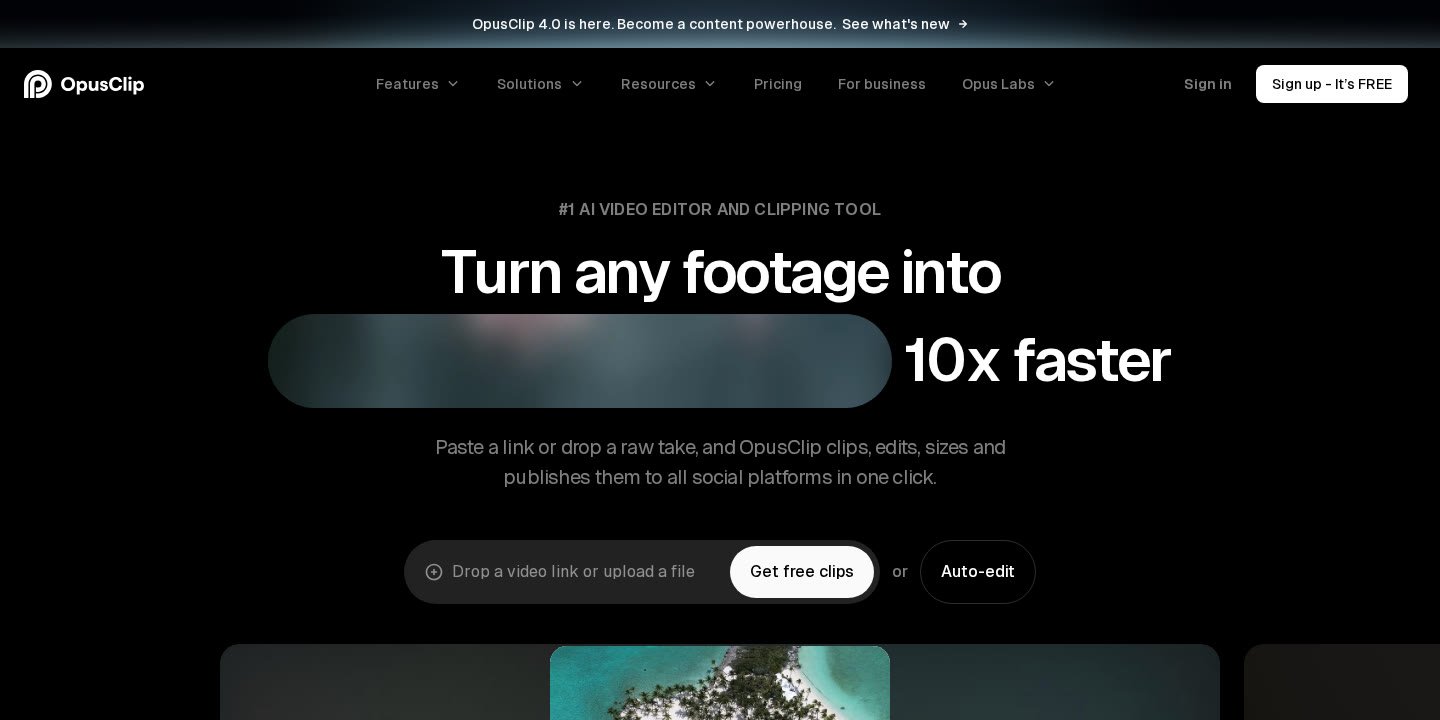
OpusClip (developed by Opusclip Inc.) is positioned as an all-in-one AI video editor and clipping tool. According to official documentation, the platform serves over 20 million creators and businesses, ranging from individual podcasters to media networks and digital agencies. The release of OpusClip 4.0 expanded the tool beyond basic transcript trimming into an automated production pipeline called AI Producer.
The traditional workflow for creating vertical short-form video requires a human editor to review hours of footage, mark timestamps, transcribe dialogue, create cut points, reframe 16:9 widescreen footage into 9:16 vertical orientation, and manually position subtitles. OpusClip automates this entire sequence by scanning the video’s audio and visual tracks simultaneously. For creators exploring the broader landscape of repurposing tools, our guide on the best AI short form video maker options outlines how automated clipping compares to traditional manual editing.
Unlike earlier iterations of AI clippers that only understood dialogue from conversational podcasts, OpusClip’s ClipAnything model is built to handle multiple genres, including vlogs, sports broadcasts, gaming recordings, and educational explainers. The software evaluates topic changes, visual cues, and contextual hooks to slice long footage into standalone short segments accompanied by dynamic captions.
OpusClip Review: Deep Dive into Core Features
To determine how OpusClip handles various production demands, it is necessary to examine each functional component of the OpusClip 4.0 suite individually.
ClipAnything Engine and Virality Score
The foundational feature of OpusClip is ClipAnything. Users provide a video URL or upload a local file, and the AI algorithm segments the footage into multiple candidate clips. Each generated clip is assigned a numerical “Virality Score” designed to predict engagement potential based on pacing, hook strength, and content coherence. Users can specify their preferred clip length intervals, such as 0–1 minute, 1–3 minutes, 3–5 minutes, 5–10 minutes, or 10–15 minutes, or reprompt the clipping assistant to fine-tune results.
ReframeAnything and Moving Object Tracking
One of the primary technical hurdles when adapting landscape (16:9) video for mobile feeds (9:16) is keeping active speakers or primary subjects within the frame. OpusClip utilizes ReframeAnything, an AI-driven reframing model that incorporates AI moving object tracking. If multiple speakers are conversing or an individual is moving across a room, the system pans and crops dynamically. For instances requiring precise visual alignment, the editor provides manual tracking controls so users can instruct the AI on which subject to follow.
Animated Captions and Multi-Language Transcription
Short-form video feeds are heavily reliant on on-screen text. OpusClip generates auto-transcribed animated captions with customizable font styles, speaker-based caption colors, automated emoji insertions, and keyword highlighters. The platform supports transcription and caption generation in English, German, Spanish, French, Portuguese, and more than 20 additional languages. Users can also configure automated curse-word censoring.
AI B-Roll, Speech Enhancement, and Voice Dubbing
OpusClip 4.0 integrates generative visual and audio refinement tools directly into the clipping workflow:
- AI B-Roll: Automatically fetches and overlays relevant context-matching stock footage, images, or AI-generated video assets (powered by Agent Opus) in under one minute.
- Speech Enhancement: Cleans up vocal tracks to achieve professional-level audio balance without external hardware plugins.
- Filler and Silence Removal: Automatically detects and removes verbal pauses (“um,” “uh”) and dead silence to tighten clip pacing.
- AI Video Dubbing: A newer feature that allows creators to dub video audio into alternate languages while preserving their natural vocal identity.
In-App AI Editor and Professional XML Export
While the AI creates initial drafts autonomously, creators often need to polish cuts. OpusClip includes an all-in-one text- and timeline-based editor where users can adjust cut points directly by deleting words from the transcript, adding music, inserting text overlays, and configuring intro/outro branding cards. For teams with professional finishing pipelines, Pro and Business plans allow users to export project files as XML, enabling seamless final grading and editing inside Adobe Premiere Pro and DaVinci Resolve.
Step-by-Step Guide: How to Generate Clips with OpusClip
Generating repurposed content in OpusClip requires minimal setup. The step-by-step workflow functions as follows:
- Import the Source Video: Paste a direct link or upload a video file. Pro accounts support importing directly from YouTube, Google Drive, Vimeo, Zoom, Rumble, Twitch, Facebook, LinkedIn, Twitter, Loom, Riverside, and StreamYard. Local files up to 10GB are supported.
- Set Parameters: Choose your target timeframe, preferred clip duration (e.g., under 60 seconds for Shorts/Reels), and language. Select whether you want automated B-roll, hook detection, and filler removal active.
- AI Processing: The platform processes the media, generating a dashboard populated with cut clips, each displaying a transcript, a Virality Score, and an auto-generated title and description.
- Review and Edit: Open any clip in the timeline editor to refine captions, adjust the ReframeAnything bounding box, swap B-roll images, or tweak intro/outro graphic cards.
- Export or Schedule: Download the finished file as an MP4, export to XML for external editing software, or route the clip directly into the built-in social scheduler.
OpusClip Review of Plans, Pricing, and Monthly Credits
OpusClip structures its pricing around processing credits. Understanding how these credits are calculated and depleted is essential before subscribing to a paid tier. In head-to-head comparisons like our Klap vs Opus Clip breakdown, subscription structures and monthly rendering limits often serve as the primary deciding factors.
| Plan Tier | Monthly Cost | Credit Allowance | Key Features & Limits |
|---|---|---|---|
| Free | $0 | 60 credits/month | Watermarked exports; up to 1080p resolution; 9:16 aspect ratio only; no text/timeline editing; rendered clips expire after 3 days. |
| Starter | $15 USD/month (monthly billing only) | 150 credits/month | No watermark; Virality Score; animated captions in 20+ languages; 1 brand template; filler & silence removal; auto-posting. |
| Pro | $29 USD/month (or $14.50/mo billed at $174 annually) | 3,600 credits over 12 months (starts at 1 pack) | Unused credits roll over for 2 months; 2 seats; 2 brand templates; 6 social accounts; AI B-roll; Premiere/DaVinci XML export; 9:16, 1:1, 16:9 ratios; scheduler; video dubbing. |
| Business | Custom pricing | Customized credit packages | Custom seats, accounts, and templates; priority processing; dedicated storage; API access; Master Service Agreement (MSA); dedicated Slack support. |
Understanding Credits and Rollover Rules
Credits represent processing time. On the Free tier, users receive 60 credits per month, but clips retain an on-screen watermark and cannot be modified using the editor. Furthermore, free files must be exported quickly, as projects expire and become unexportable after 3 days.
The Starter plan is exclusively available on a monthly billing cycle ($15 per month) and grants 150 credits alongside standard watermark-free exports. However, it lacks advanced tools like AI B-Roll, multi-aspect ratio rendering, XML exports, and team seats.
The Pro plan unlocks modular credit scaling through “packs.” A single Pro pack costs $29 per month on a monthly plan or $174 per year (equating to $14.50 per month, reflecting a 50% annual savings). Billed annually, a single pack provides 3,600 credits across the 12-month period. Notably, Pro subscribers benefit from credit rollover: unused credits remain active for up to 2 months rather than vanishing at the end of every 30-day billing cycle. If extra capacity is needed mid-cycle, on-demand credit top-ups are available.
Social Media Scheduling and Automation Workflows
For organizations looking to consolidate their software subscriptions, OpusClip 4.0 incorporates a native social media scheduler. According to official product specifications, the tool allows users to schedule up to a month’s worth of short-form posts across connected platforms in approximately 10 minutes.
On the Pro tier, users can connect up to 6 social account profiles across channels such as YouTube Shorts, TikTok, and Instagram Reels. The scheduler automates publishing directly from the OpusClip dashboard, generating accompanying clip titles, descriptions, and relevant hashtags automatically. For creators reviewing best AI video repurposing tools, having an integrated scheduler eliminates the need to download clips locally and re-upload them through external third-party social media managers.
Furthermore, OpusClip supports advanced technical automations, including an Agentic Workflows API and a Video MCP connector. These developer tools allow marketing teams and enterprise software stacks to connect OpusClip’s rendering engine directly to their content management systems (CMS) or proprietary AI agent architectures.
Key Limitations and Operational Constraints
While OpusClip provides significant automation, potential subscribers should review the platform’s operational limits and technical boundaries before integrating it into commercial production workflows:
- Free Plan Restrictions: The free tier is strictly an evaluation environment. It leaves a visible watermark on rendered files, disables the in-app editor, limits aspect ratios strictly to vertical 9:16, and deletes export access after 3 days.
- File Size Constraints: Local file uploads are capped at 10GB per video file, which can restrict creators working with uncompressed 4K master files or multi-hour livestream recordings.
- Starter Plan Exclusions: The $15 monthly Starter plan does not include annual billing discounts, team collaboration seats, multiple aspect ratios (1:1 and 16:9 remain locked), XML export for Premiere Pro/DaVinci, or AI B-roll generation.
- Source Video Dependency: While ClipAnything handles sports and gaming, AI highlight quality remains directly tied to audio clarity and camera framing. Source footage with poor audio separation or heavily muffled speech will require manual transcript corrections in the editor.
Who Is OpusClip Best For (and Who Should Look Elsewhere)?
Because content production requirements vary widely, OpusClip fits specific creator profiles more effectively than others.
Ideal Use Cases
- Podcasters and Talk Show Hosts: Consistent, multi-speaker interview formats allow ReframeAnything and speaker-based caption coloring to operate with high reliability.
- Marketing Agencies and Social Media Managers: Managing multiple client deliverables is streamlined through Pro plan features such as 2 brand templates, 6 social profile connections, and team workspaces.
- High-Volume Solo Creators: Creators posting daily to TikTok, YouTube Shorts, and Instagram Reels can cut down hours of manual trimming and subtitle generation into a quick review workflow.
- Livestreamers and Webinar Hosts: Dropping links from platforms like Twitch, Zoom, or YouTube allows immediate extraction of standalone highlights from 1–2 hour broadcasts.
When to Consider Other Solutions
- Narrative and Cinematic Filmmakers: Highly stylized narrative films that rely on deliberate pacing, complex visual storytelling, and precise sound design will find automated algorithmic cutting too rigid for creative storytelling.
- Offline Desktop Editors: Users who refuse to work in browser-based environments or who operate with unstable internet connections may prefer local desktop editing software.
- Teams Requiring Unlimited Free Video Exports: Because OpusClip locks watermark-free exports and editing tools behind paid subscriptions, organizations requiring completely free production tools must seek open-source or manual alternatives.
Official website · Latest pricing & offers
FAQ
What video platforms and import sources does OpusClip support?
On the Pro plan, OpusClip supports direct video imports from over 10 sources, including YouTube, Google Drive, Vimeo, Zoom, Rumble, Twitch, Facebook, LinkedIn, Twitter, Loom, Riverside, and StreamYard. Users can also upload local video files up to 10GB in size.
Does OpusClip offer a completely free plan?
Yes. OpusClip provides a Free plan that grants 60 credits per month. However, clips generated on the Free plan contain watermarks, lack access to the video editor, are limited to 9:16 aspect ratios, and become unexportable after 3 days.
Do unused OpusClip credits roll over each month?
On the Pro plan, unused processing credits roll over for up to 2 months. On the Starter plan, credits refresh monthly without extended rollover terms.
Can I export OpusClip projects to Adobe Premiere Pro or DaVinci Resolve?
Yes. Subscribers on the Pro and Business plans can export their projects as XML files, allowing editors to import cut points, audio tracks, and assets directly into Adobe Premiere Pro or DaVinci Resolve for further finishing.
What languages are supported for AI captions and transcription?
OpusClip supports video processing and automated animated captions in English, German, Spanish, French, Portuguese, and more than 20 additional languages.
Can I schedule social media posts directly from OpusClip?
Yes. Pro and Business plans include a native social media scheduler that enables users to connect accounts across YouTube Shorts, TikTok, and Instagram Reels, generating automated titles, descriptions, and hashtags alongside scheduled releases.
Related Reading
- Best AI Short Form Video Maker in 2026: Top Tools to Turn Long Videos Into Shorts
- Klap vs Opus Clip: Which AI Shorts Maker Is Better?
- Best AI Video Repurposing Tools for YouTube Shorts in 2026
- Best Social Media Automation Tools Like Repurpose.io in 2026